Custom Theme Paper Lantern

Hello,
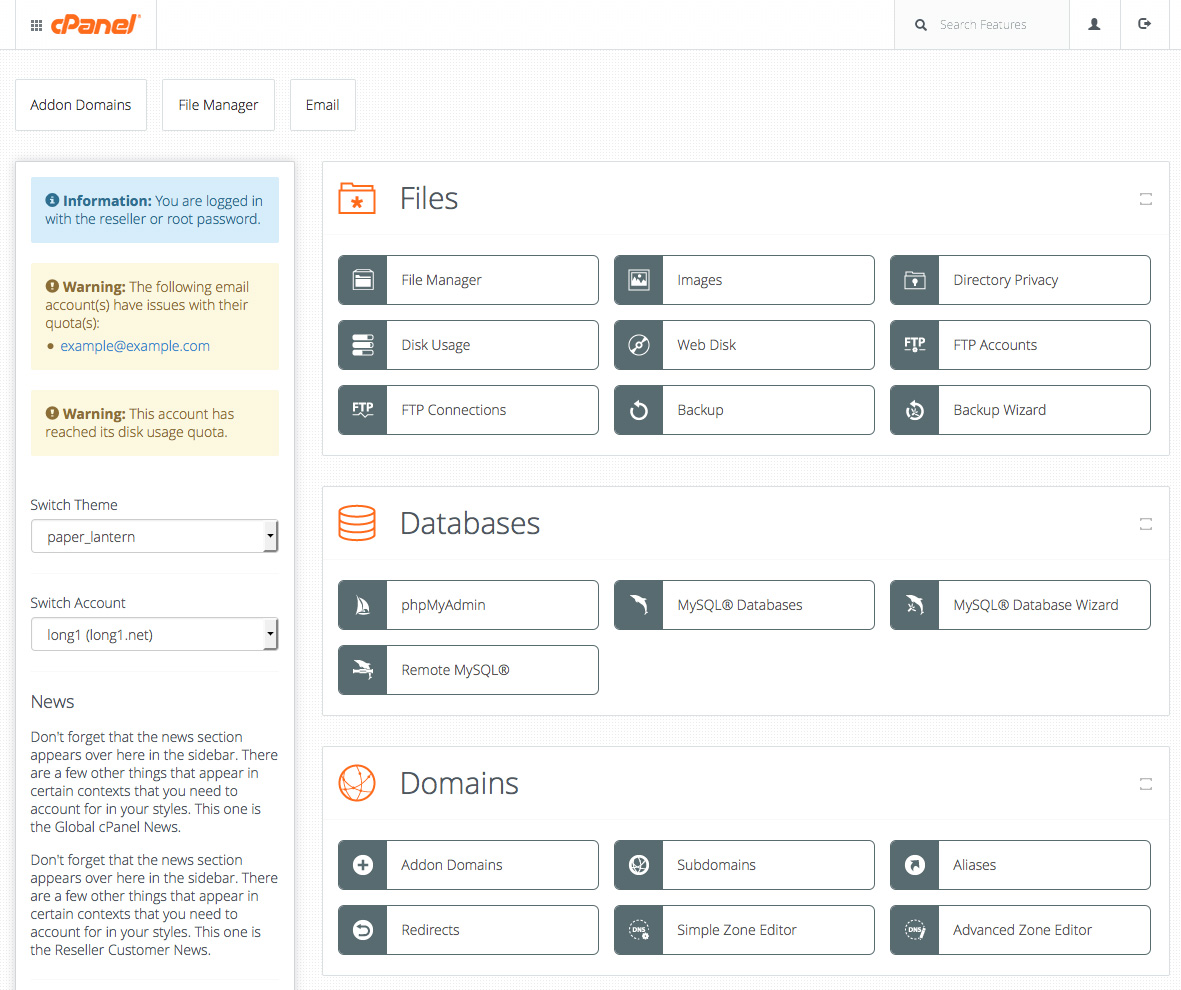
I saw in the cPanel Blog these custom themes, but found no download of them. How could I get them?
![]() https://blog.cpanel.com/wp-content/uploads/2015/11/cPanel-UI-Screenshots-1.jpg
https://blog.cpanel.com/wp-content/uploads/2015/11/cPanel-UI-Screenshots-1.jpg
-
I don't think it was ever released as a downloadable theme. The post you take your example from looks like it came from Nov/Dec 2017 Tutorial - Create a Custom cPanel Style - Developer Documentation - cPanel Documentation 0 -
They are actually already available in cPanel & WHM v64 or newer. Click the "Change Style" feature in the User Preferences feature of the cPanel interface and they should be available for you switch to already. 0 -
They are actually already available in cPanel & WHM v64 or newer. Click the "Change Style" feature in the User Preferences feature of the cPanel interface and they should be available for you switch to already.
cPanel 74.0.9 Now I'm feeling hard done by :( I only see options for Basic, Dark, Light and Retro - nothing like the themes that are shown in the Blog post above - whoever stole them - please give them back :confused:0 -
Light and Dark are those styles. We have since made a few modifications to the styles since the blog post in an effort to make them more accessible (for users with vision difficulties or color blindness of various forms) 0 -
We have since made a few modifications to the styles since the blog post in an effort to make them more accessible (for users with vision difficulties or color blindness of various forms)
Then I must be completely blind - the only theme that looks vaguely like the dark theme is The other two themes displayed are quite different - and - so whilst they may well be built on top of the Paper Lantern theme, it is hard to rationalise that they cold possibly be precursors to the included themes at all. Come on guys - I bothered to go find the Blog post the image came from .... the least you could do is take the time to LOOK before you make ridiculous statements.0 -
Come on guys - I bothered to go find the Blog post the image came from .... the least you could do is take the time to LOOK before you make ridiculous statements.
This comment bothers me. No one has made any ridiculous comments in this thread. Sans the one you just made, for whatever reason. Please try to remain professional and respectful to others when posting to these forums. I hate to keep coming back to this with you, but there's no reason for you to respond like that, here. We're discussing styles, not politics. I've got no clue what version of cPanel you're running, but the screenshots you've posted above do not reflect the Dark and Light styles cPanel comes with by default. Did you grab those from online somewhere are are they from your own server? I bothered to grab you a screenshot of available styles in cPanel STABLE 74.0.9. 549610 -
Come on guys - I bothered to go find the Blog post the image came from .... the least you could do is take the time to LOOK before you make ridiculous statements.
Oh. You attached images from the blog post. Why? Whats the point you're making here that I'm missing?0 -
Yes OK .... Your right, the 3 themes in the blog post that @Ricardo Mecca was asking about that I posted screenshots of, and that @cPanelAdamF stated were They are actually already available in cPanel & WHM v64 or newer.
are obviously included in cPanel and available for use as demonstrated in the screenshot you posted. It must be absolutely obvious to everyone (apparently except me) that the 3 themes in the blog post had a "few modifications" and turned into the themes in your screenshot that we see today. Sorry, once again, for daring to criticize or disagree with a member of the cPanel staff.0 -
Hi Guys, I think there's a misunderstanding here. @rpvw your initial post is correct that blog tutorial is a style customization example and what the OP is referencing is one of the examples. The style examples provided there are not available by default. - As noted by @Infopro there are four styles. Basic, Dark, Light, and Retro and as noted by @cPanelAdamF they have been modified since the post of the blog. - The blog post is related to customizing styles the referenced style customization is only available if you customize it. @Ricardo Mecca as indicated in my response already you can't get that style without customization, which you are more than welcome to do. The style that is the most similar to that one and available by default is, in my opinion, the light style. I've included a screenshot for you as well. Thanks! 0 -
The themes that OP posted do look really nice. Is there any possibility we could get some style sheets for this look? @cPanelAdamF @cPanelMichael ? 0 -
Please don't bump your posts. Thanks. 0 -
Please don't bump your posts. Thanks.
I see you had time to respond and reprimand me for bumping but didn't answer the query I posted? That's great.0 -
I see you had time to respond and reprimand me for bumping but didn't answer the query I posted? That's great.
Well, you posted your question after 8 PM last night, and then bumped the thread (and another thread) this morning before anyone, including Adam and Michael has seen it. Those style screenshots are from a blog post linked above that desrcibes how to create your own stylesheets. But, the details in that blog post is out of date with current cPanel style and I'm not sure those stylesheet suggestions are valid today. cPanelAdam can answer this though, and he will surely be by to reply to you when he comes into work today. It is the early hours of the morning in Houston right now. You tagged Adam in your post, he'll post back soon. There is no need to bump your posts.0 -
Thanks for your reply :) 0 -
no. 0 -
no.
That's too sad. Does that also mean that these stylesheets syggestions are not valid or can someone create them?0 -
That's too sad. Does that also mean that these stylesheets syggestions are not valid or can someone create them?
The documentation for creating your own style can be found here: Tutorial - Create a Custom cPanel Style - Developer Documentation - cPanel Documentation0
Please sign in to leave a comment.
Comments
18 comments