Email sending blocked since the implementation of the OVH network firewall.
Answered
Hello,
To give you some context:
My client has a VPS server hosted by OVH with WHM and cPanel installed. This server runs PHP scripts via cron jobs, performing several actions, including sending emails.
In early October, OVH's anti-hack service was triggered. After some research, we concluded that it was a false alarm. Since then, OVH has adjusted the anti-DDoS thresholds and advised me to activate and configure the network firewall.
Since activating this firewall, emails sent via PHP scripts, and more specifically via the mail() function, no longer work.
However, the following ports have been opened:
0 Autoriser TCP tous 80 Actif
1 Autoriser TCP tous 443 Actif
2 Autoriser TCP tous 2087 Actif
3 Autoriser TCP tous 2083 Actif
4 Autoriser TCP tous 49152 Actif
5 Autoriser TCP 212.194.142.225/32 21 Actif
6 Autoriser TCP tous 25 Actif
7 Autoriser TCP tous 465 Actif
8 Autoriser TCP tous 143 Actif
9 Autoriser TCP tous 993 Actif
10 Autoriser TCP tous 110 Actif
11 Autoriser TCP tous 995 Actif
12 Autoriser TCP tous 49153 Actif
13 Autoriser TCP tous 49154 Actif
14 Autoriser TCP tous 49155 Actif
15 Autoriser TCP tous 587 Actif
19 Refuser IPv4 tous Actif
Here is a test that was performed:
$to = "[email_destinataire]";
    $subject = "Test mail() depuis VPS";
    $message = "Ceci est un test simple.";
    $headers = "From: [email_emetteur]\r\n";

    if (mail($to, $subject, $message, $headers)) {
        echo "✅ Message accepté par mail()";
    } else {
        echo "❌ Erreur : mail() a échoué";
    }
I got the following response ✅: Message accepted by mail(), which means that the emails are being sent but seem to be blocked somewhere.
I also tested the exim -bp command, which displayed a list of pending emails.
I then retrieved the logs and here is the result I obtained during my test:
2025-11-03 14:13:15 cwd=/home/scriptxxxx 3 args: /usr/sbin/sendmail -t -i
2025-11-03 14:13:15 1vFuN1-0000000001F-2w1K <= scriptxxxxx@vps-xxxxx.vps.ovh.net U=scriptxxxx P=local S=480 T="Test mail() depuis VPS" for xxxxx@gmail.com
2025-11-03 14:13:15 cwd=/var/spool/exim 3 args: /usr/sbin/exim -Mc 1vFuN1-0000000001F-2w1K
2025-11-03 14:13:15 1vFuN1-0000000001F-2w1K Sender identification U=scriptxxxx D=xxxx.fr S=scriptxxxx
2025-11-03 14:13:15 1vFuN1-0000000001F-2w1K ** xxxxxx@gmail.com R=enforce_mail_permissions: Domain xxxx.fr has exceeded the max defers and failures per hour (5/5 (100%)) allowed. Message discarded.
2025-11-03 14:13:15 cwd=/var/spool/exim 7 args: /usr/sbin/exim -t -oem -oi -f <> -E1vFuN1-0000000001F-2w1K
2025-11-03 14:13:16 1vFuN1-0000000001K-45q7 <= <> R=1vFuN1-0000000001F-2w1K U=mailnull P=local S=1955 T="Mail delivery failed: returning message to sender" for scriptxxxxx@vps-xxxx.vps.ovh.net
2025-11-03 14:13:16 cwd=/var/spool/exim 3 args: /usr/sbin/exim -Mc 1vFuN1-0000000001K-45q7
2025-11-03 14:13:16 1vFuN1-0000000001F-2w1K Completed
2025-11-03 14:13:16 SMTP connection from [127.0.0.1]:37568 (TCP/IP connection count = 1)
2025-11-03 14:13:16 1vFuN1-0000000001K-45q7 [127.0.0.1] SSL verify error: certificate name mismatch: DN="/CN=vps-xxxxx.vps.ovh.net" H="127.0.0.1"
2025-11-03 14:13:16 SMTP connection identification H=localhost A=127.0.0.1 P=37568 U=mailnull ID=47 S=mailnull B=identify_local_connection
2025-11-03 14:13:16 1vFuN2-000000075un-0wTu <= <> H=localhost (vps-xxx.vps.ovh.net) [127.0.0.1]:37568 P=esmtps X=TLS1.3:TLS_AES_256_GCM_SHA384:256 CV=no S=2228 id=E1vFuN1-0000000001K-45q7@vps-xxxx.vps.ovh.net T="Mail delivery failed: returning message to sender" for scriptxxxx@vps-xxxx.vps.ovh.net
2025-11-03 14:13:16 cwd=/var/spool/exim 3 args: /usr/sbin/exim -Mc 1vFuN2-000000075un-0wTu
2025-11-03 14:13:16 SMTP connection from localhost (vps-xxxx.vps.ovh.net) [127.0.0.1]:37568 D=0s closed by QUIT
2025-11-03 14:13:16 1vFuN1-0000000001K-45q7 => scriptxxxx@vps-xxxxxx.vps.ovh.net R=deliver_local_outside_jail T=remote_smtp H=127.0.0.1 [127.0.0.1] X=TLS1.3:TLS_AES_256_GCM_SHA384:256 CV=no C="250 OK id=1vFuN2-000000075un-0wTu"
2025-11-03 14:13:16 1vFuN1-0000000001K-45q7 Completed
2025-11-03 14:13:16 1vFuN2-000000075un-0wTu => scriptxxxx<script> R=localuser T=dovecot_delivery C="250 2.0.0 <script> PQAFD2yqCGmizRkAMVBhDg Saved"
2025-11-03 14:13:16 1vFuN2-000000075un-0wTu Completed
I contacted OVH support, who told me that the problem was not within their scope.
I then posted a message on the OVH community forum, where I was advised to contact you, as the issue appeared to be related to cPanel.
Do you have any idea what might be preventing emails from being sent, and how I could resolve this issue?
Thank you in advance for your help.
Kind regards,
Loïc.
-

Hey there! You mentioned your change was to "activate and configure the network firewall" - can you let me know exactly what that means? Was this something that happened inside of WHM? Once I know more details on that I can get you better information.
0 -
Probably the first thing I would do is test outbound TCP 25 (SMTP) connections, such as to Google or someplace else.
telnet smtp.google.com 25
Trying 142.251.111.26...
Connected to smtp.google.com.
Escape character is '^]'.
220 mx.google.com ESMTP 6a1803df08f44-8803fc10f94si37319446d6.869 - gsmtpIf you don't get a 220 banner, then port 25 is blocked elsewhere. If you do get a banner, is it a google.com banner or is it a 220 banner for some other service.
Also, your account is limited to 5 deferred/failed attempts to send mail per hour. If you send an email and it can't connect to the remote server immediately, the 5/hr is going to start incrementing. If you send more than one outbound legitimate email per hour that can't be instantly delivered, the limit is reached even faster. 5 deferred/failed attempts per hour is a pretty tight limit. After that limit the email is bounced back to the sender address.
R=enforce_mail_permissions: Domain xxxx.fr has exceeded the max defers and failures per hour (5/5 (100%)) allowed. Message discarded.
So you really want to figure out if you can connect to mailservers on the public internet over TCP 25 by telnetting to see if you get a banner. If you don't, perhaps has an alternate setup in place whereby they require your server to send all outbound email through a custom setup they have that can scan your mail for malicious content/spam before it goes out to the internet. That's a pretty popular thing that some datacenters do.
0 -
Hello,
Thank you both for your feedback.
cPRex,
Following the problem encountered, OVH, which hosts the VPS, advised me to configure and activate the network firewall. (https://help.ovhcloud.com/csm/en-gb-dedicated-servers-firewall-network?id=kb_article_view&sysparm_article=KB0043447).
mtindor,So I executed the following command:
nc -zv gmail-smtp-in.l.google.com 25Here is the response received:
nc: connect to gmail-smtp-in.l.google.com (108.177.96.26) port 25 (tcp) failed: Connection timed out
nc: connect to gmail-smtp-in.l.google.com (2a00:1450:4013:c06::1a) port 25 (tcp) failed: Network is unreachable
Then, I allowed myself to execute this command:
iptables -L OUTPUT -n | grep 25Here is the result obtained:
ACCEPT     tcp  --  0.0.0.0/0            0.0.0.0/0            multiport dports 25,465,587 owner GID match 988
ACCEPT     tcp  --  0.0.0.0/0            0.0.0.0/0            multiport dports 25,465,587 owner GID match 12
ACCEPT     tcp  --  0.0.0.0/0            127.0.0.1            multiport dports 25,465,587 owner UID match 990
ACCEPT     tcp  --  0.0.0.0/0            0.0.0.0/0            multiport dports 25,465,587 owner UID match 0
If I understand correctly, based on my limited knowledge in this area, port 25 seems to be blocked for outgoing traffic by OVH on my VPS. Is that right?
What do you recommend I do to resolve this issue?Thank you in advance for your help.
0 -
If port 25 is being blocked you may need to setup a smarthost in order to workaround that:
I'm just amazed they said this wasn't their issue after they told you specifically to use their tool - that just doesn't make sense at all.
0 -
cPRex
That's not true, we have now and have had several dedicated servers and VPS in OVH and port 25 has never been blocked.EDIT:
If your server sends lots of spam, unsolicited emails, OVH will block port 25, but they will contact you and tell that port 25 is blocked, and that when you have solved the problem you can open port 25 in the OVH control panel.
By default port 25 is not blocked.0 -
Maybe my reference was out of date, or I was looking at the wrong three-letter combination - I've updated my previous post.
0 -
Thank you for your feedback quietFinn and cPRex.
First, I tried to configure it as suggested by cPRex:
Smarthost support : * [MON_HOSTNAME_O2SWITCH]
Smarthost requires SMTP authentication [?] : ON
Smarthost username [?] : [MON_EMAIL]
Smarthost password [?] : [MON_MDP]
Unfortunately, this does not seem to have fixed the problem.
Here is the email test I performed:$to = "[email_destinataire]";
$subject = "Test mail() depuis VPS";
$message = "Ceci est un test simple.";
$headers = "From: [email_emetteur]\r\n";
if (mail($to, $subject, $message, $headers)) {
echo "✅ Message accepté par mail()";
} else {
echo "❌ Erreur : mail() a échoué";
}Here are the logs obtained:
2025-11-04 18:03:09 1vGKR3-00000000013-0U4D <= scriptxxxx@vps-xxxxx.vps.ovh.net U=scriptxxxx P=local S=480 T="Test mail() depuis VPS" for [EMAIL_DESTINATAIRE]
2025-11-04 18:03:09 cwd=/var/spool/exim 3 args: /usr/sbin/exim -Mc 1vGKR3-00000000013-0U4D
2025-11-04 18:03:09 1vGKR3-00000000013-0U4D Sender identification U=scriptxxxx D=[DOMAIN_CLIENT] S=scriptxxxx
2025-11-04 18:03:09 1vGKR3-00000000013-0U4D SMTP connection outbound 1762275789 1vGKR3-00000000013-0U4D [DOMAIN_CLIENT] [EMAIL_DESTINATAIRE]
2025-11-04 18:04:28 1vFxjA-00000007CMx-29gf H=[MON_HOSTNAME_O2SWITCH] [[IP_HOSTNAME]]: SMTP timeout after initial connection: Connection timed out
2025-11-04 18:04:28 1vFxjA-00000007CMx-29gf == [MON_EMAIL] <cpanel@vps-xxxxx.vps.ovh.net> R=dkim_lookuphost T=dkim_remote_smtp defer (110): Connection timed out H=[MON_HOSTNAME_O2SWITCH] [IP_HOSTNAME]: SMTP timeout after initial connection
2025-11-04 18:04:28 1vFxjA-00000007CMo-0UTe Unfrozen by errmsg timer
2025-11-04 18:04:28 1vFxjA-00000007CMo-0UTe Sender identification U=mailnull D=-system- S=mailnullWhat could these errors be related to, and how can they be resolved?
We agree that port 25 seems to be blocked for outgoing traffic by OVH on my VPS, right?
If so, do you think it would be possible to ask them to unblock it?Thank you in advance for your help!
0 -
Loïc Unknown
You will need to login to OVH manager area, head over to your IPs, and you should see a warning/notification that there is a blocked IP. Unblock the Anti-Spam by heading to the right area of the IP and clicking on the 3 dots or gear icon.After done so, your port 25 will be unblocked and thus the outgoing mails will not fail. You can always use a smarthost, but make sure you activate some anti spam measures so that this problem doesn't happen again in the future.
0 -
Hello Stathinho,
Thank you for your feedback.
I went to my OVH customer account, then to the “Your IP addresses” section, and this is what I get every time I access this page:
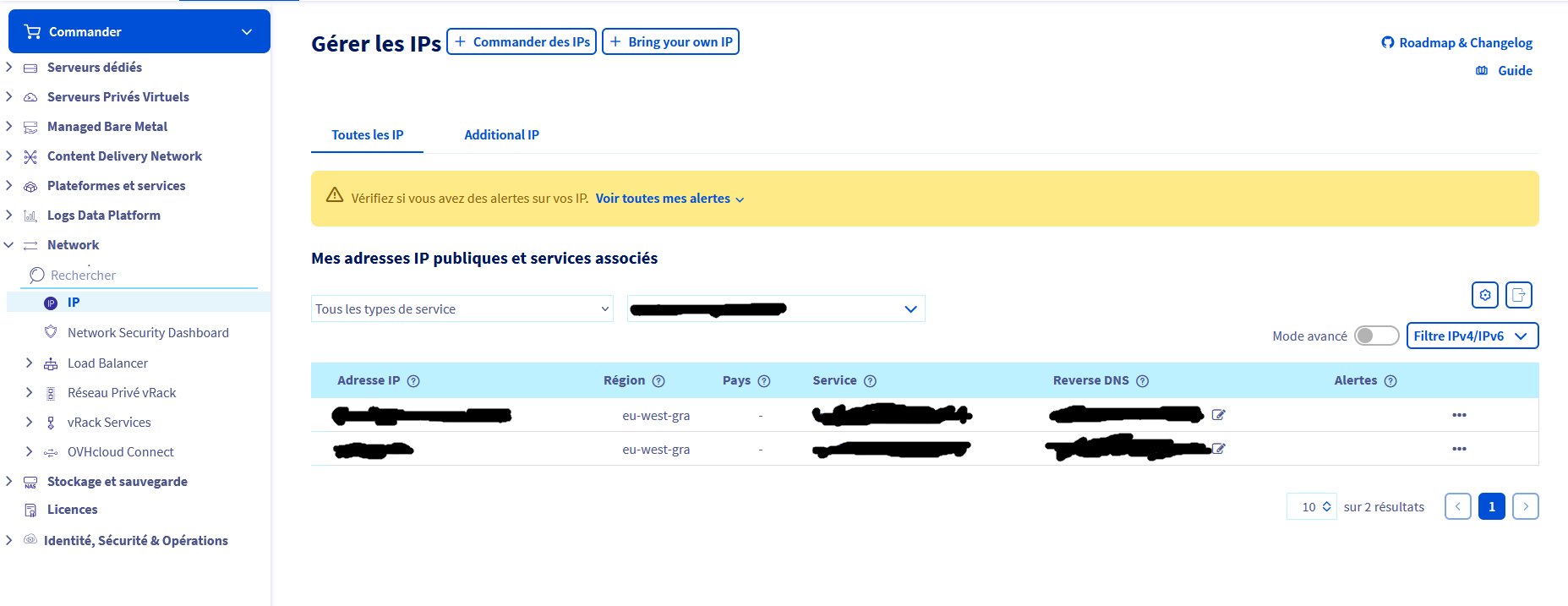
I clicked on “View all my alerts” and here is the result: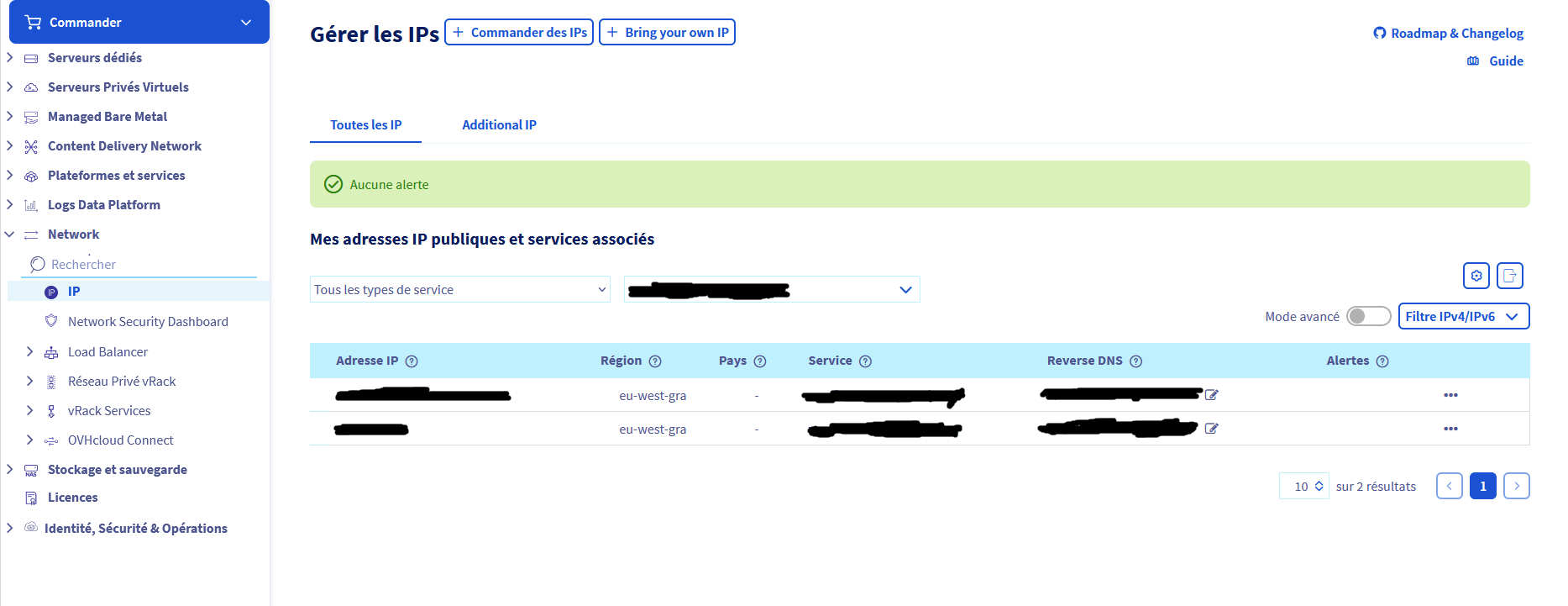 As you can see, it tells me that there are no alerts and therefore no blocked IP addresses.
Have I gone to the wrong place, or is there something else I need to do?
Thank you in advance for your help!
0 -
Hello everyone,
Sorry for the delay in responding, I wanted to make sure everything was working properly before getting back to you.As a reminder, last week I lost access to WHM and cPanel due to a supposed expired license issue. I therefore had to switch the server to Rescue mode to resolve the situation.It turns out that the cause was a misconfiguration of the network firewall. Since I reconfigured it, I have regained access to WHM and cPanel, and email is working again.
Thank you all for your help!0 -
Glad to hear it!
0
Please sign in to leave a comment.
Comments
11 comments