How to disable WHM Log in via WebPros?

How do I disable "Log in via WebPros" for WHM please?
-
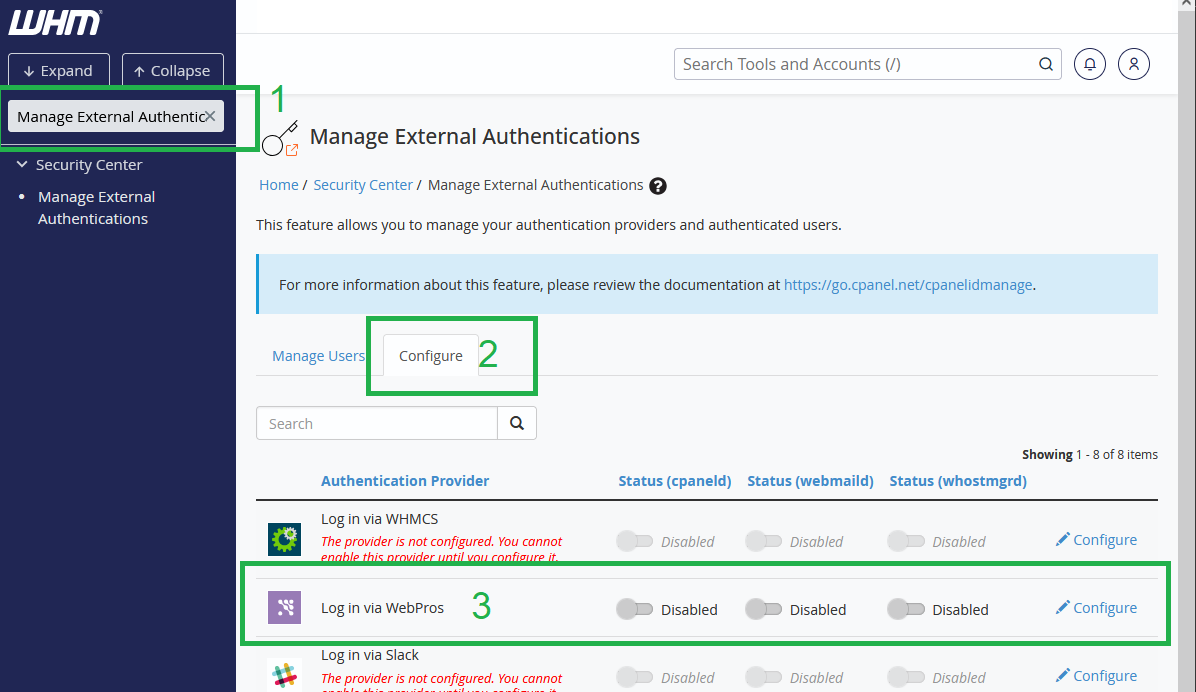
Go to WHM -> Security Center -> Manage External Authentications -> Configure
and disable Log in via WebPros1 -
Found, set and confirmed; thank you Finn.
0 -
@... So I only had it on WHM, not cPanel. Are you getting those two mixed up? Do you have WHM access or just cPanel? Port 2083 is cPanel, port 2087 is WHM.
0 -
Try this;
edit or create file:
/var/cpanel/panel.ini
in that file add:
[AuthProviders]
WebProsAccountForceEnabled.whm = False0 -
@... So here is a screenshot of what you need to do in WHM:
 0
0 -
That is not possible in DNSonly server.
0 -
Thank you very much friend.
However edit "/var/cpanel/panel.ini" and add the mentioned code don't works: https://docs.cpanel.net/knowledge-base/accounts/webpros-account/
Maybe should restart some service?
I'm using version: WHM/cPanel DNSOnly 11.134.0.35
Have a nice day.
0 -
David MartÃnez You're going to need to be much more decisive if you want to resolve problems at a meaningful pace in life. When you know the server isn't busy do a graceful reboot in WHM. If that doesn't result in the problem being fixed then the attempt wasn't the solution and you'll have to try something else.
0 -
JAB CreationsJAB Creations Thank you very much, I tried various things and rebooted the server, however don't works.
Maybe we cannot disable "Log in via WebPros" in WHM/cPanel DNSOnly
Thank you again for your recommendation. Have again!
0
Please sign in to leave a comment.
Comments
9 comments