Security Advisor Notification

After receiving some inputs here, I finally switched the server we had from VPS to dedicated server that can run on CloudLinux. I am currently finalizing the transfer and making sure that the server runs smoothly without errors. Overnight, I received email notification that said:
Failed to check whether running executables are up-to-date: The system received unexpected output from "/usr/bin/needs-restarting": This system is receiving updates from CloudLinux Network server.
This morning, I ran Security Advisor and got the same message in it. Since then, I have downloaded the latest update and installed, then ran "yum clean all" command, rebooted the server, but the problem still persist. What can be the issue or something that I am doing wrong? Other than this, everything cleared out including external DNS tests and SSL tests.
-

Could you please submit a ticket so our team can take a look?
0 -
👍
0 -
I get the same message in the security advisor
/usr/bin/needs-restarting
however, when I run it from the terminal, is says file not found. It is currently located at
/bin/needs-restarting
I am running cpanel 120.0.5, cloudlinux 9
This i a brand new install and all account migrated today.
0 -
Jeff Shields - it should be a symlink on the system:
lrwxrwxrwx 1 root root 22 Dec 15 09:47 needs-restarting -> /usr/libexec/dnf-utils
0 -
I am on a newly build server with cpanel 120.0.8, Cloudlnux 9, and I still get the message
"""Failed to check whether running executables are up-to-date: The system received unexpected output from “/usr/bin/needs-restarting”: This system is receiving updates from CloudLinux Network server."""
both in the Security advisor and when run from SSH. Cloudlinux was purchased from them.
0 -
I'd submit a ticket to either us or CloudLinux so we can check that out.
0 -
its the same issue with cPanel/WHM 122.0.2 fresh install with CloudLinux 8.10
0 -
WHM 120 - Same issue. Almalinux 8
0 -
This false positive is still a bug. Here's my conversation just a few days ago with Cpanel. As you can see, they sort of at first side stepped admitting there is no current solution until I pointed out this shouldn't happen in the first place.
Cpanel:
"The notifications can be false positives, but to confirm if any processes need to be restarted, you can run the script manually. I have run the needs-restarting script and no output was provided, which indicates no processes need to be restarted. If you want to disable these notifications, you can manage them within the Contact Manager in WHM by following the instructions in the following article."
Me:
"
False positive? How can false positives be prevented?
You seem to be suggesting the solution to the problem is to turn off this specific notification. But would there not be a chance sometimes this notification would not be a false positive and require action? If so, it seems turning off the notification would not be a good practice?
In that case does this mean every time I receive this notification I need to go manually run needs-restarting to verify whether or not it is a false positive? This seems like it should be unnecessary don't you agree?"
Cpanel:
"Thank you for the reply. You are correct, the best option is for the false positives to not trigger these notices, so what I have done is linked this ticket to the case CPANEL-42350 for our dev team to review. Unfortunately, I do not have a time frame to provide on this issue however, the issue has been passed along.
For now as a temporary measure, you can disable the notifications or manually run the command to confirm if any processes require a restart."1 -
Thanks for sharing that - I did add some of my own details on the case and linked the developers to this Forums post.
0 -
fyi I'm having a play with WPSquared: https://wpsquared.com/
CloudLinux 8.10.0 WP2 KVM
cPanel 124.1.5
When I run Security Advisor in WHM for WP Squared, I also see:
Failed to check whether running executables are up-to-date: The system received unexpected output from “/usr/bin/needs-restarting”: This system is receiving updates from CloudLinux Network server.
When I run /usr/bin/needs-restarting at the terminal, I just get back:
This system is receiving updates from CloudLinux Network server
Failed to read PID 4094's smaps.
If I run the command again, I get a different PID, e.g.
Failed to read PID 4114's smaps.
I would like this Security Advisor warning to be resolved too.0 -
spaceman - thanks for the heads up - I've let the team know it's happening there as well!
0 -
I really cannot believe cPanel hasn't resolved this. I get this message every week. I then manually run the /usr/bin/needs-restarting from the command line and all I see is this:
[root@******* ~]# /usr/bin/needs-restarting
This system is receiving updates from CloudLinux Network server.
Waiting for process with pid 282191 to finish.
[root@******* ~]#Its actually unacceptable that this has been an issue for such a long time without resolution. We pay a LOT of money for cPanel now.
0 -
BlueSteam - I agree this is a frustrating issue for sure. I do know it's being worked on, but I still don't have any specific timeframe for when this will be resolved. I did reach out to the team again today and let them know there are still users reporting this issue.
1 -
Hello
Mine shows this:
]# /usr/bin/needs-restarting
This system is receiving updates from CloudLinux Network server.
Failed to read PID 694640's smaps.
Failed to read PID 695164's smaps.
Failed to read PID 695373's smaps.
Failed to read PID 695529's smaps.
Failed to read PID 695871's smaps.
Failed to read PID 695932's smaps.
Failed to read PID 695933's smaps.
Failed to read PID 696116's smaps.
Failed to read PID 696296's smaps.
Is that normal?
Thank you!
0 -
Manuel Y2K - that is a slightly different error, which you can read about here - https://support.cpanel.net/hc/en-us/articles/26823328252951-WHM-Security-Advisor-returns-unknown-error-when-checking-if-executables-are-up-to-date
0 -
Thank you Rex
I'm not sure that article applies to me since the error I have in Security Advisor is this one:
Failed to check whether running executables are up-to-date: The system received unexpected output from “/usr/bin/needs-restarting”: This system is receiving updates from CloudLinux Network server.
However I went ahead and ran
/usr/bin/needs-restarting
with this output:
[root@server2 ~]# /scripts/find_outdated_services
Looking for outdated services …
This system is receiving updates from CloudLinux Network server.
313 files removed
warn [find_outdated_services] Failed to read PID 19051's smaps.
Failed to read PID 19737's smaps.
Failed to read PID 19900's smaps.
Failed to read PID 19913's smaps.
Failed to read PID 19978's smaps.
Failed to read PID 19981's smaps.
Failed to read PID 20034's smaps.

warn [find_outdated_services] This system is receiving updates from CloudLinux Network server.
The system did not find any outdated services.
And nothing changed.
Should I request support at this point?
Best regards,
0 -
Hi there,
I have the same issue anyone have solutions.
 0
0 -
Manuel Y2K - that sounds like case RE-875 which is being worked on by our team and is in testing now, so hopefully a fix is released soon!
NASSER ELSAYED - if you run the command directly on the command as outlined in this thread, what response do you get?
1 -
cPRex [root@s1 ~]# /usr/bin/needs-restarting
This system is receiving updates from CloudLinux Network server.
Failed to read PID 772369's smaps.0 -
Thanks for that information. That is the same case I mentioned in my last reply that we're working on, so hopefully there is a fix released soon!
0 -
I have the same issue with cloudlinux 9, any update from the dev team?
0 -
Brand new CL 9 installation on AL 9, same error message. Here's the CL forum response:
Solution
According to cPanel, it's related to a known issue. More details at cPanel knowledgebase and forum.
Unfortunately, there's no solution yet. A possible solution might be implemented on the cPanel side.Cause
This message comes from the dnf-plugin-spacewalk plugin that's needed to get the updates from our private repositories. The plugin is not developed by CloudLinux so it's impossible to make changes to it to fix it.
Useful Links
- https://support.cpanel.net/hc/en-us/articles/4404419242007-Security-Advisor-failed-to-run-with-unexpected-output
- https://forums.cpanel.net/threads/security-advisor-notification.707293/
0 -
So again, this morning I wake up to this:
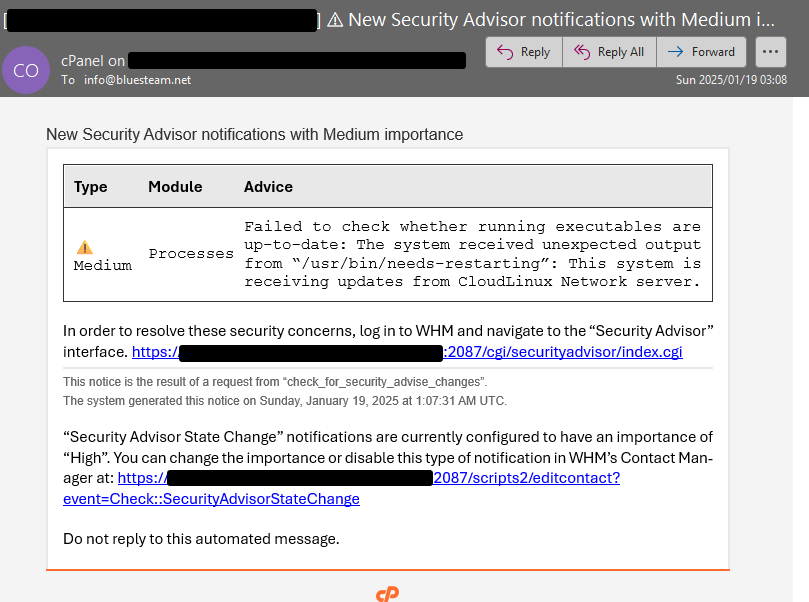
Upon running the command from the command line I see this:
[root@##### ~]# /usr/bin/needs-restarting
This system is receiving updates from CloudLinux Network server.
Failed to read PID 619964's smaps.
Failed to read PID 620190's smaps.
Failed to read PID 620191's smaps.
Failed to read PID 620192's smaps.
Failed to read PID 620193's smaps.I posted 3 months ago that we have already waited a really long time for a fix and now it's another 3 months later and still l we get this message. How can cPanel increase the cost to these ridiculous amounts and rake in everyone's money and not fix this problem after all this time?
I tried the cases linked above and none of them solve this issue as you can see below. The one case linked states to try running the find_outdated_services manually but as you can see below, the error remains:
[root@##### ~]# /scripts/find_outdated_services
Looking for outdated services …
This system is receiving updates from CloudLinux Network server.
275 files removed
warn [find_outdated_services] Failed to read PID 624384's smaps.
Failed to read PID 624386's smaps.
Failed to read PID 624389's smaps.
Failed to read PID 624390's smaps.
Failed to read PID 624395's smaps.
Failed to read PID 624400's smaps.warn [find_outdated_services] This system is receiving updates from CloudLinux Network server.
The system did not find any outdated services.1 -
I am experiencing this identical issue on my (CloudLinux v9.5.0 STANDARD kvm / cPanel Version 126.0.2) server.
Is there still no solution? When is one (finally) expected?
[user@servername ~]# /usr/bin/needs-restarting
  This system is receiving updates from CloudLinux Network server.
  Failed to read PID 1237165's smaps.
  Failed to read PID 1262443's smaps.
  1194 : /usr/sbin/NetworkManager --no-daemon
[user@servername ~]#

[user@servername ~]# /scripts/find_outdated_services
  Looking for outdated services …
  This system is receiving updates from CloudLinux Network server.
  326 files removed
  warn [find_outdated_services] This system is receiving updates from CloudLinux Network server.
  The system did not find any outdated services.
[user@servername ~]#

[user@servername ~]# /usr/bin/needs-restarting
  This system is receiving updates from CloudLinux Network server.
  1194 : /usr/sbin/NetworkManager --no-daemon
[user@servername ~]#
0 -
I spoke with the team about this again today and they created yet another case related to this issue. This specific problem we're still seeing seems to be that CloudLinux is printing unexpected messages to standard out rather than standard error, and we aren't handling that how they expect, as most everyone in this thread is using CloudLinux.
The new case is RE-922 and will be resolved as part of this larger work in this area.
0 -
Thank you, cPRex.
Kindly update this thread with milestone progress reports.
0 -
For sure - if I hear *anything* I'll be sure to post!
0 -
Update - this will be fixed in all versions of 126, and it could also be backported to earlier versions but that hasn't been decided yet.
I'll continue to post updates as I get them!
0 -
Update - QA testing has completed so this should be coming soon. "Soon" is all I have at this point, but if I get a specific cPanel version number I'll share it here.
0
Please sign in to leave a comment.
Comments
69 comments