Email Migration

Hello. I just migrated from one cpanel server to another, i combined two cpanels into one. So the target server already had email accounts in it. I just added other cpanel data to it. Everything went well with one minor thing. The roundcube folders do not exist for the new email accounts, and some folders are missing in the /home mail folder
Under cpanel email accounts the new email accounts are listed there but there is no folder in roundcube for it. I am thinking all i need to do is just use roundcube to create the folders but i am not sure since they are also missing in the /home mail folder
I looked at the file structure in file manager, in the /home mail folder, all of the original (target) cpanel mail accounts are listed, but there is only one folder for one of the new email accounts. That folder has all the dovecot files in it.
So i have one new domain email account that appears to have some folders in file manager, and is also listed in the cpanel mail account listing, but no dir in the roundcube.
All the other domains have nothing in the /home mail folder, and there is no folder for any of them with the paperclip icon on it in that folder either, they also have no folder in roundcube, but all of them are listed in the cpanel mail account listing.
I opened one of the new email accounts in cpanel mail listing and checked the box for auto create folder thinking once i save it, it would create what i was missing, but it did not.
I do have a complete backup but not sure what to upload from it.
So first how do i create the folders that are missing in the roundcube?
Then what do i need to upload from the backup to complete the ones that are not listed in the /home mail folder?
And is that all i need to do or is there another step?
Thanks... Dave
-
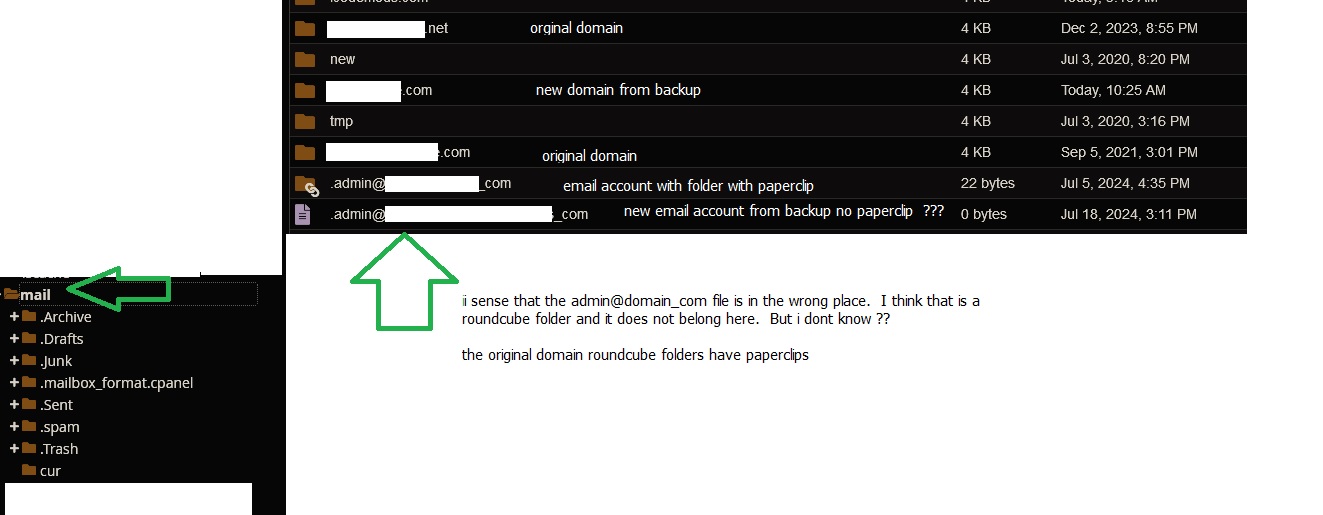
Alittle update here. I got the files and folders uploaded from backup of the old cpanel to the new server in etc and mail folders but still no roundcube folder for the new domain email accounts. I see that the target server domain emails folders domain_com example with underscore all have paperclips on the folder, what does the paperclip icon on the folder mean?
The folders that i uploaded dont have paperclips and also i notices that my domain_com are files not folders.
 0
0 -
Another update here, so i ended up starting from scratch. I removed all of the email accounts for the migrated accounts in cpanel, files everything just for the migrated domains, even deleted them from the cpanel email listing.
Then i manually created one account from the migrated domains, that way i could check to see what was created and just duplicate that process manually from backup.
So far i have the /home/etc folder ready to go, its updated with the new domain email data. Now im working on the /home/mail folder.
I figured out the folders with the paperclip icon is actually a link icon so those folders are symbolic link folders in the mail dir. I dont know how to create a symbolic link and i think you lose the symbolic link effect in a backup because in the backup all those symbolic links are just files now, they lost their link. I dont know how to recreate that but i guess ill have to learn.. :)
So now the question is:
How to take the non symbolic link in the back /home/mail folder and upload it giving it back its link ability?
OR
How to manually create the symbolic link so i can just add the files and folders from the backup back inside the linked folder?
And so on we go into the land of the lost lol :)
Another update here... one step closer...
So i figured out that the symbolic link in the mail folder points to the mail/domain folder email address.
Example... if i have a domain of example.com and an email address of test@example.com
in the /home/mail folder would be a folder named example.com and inside that folder would be another folder named test (this is where the symbolic link points to.
So that means in the /home/mail folder i need a symbolic link to /home/example.com/test and that is
written in the symbolic link format (starting with a dot) .test@example_com
So now that i understand the concept, i still need to learn either how to get the backup data item uploaded and converted to a symbolic link or create each symbolic link manually....
off we go again to the land of learning.... :)
Discovery update:
So basically there is no easy way to do it, you have two choices:
1. start from scratch and just manually create each email account maually via cpanel (at least that way you know that all the files are where they need to be and the symbolic link is created by cpanel)
2. upload the (old symbolic link) files (which have lost their link) from backup and then go one by one using the command line to create each link again. Or i guess you could create each link before that and then just upload the data from backup into the symbolic link folder.
Either way its alot of work and i have found no easy tool to do it. One might think that since migration happens alot that there would be an option in cpanel to create symbolic links and restore the email link folders, but i have not found anything so far.
0 -

Hey there! Unfortunately there aren't any tools available for this type of work, or merging emails/email account data, and the path you've discovered of manually making things work is the best option.
Option 1 is likely the safest and easiest if you already have the account data.
1 -
Thank you cPRex :)
1
Please sign in to leave a comment.
Comments
4 comments