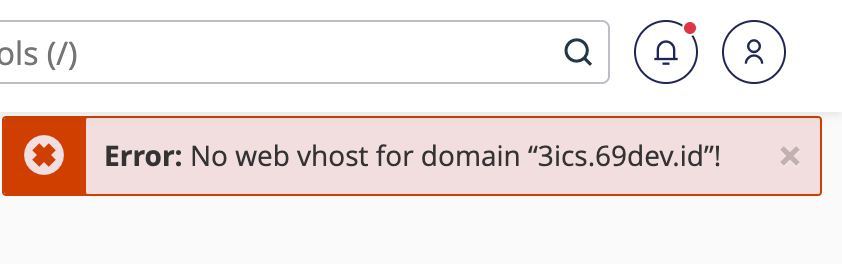
Error: No web vhost for domain

I just did the transfer tool, all accounts were successfully transferred, but there were several accounts that experienced the error Error: No web vhost for domain “subdomain.domain.com”! is there a way to restore the virtualhost? I can't do it one by one
please help me
-

Hey there! Without knowing the root cause, it may be difficult to say, although you may end up finding the same problem is happening on each account.
On the Source machine, do you see missing domain entries from /var/cpanel/userdata/$username for the account? If so, a process likely happened at some point that caused that file to get out of sync.
If that is the case, you can try running:
/scripts/updateuserdomains
to see if that fixes the file, and then re-migrate the account to restore that data to the new machine. If not, it would be best to create a ticket so this situation can be investigated.
0 -
I just ran /scripts/updateuserdomains, after I thought maybe this problem occurred because during the process of changing the primary domain because I did a bulk using api to change all the primary domains
/scripts/updateuserdomains succeeded in making the domain accessible but it was not redirected to cpanel which was actually redirected to cgi-sys/defaultwebpage.cgi
0 -
That sounds like normal behavior to me, depending on what URL you were trying to access.
1 -
it should be normal but why does it redirect to defaultwebpage.cgi? the No web vhost for domain error still appears when I try to enter cpanel
 0
0 -
If you are still seeing the error inside cPanel when you access the interface then there is still an issue with the userdata on the account. It would be best to create a ticket for this issue so the problem can be investigated directly on the server, especially if this is happening with multiple domains.
0 -
but the domain entries from in /var/cpanel/userdata/$username have no problems, it's just the vhost that has the problem
0 -
I just found an article that says it says to run /scripts/rebuildhttpconf, but now it can't?
0 -
Failed to find the domain(s): “luckycat.69dev.id”. at /usr/local/cpanel/Cpanel/PHP/Config.pm line 268. Cpanel::PHP::Config::_get_php_config_for_domains(0, ARRAY(0x4732f90)) called at /usr/local/cpanel/Cpanel/PHP/Config.pm line 288 Cpanel::PHP::Config::get_php_config_for_domains(ARRAY(0x4732f90)) called at /usr/local/cpanel/Cpanel/PHPFPM.pm line 1027 Cpanel::PHPFPM::remove_primary_domain_fpm_conf("luckycat.69dev.id") called at /usr/local/cpanel/Whostmgr/Accounts/Modify.pm line 840 Whostmgr::Accounts::Modify::_rebuild_phpfpm_if_needed(Whostmgr::Accounts::Modify::AccountModification=HASH(0x4741fc8)) called at /usr/local/cpanel/Whostmgr/Accounts/Modify.pm line 2022 Whostmgr::Accounts::Modify::__ANON__() called at /usr/local/cpanel/3rdparty/perl/536/cpanel-lib/Try/Tiny.pm line 100 eval {...} called at /usr/local/cpanel/3rdparty/perl/536/cpanel-lib/Try/Tiny.pm line 91 Try::Tiny::try(CODE(0x4741f68), Try::Tiny::Catch=REF(0x467e180)) called at /usr/local/cpanel/Whostmgr/Accounts/Modify.pm line 2077 Whostmgr::Accounts::Modify::_modify_one_user(Cpanel::Config::CpUser::Object=HASH(0x45fbc20), HASH(0x24c5cc8)) called at /usr/local/cpanel/Whostmgr/Accounts/Modify.pm line 1958 Whostmgr::Accounts::Modify::_local_modify(Cpanel::Config::CpUser::Object=HASH(0x45fbc20), HASH(0x24c5cc8)) called at /usr/local/cpanel/Whostmgr/Accounts/Modify.pm line 250 Whostmgr::Accounts::Modify::modify("_PACKAGE_EXTENSIONS", "wp-toolkit", "domain", "admintes.6l9.dev", "newuser", "luckycat", "rename_database_objects", 1, ...) called at /usr/local/cpanel/Whostmgr/API/1/Accounts.pm line 734 Whostmgr::API::1::Accounts::modifyacct(HASH(0x233d0e8), Whostmgr::API::1::Utils::Metadata=HASH(0x24a5ef8), HASH(0x45f12a0)) called at whostmgr/bin/xml-api.pl line 5340 whostmgr::bin::xml_api::__ANON__(Whostmgr::API::1::Utils::Metadata=HASH(0x24a5ef8), HASH(0x233d0e8), HASH(0x45f12a0), CODE(0x45f09e8)) called at /usr/local/cpanel/Whostmgr/API/1/Data/Wrapper.pm line 240 Whostmgr::API::1::Data::Wrapper::__ANON__() called at /usr/local/cpanel/3rdparty/perl/536/cpanel-lib/Try/Tiny.pm line 100
0 -
Correct - you won't be able to rebuild the Apache configuration until the userdata and vhost issue is resolved.
0 -
So how can I solve that problem?
0 -
It would be best to open a ticket.
0 -
okay, thank you for your help
0 -
I'm sorry I can't offer more on the Forums - I'd hate to recommend something that may inadvertently cause more issues to the machine.
0 -
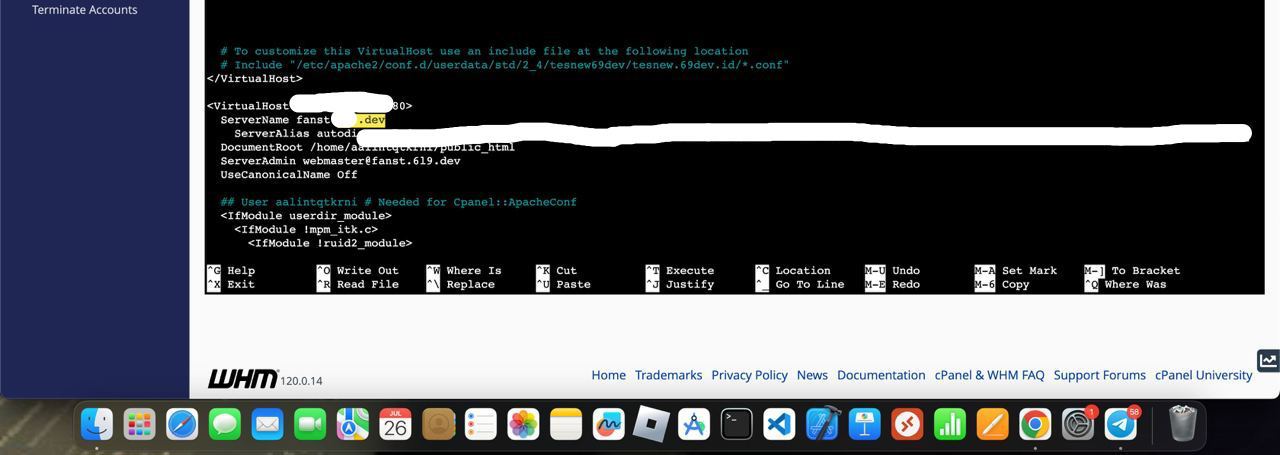
Please help me, after I checked it turned out the problem was in the file /usr/local/apache/conf/httpd.conf there it still says the old domain should be the new domain, then how do I fix it? do I have to change it in that file? but I'm afraid something will go wrong
 0
0 -
You can not manually change that file. If that file is wrong, that indicates other areas of the system still show the wrong domain name.
I would recommend searching /var/cpanel/userdata for that domain name to see if you can find the old on there, but *please* make a backup of any userdata files you edit or else things may not work properly if a bad change is performed.
I would strongly recommend making a ticket for this issue.
0 -
for the last one, i found the old domain in /var/cpanel/userdata
if this problem is not resolved i will open a ticket
0 -
Was that inside the content of another domain userdata file? Or did it have a unique userdata file?
0 -
not all normal, it's just that the written test domain is domainold.com, it should be domainnew.com, maybe the best way is to do openticket, but I'll try asking first, who knows you can help me
0 -
No, it would definitely be best to open a ticket. Manually hacking the userdata files isn't advisable, especially through a Forums post where we can't see what underlying issues may have caused it.
0 -
Had the same issue.
ERRROR:
Failed to find the domain(s): “XXXXXX”. at /usr/local/cpanel/Cpanel/PHP/Config.pm line 268. Cpanel::PHP::Config::_get_php_config_for_domains(0, ARRAY(0x4732f90)) called at /usr/local/cpanel/Cpanel/PHP/Config.pm line 288Found solution here:
https://support.cpanel.net/hc/en-us/community/posts/25127123888151-Error-No-web-vhost-for-domain
Somehow running mailperm fixed the issue./scripts/mailperm
0
Please sign in to leave a comment.
Comments
20 comments