Host Access Control One Static IP Access

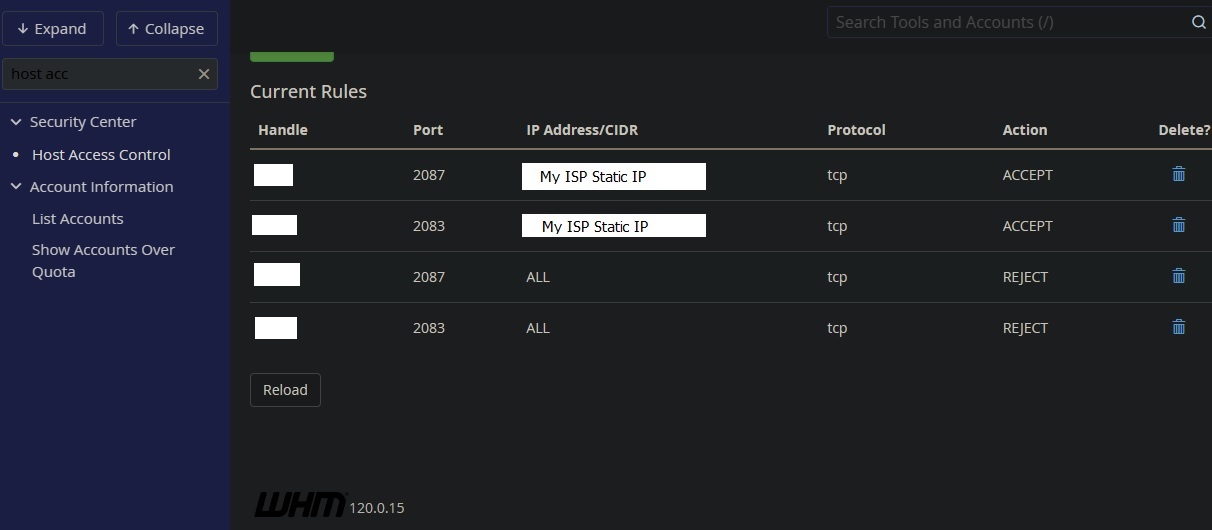
Hi, i set my Host Access Control for ports 2087 and 2083 to one static IP access from my ISP.
Should i also do 2082 as well? I do have it set to https only
TCP is done, do i also need to do UDP as well ?
Thanks
-

Hey there! 2082 would be the non-SSL cPanel port, so it's up to you if you want to include that in the list. If there is ever a problem with the SSL certificate for cPanel it might be good to have that port on there as well, the same for 2086 - that's the WHM non-SSL port.
0 -
Thats what i was thinking too, thanks :)
1 -
Hi, I know this topic is almost a year old but i wanted to comment on this because it involves host access control and how i set it up. A continuation of the topic using configserver firewall as well.
Im not sure if i misunderstood the host access feature or if it is not working but you can see in my earlier posts how i set it up last year. I am not sure why it took me this long to test it but i guess i forgot or i guess maybe i thought it was handled.
How i thought it would work is that any access to those ports would be blocked (as it no login page) and just getting a message that the site cannot be accessed.
But i did finally test it using my cell phone which has a different ip and i was able to get the login pages for whm, cpanel, and web mail. So i ask AI and it suggested i use configserver firewall to do the job.
So i removed ports 2086 2087 (whm) , 2082 2083 (cpanel), and 2095 2096 (webmail) from the configserver firewall ip4 listing, but first making sure my static ip was whitelisted. And now when i try to access webmail, whm, cpanel via my cell phone, i get the message "This site cant't be reached", but it does work using my static ip, which is actually what i wanted a year ago.
I do understand that if my static ip changes (which they promise me it will not) then i am screwed. But i am gambling on the fact that the server host for the VPS has access to the files and they can help get me in if that should happen.
I am glad i finally have it working like i wanted but did i totally misunderstand the host access feature?
Thanks :)
0 -
I believe you should have been (and still could) configure the same access with only Host Access Control - what is not blocking the access to the service like you expected with the previous configuration?
0 -
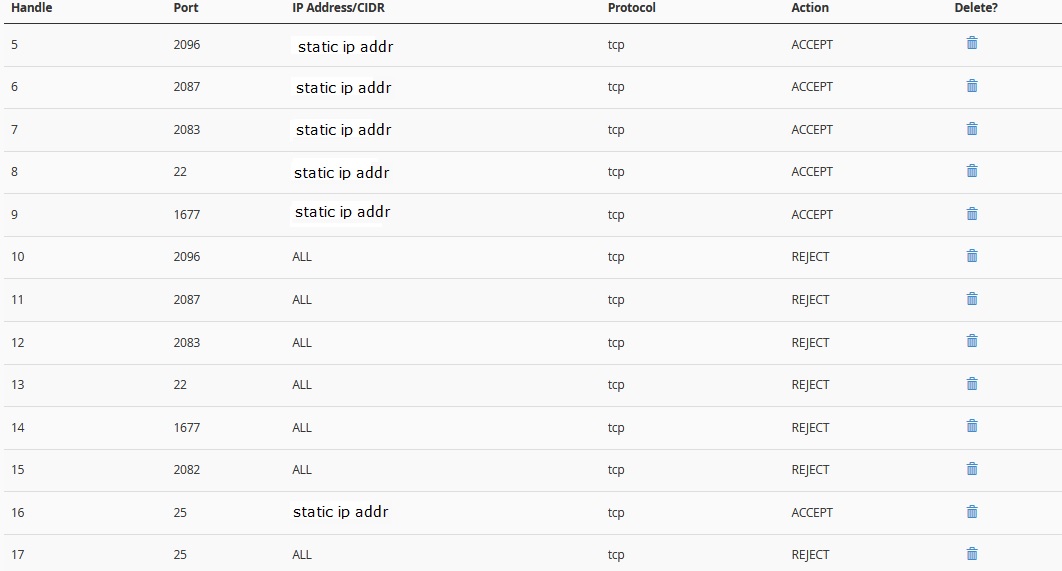
Hi, the host access is not blocking access to https://example.com:2083 or 2096 or 2087 and i get the login page from non static ip for all of those without the firewall setting.
I just happen to have my WHM open and here are my current settings:
 0
0 -
Interesting - that might be something that's ticket worthy because that's one of those "it should just work" items.
0 -
Thanks i agree it should just work. :) I will consider doing a ticket. I am hessitant to do so because usually that means if they cant duplicate it, then i have to allow the devs access to my server and that means changing all my settings so they can do that, and i just got everything set back after my VPS host had to have full access to fix my EXIM issue.
I have no problem letting the devs have a look, its my time management and if i remember to unset everthing and the time it takes to do that and then set it back that is the challenge. But i might do so anyway just because i am almost positive they can duplicate it and if so then it does need to be addressed.
Thanks :)
0 -
I did not open a ticket, but i did use the cPanel feedback link to let them know. I hope that is enough to get some attention :) Thanks for all your help on this.
1
Please sign in to leave a comment.
Comments
8 comments