Transfer reseller with custom DNS

Hello!
I am about to transfer several accounts from a reseller that has custom DNS. My plan is to first transfer the main reseller account to our server. Give it all the necessary reseller permissions.
Then I have to live transfer the sub accounts of that same reseller. I understand that by making the transfers they will already be owned by the same reseller. I had root credentials to this reseller current WHM.
My question is what happens with the custom DNS, will all the sub accounts continue to have the same custom DNS records of the reseller or are they assigned the ones from my server until I manually edit the zones?
After everything is migrated, I plan to change the IP for the reseller's custom ns1 and ns2 servers. During the entire process, the client's current ns1 and ns2 servers will always be active.
Thanks
-

Hey there! Any DNS records that have been customized will stay as they are on the new system. The only IP addresses that will get updated are records that are still set to the server defaults.
Does that answer the question?
0 -
I don't know yet, for now I see that when transferring the main account where it says nameserver1 and nameserver2 it put ours instead of the ones the client has.
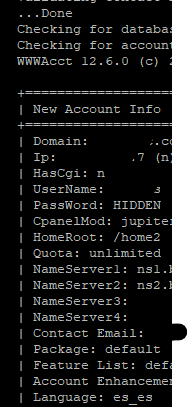
When I finish transferring I'll check.
0 -
That would be an expected change as well, if the default nameservers configured in WHM >> Basic WebHost Manager Setup are different between the two machines, or they aren't using the default on the Source server there.
0 -
Ok, that's what I wanted to keep unchanged.
Looking at the DNS zone on our server I see that the records marked in red were modified with our data instead of leaving the client's data.
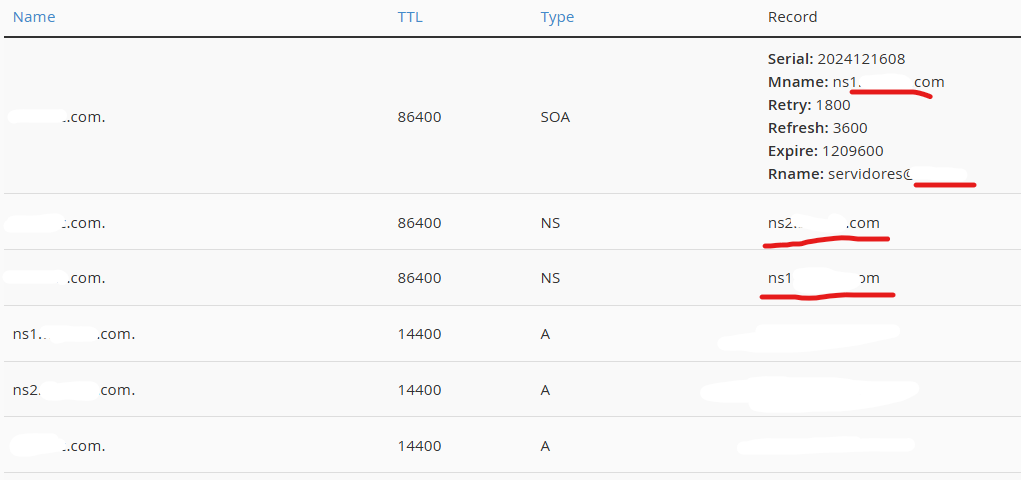
He is now a reseller within our servers, we would like that when we transfer his clients' accounts they remain within his reseller with their own DNS.
0 -
Unfortunately I don't have a way to make the Transfer Tool keep certain records. There is actually a feature request right now from one of our Partners to add this functionality to the tool, but it isn't a project that has been taken on just yet.
0 -
I have good news, for the reseller's child accounts, the correct nameservers are automatically set!
0 -
Glad to hear it!
0
Please sign in to leave a comment.
Comments
7 comments