Feature Requests and Issues Regarding Password Strength Policies in cPanel Webmail

Dear cPanel Support Team,
I would like to inquire about some features and report a few issues related to the Password Strength policies in cPanel. Please advise if these exist currently or if there are plans to include them in future updates:
Automated Email Notifications:
1 - Is there a way or plan to implement automated email notifications sent periodically to users whose passwords do not meet the configured strength policy, encouraging them to update their passwords?
2 - Security Questions for Password Reset:
Is there any method to integrate security questions as part of the password reset process, to enhance account recovery security?
3 - Password Strength Policy Coverage for Email Clients:
Currently, the password strength policy enforcement seems to apply mainly to webmail logins. Is there a way to extend this enforcement to email clients (e.g., Outlook, Thunderbird) or other access methods, to make the policy more comprehensive?
4 - Persistent Password Strength Cache:
Is there a dedicated cache or file (similar to @pwcache) that reliably stores the password strength scores and does not get overwritten or cleared, so that administrators can monitor which accounts currently have weak passwords?
5 - Bug in Password Strength Enforcement:
We have noticed a bug where, upon activating the password strength policy, users are sometimes able to update their password to one that does not meet the policy after being warned with an error message. The system allows repeating the process. Is this a known issue, and is there a fix planned?
6 - We enabled the option for sending a verification code to reset the webmail password, but cPanel does not send the email neither locally nor to an external contact email. The contact email is correctly configured. Could you help us understand why this might be happening?
Thank you for your support and guidance.
Best regards,
-

Hey there! For issues 1-4, we don't currently have them in place and don't have plans for them. If you'd like I can submit a feature request for them, but you're always welcome to do that over at features.cpanel.net as I am also the admin that handles the features site.
For #5 I tested this just now and I wasn't able to reproduce. If you can outline the necessary steps to take so I can make this problem happen I'd be happy to try again, or you could always submit a ticket from a system that is experiencing this problem.
For #6, I don't have a good explanation for that. Do you see the email getting handled at all in the main Exim log at /var/log/exim_mainlog?
0 -
Hi cPRex,
Thank you for your quick response.
Regarding issues 1–4, I understand they are not currently implemented. Yes, please go ahead and submit the feature requests on our behalf. We will also consider posting them directly on features.cpanel.net to provide more context and track any progress.
As for issue #5, I’ll prepare a detailed set of steps to reproduce the problem.
- Password Strength Configuration is set to 90 for Webmail.
- After that I apply in Configure Security Policies and Password Strength to validate the strength when entering the webmail
- Then I try to enter a box which has less than 90 score in the strength
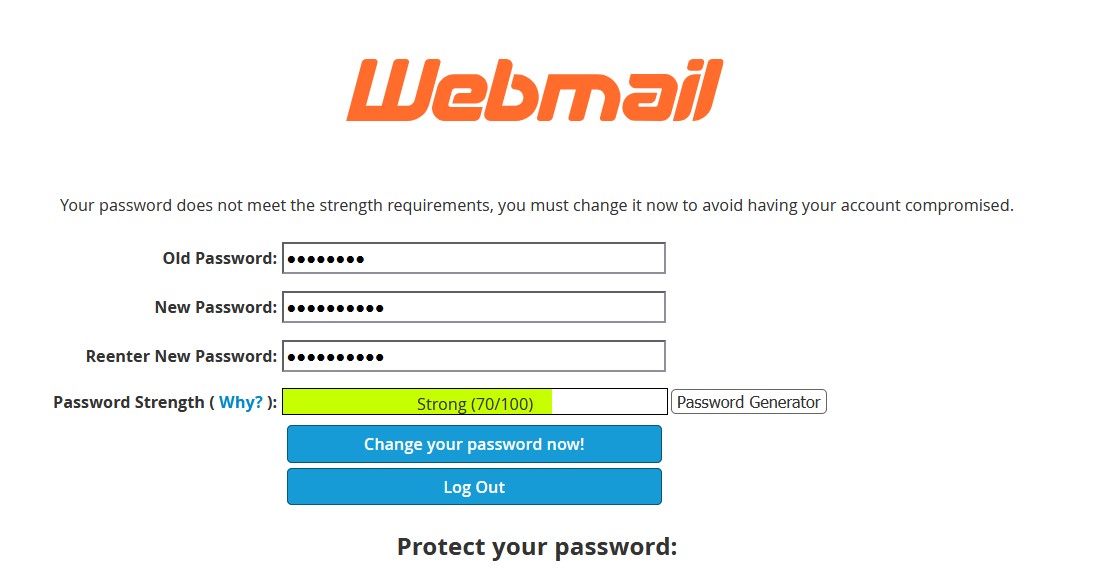
- I place a key with less than the established score and the error is reproduced
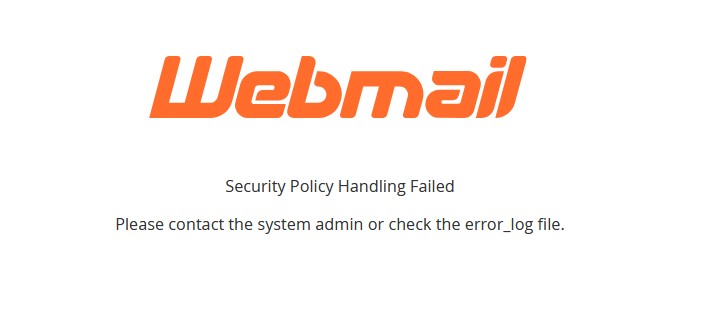
I understand this error is because a key was placed that does not meet the 90 score but it should not be allowed to update it and we see that if it is updated, only then this has to be repeated until the correct score can be entered and entered
That is to say, if I want to enter the webmail again, it is not with the original password, but rather I update it to the one with the lowest score, even though it then asks me again and does not let me enter.
Thanks again for your assistance.
Best regards,
0 -
Thanks for the excellent description. I was able to reproduce this perfectly and I've created case CPANEL-48566 with our team so they can look into this. If you ever want to check the status on that just ask!
Did you want me to get those other items submitted on the features site for you?
0 -
Hello again,
Thank you for confirming the creation of the case CPANEL-48566. I would like to know how I can check the status of this case in the future or contribute additional information if necessary.
Additionally, I would like to provide more details related to Issue #6, as we are still facing the following situation:
-
The server is correctly configured to send outgoing emails from its main domain (tested and working).
-
However, WHM/cPanel is not sending system notifications, such as login alerts or password reset emails.
-
We have already verified that the corresponding contact email addresses were added correctly in "Contact Manager" and "Basic WebHost Manager® Setup".
-
We also checked
/var/log/exim_mainlog, but no entries appear related to those system notification emails. -
The server can send emails using the domain configured, but apparently not from WHM directly, which suggests the issue is limited to internal system notifications.
Is there any other log or test we can perform to verify whether WHM is attempting to send these emails?
Are there any debugging methods or known issues with this behavior?We appreciate your guidance on how to continue testing or debugging this issue.
Best regards,
0 -
-
The only way to get details on the case would be the ask me directly, as we don't have anything public facing for the development system.
It sounds like a ticket would be best to see what's happening with issue #6 as that's one of those "it should just work" - we'd likely end up stracing a cPanel process and seeing if there is anything happening there.
0 -
Hello again,
After testing, I don't know what changed but I see that the error also extends to users who entering a key with the correct score takes them to the same error screen. I just adjusted it on a production server, thinking that it would only be reflected in lower-scoring passwords, but no. This is confusing for the end user. Has anything changed since this Monday that I tested and it behaved differently than today?
Best regards,
0 -
We haven't pushed any updates this week - you can always check the changelogs here: https://docs.cpanel.net/changelogs/130-change-log/
0 -
Additional details for case CPANEL-48566
After more testing, I’ve noticed that the behavior is slightly different now:
-
When logging into Webmail with a password below the configured strength requirement, the user is prompted to change it (expected).
-
If they enter a new password with a lower score, it accepts and channge shows an error message saying there was a problem (bug)
-
If they enter a new password that meets the required strength, the system still shows an error message saying there was a problem, but the password is actually updated. (bug)
-
After reloading the Webmail login page and using the new valid password, the login works correctly.
The issue is not preventing login, but the error message is misleading and could confuse users into thinking the password was not updated when in fact it was.
No updates have been applied this week (confirmed via changelog), so the behavior change happened without a cPanel version change.
I tried this on Monday, and it only failed for passwords that didn't reach the minimum score requested. Now, it happens for all of them. Could you try to reproduce the error? I have applied a stregth of 100 only to the mailboxes.
I await a response
0 -
Please sign in to leave a comment.
Comments
8 comments