cPanel Raw Access Logs Problem

Hello!
The option "Remove the previous month's archived logs from your home directory at the end of each month." on my "Raw Access" page is not working, The statistics of the previous month will be recorded continuously and will not be deleted.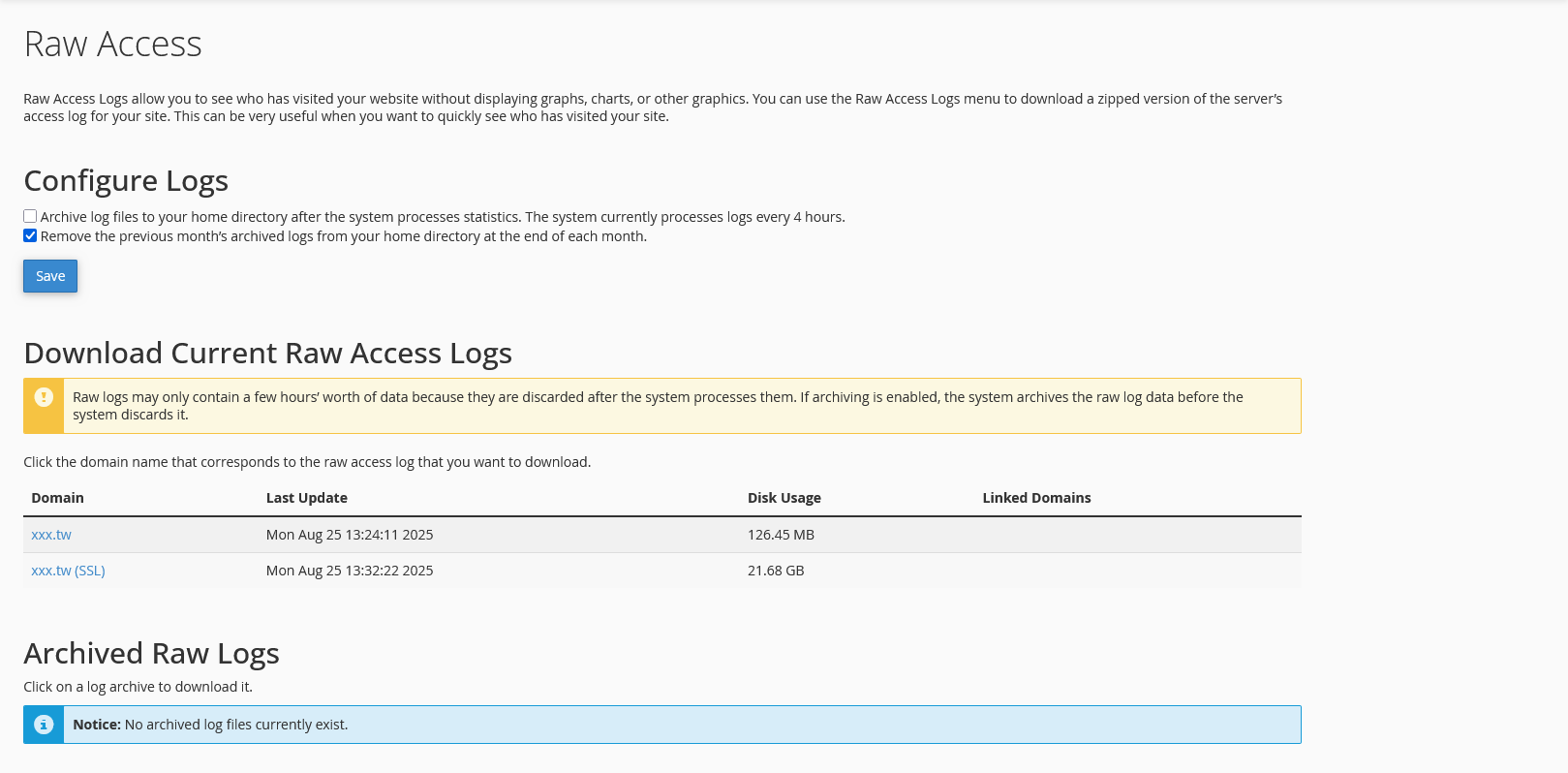 It's really annoying that this keeps taking up space on my hard drive.
My settings: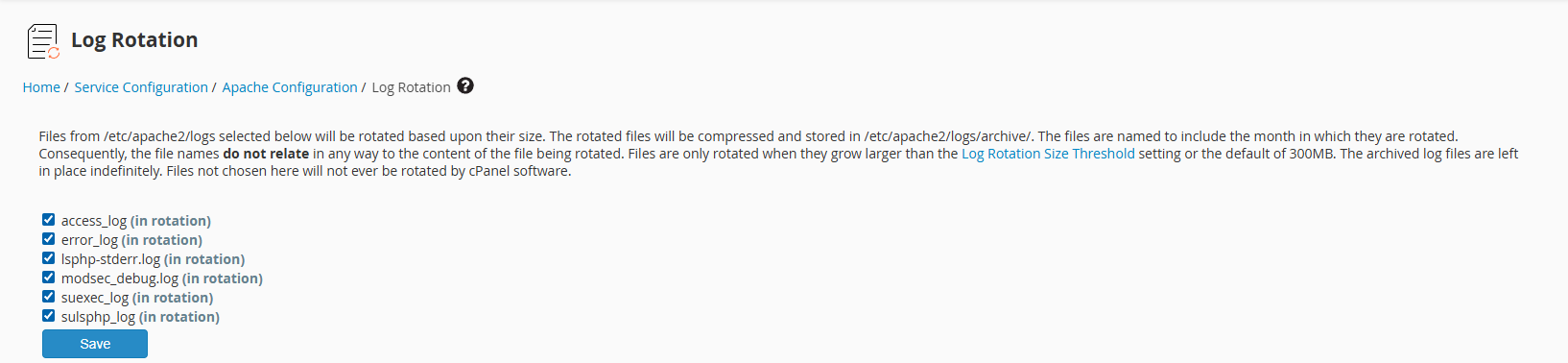
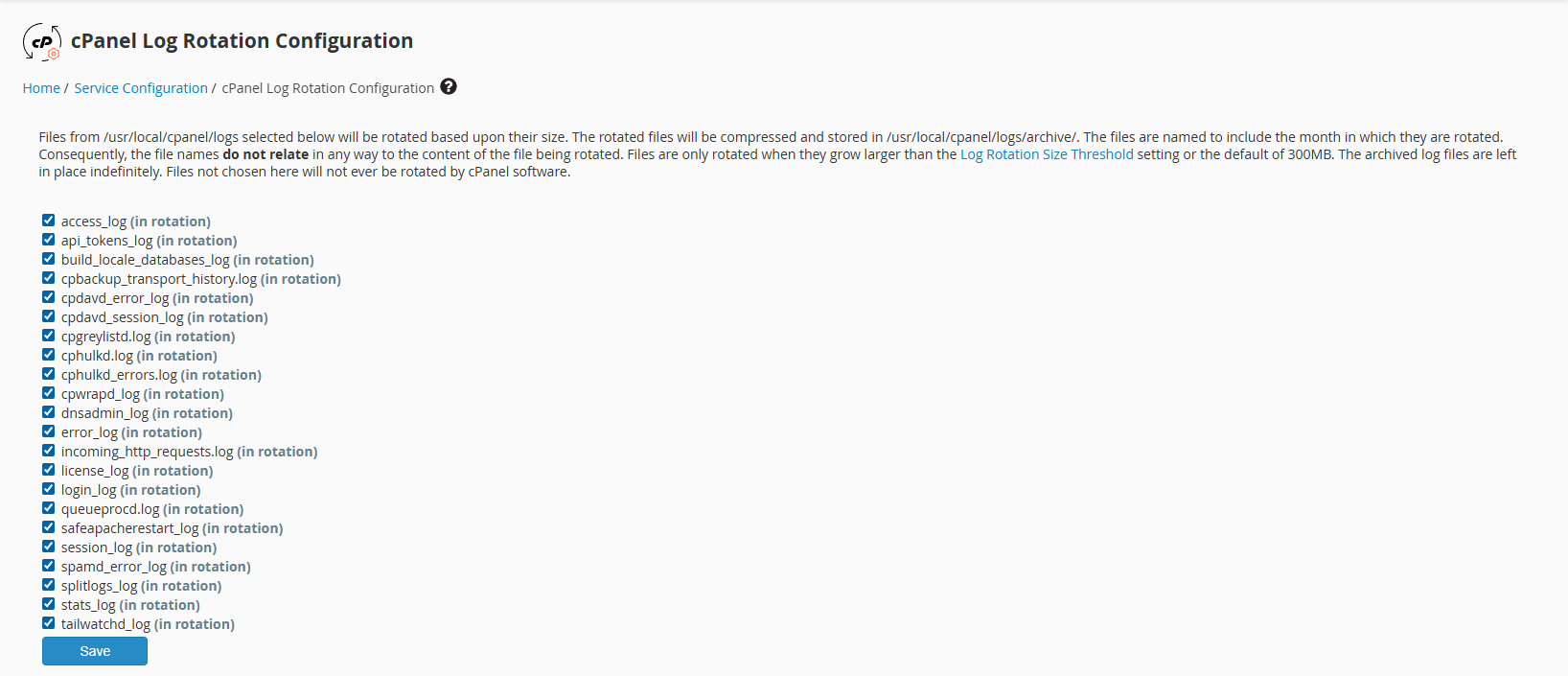
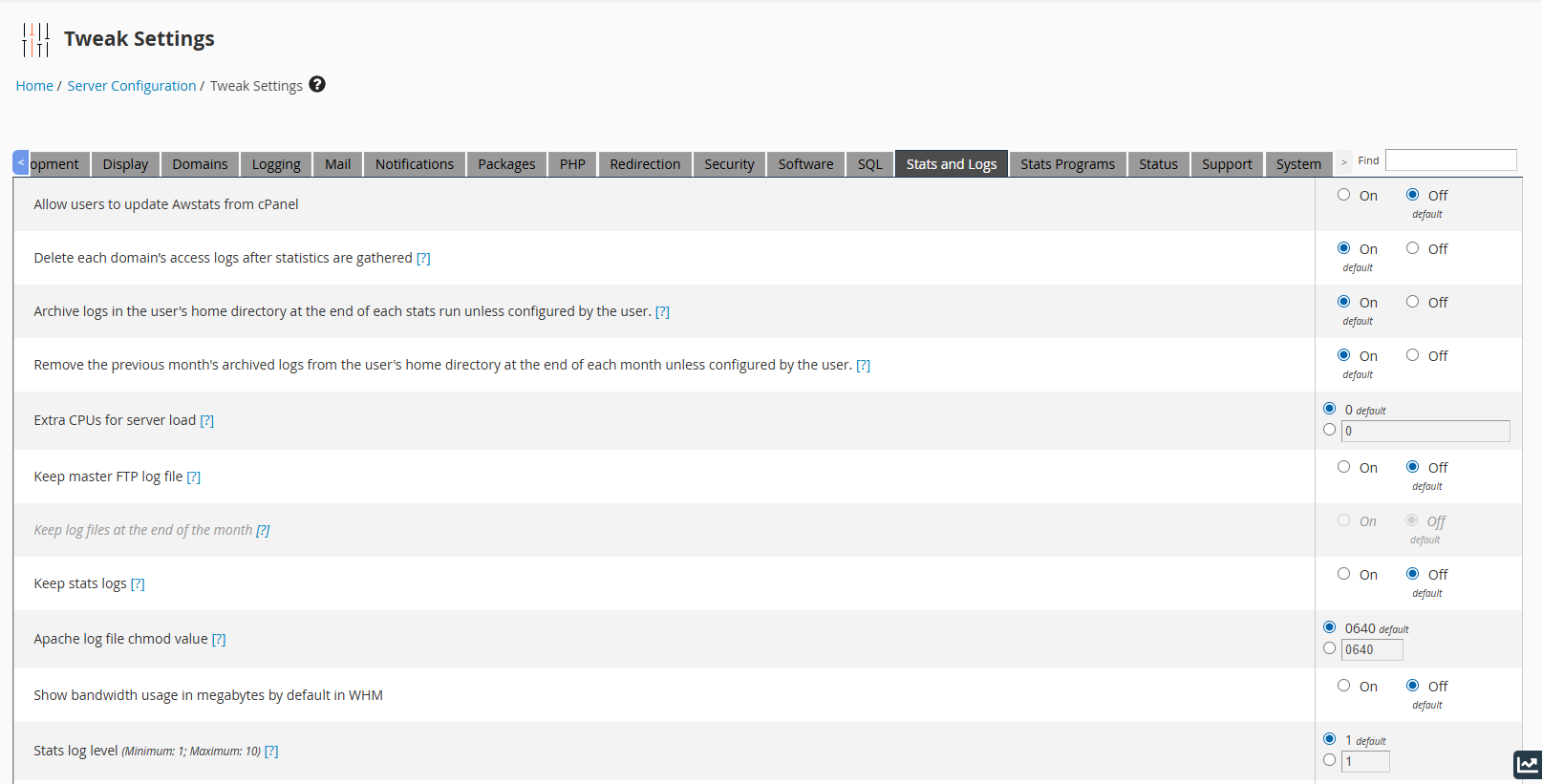
Dear Sir, how can I set it up correctly so that I can retain Raw Access for only one month?
Please help me, Thank you!
-

Hey there! Thanks for including those screenshots, although I don't see anything that is obviously configured incorrectly. If you're not seeing any errors in the main cPanel error log (/usr/local/cpanel/logs/error_log) it would be best to create a ticket so this can be investigated directly on the server to determine the issue.
0 -
My server provider is unable to provide technical support because we have not purchased technical support services. (Because my boss can't afford the high technical service fees)
The current situation is that the VPS host hard disk space is only 300G, Currently using 70G UP*2 Daily backup + Weekly backup, Coupled with the ever-increasing volume of Raw Access Logs, we felt powerless.
If you would like, please tell us how to change it to default value, and delete the previous month's statistics on the 1st of each month, If there is a setting modification step, I think we should be able to execute the setting.
Thank you!0 -
It's important to note that cPanel never charges for technical support - that is always included in our license. If you have purchased your license through a third-party they should be offering some level of support, and then escalating the issue to us if they are not able to resolve it.
A license purchased directly through cPanel would give you support as well.
As far as the issue, I don't see anything wrong with your settings so they likely aren't far from the default values anyway, so there is likely something else happening on the machine.
0 -
We are now facing a more complex situation, Our VPS hosting is about to expire next month, which may affect my boss's willingness to renew the contract.
But as I said, their policies make it difficult to provide further technical support, If you are willing to accept that I can provide you with our IP address and related information in use, can you provide assistance directly?
Perhaps we can consider other solutions, including purchasing the license directly from you.
0 -
I wouldn't be able to do anything on my side directly, but if you moved your license to us we'd be happy to look! If you'd like to get the license moved I would start by emailing cs@cpanel.net and that will put you in touch with our Customer Service team and they can help with that process.
0 -
We just completed the renewal of the VPS host, Unfortunately, We cannot change the content of the hosting plan, Which means that the license is difficult to transfer.
I can understand the difficulties faced by Taiwan's server hosting companies, Any technology requires cost. Unfortunately, We do not have enough money to pay for technical personnel.
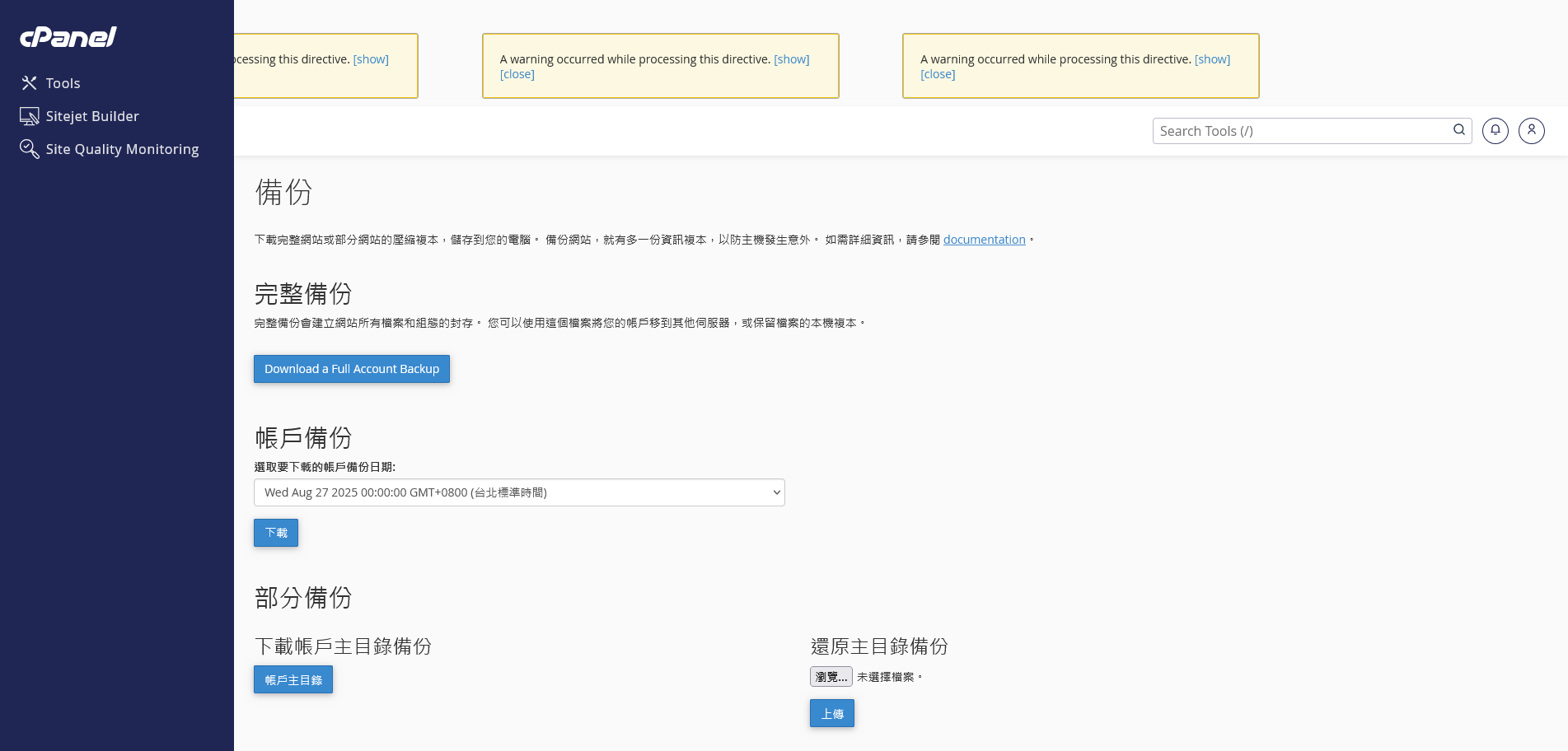
We are having some issues with cPanel right now. I feel helpless because I understand the difficulties faced by both parties, but I am powerless to help.
 0
0 -
What message appears when you click the "show" button on those errors? Does it provide any helpful information?
0 -
The same error message appears on many pages:A warning occurred while processing this directive. [close]'tech_domains' array in /etc/cpanel/ea4/ea4-metainfo.json contained only invalid or empty entries.at /usr/local/cpanel/Cpanel/IP/AutoDomain/TemporaryDomain/Check.pm line 66.Cpanel::IP::AutoDomain::TemporaryDomain::Check::get_ea4_techdomains_pattern() called at /usr/local/cpanel/Cpanel/IP/AutoDomain/TemporaryDomain/Check.pm line 93Cpanel::IP::AutoDomain::TemporaryDomain::Check::domain_is_temporary_subdomain("test.tylee.tw") called at /usr/local/cpanel/Cpanel/API/DomainInfo.pm line 186Cpanel::API::DomainInfo::_get_all_domains_data() called at /usr/local/cpanel/Cpanel/API/SiteTemplates.pm line 64Cpanel::API::SiteTemplates::list_user_settings(Cpanel::Args=HASH(0x3fe89b0), Cpanel::Result=HASH(0x3fe8890)) called at /usr/local/cpanel/Cpanel/API.pm line 369eval {...} called at /usr/local/cpanel/Cpanel/API.pm line 371Cpanel::API::_run_module_function(Cpanel::Args=HASH(0x3fe89b0), Cpanel::Result=HASH(0x3fe8890), "SiteTemplates", "list_user_settings") called at /usr/local/cpanel/Cpanel/API.pm line 252Cpanel::API::execute("SiteTemplates", "list_user_settings", HASH(0x3f9f680)) called at /usr/local/cpanel/Cpanel/Template/Plugin/Uapi.pm line 24Cpanel::Template::Plugin::Uapi::_uapi_exec("SiteTemplates", "list_user_settings", HASH(0x3f9f680)) called at (eval 9) line 1eval {...} called at (eval 9) line 1eval {...} called at (eval 9) line 1Cpanel::Template::Shared::__ANON__(Template::Context=HASH(0x3f97be8)) called at /usr/local/cpanel/3rdparty/perl/536/cpanel-lib/x86_64-linux/Template/Document.pm line 165eval {...} called at /usr/local/cpanel/3rdparty/perl/536/cpanel-lib/x86_64-linux/Template/Document.pm line 163Template::Document::process(Template::Document=HASH(0x3fa0590), Template::Context=HASH(0x3f97be8)) called at /usr/local/cpanel/3rdparty/perl/536/cpanel-lib/x86_64-linux/Template/Context.pm line 352eval {...} called at /usr/local/cpanel/3rdparty/perl/536/cpanel-lib/x86_64-linux/Template/Context.pm line 322Template::Context::process(Template::Context=HASH(0x3f97be8), Template::Document=HASH(0x3fa0590)) called at /usr/local/cpanel/3rdparty/perl/536/cpanel-lib/x86_64-linux/Template/Service.pm line 94eval {...} called at /usr/local/cpanel/3rdparty/perl/536/cpanel-lib/x86_64-linux/Template/Service.pm line 91Template::Service::process(Template::Service=HASH(0x3f977c8), "/usr/local/cpanel/base/frontend/jupiter/site_publisher/index."..., HASH(0x3f954b0)) called at /usr/local/cpanel/3rdparty/perl/536/cpanel-lib/x86_64-linux/Template.pm line 66Template::process(Template=HASH(0x3f97420), "/usr/local/cpanel/base/frontend/jupiter/site_publisher/index."..., HASH(0x3f954b0), SCALAR(0x1fc0ac8)) called at /usr/local/cpanel/Cpanel/Template.pm line 487Cpanel::Template::process_template("cpanel", HASH(0x3f954b0), HASH(0x1fc8148)) called at cpanel.pl line 1108cpanel::cpanel::cptt_exectag("/usr/local/cpanel/base/frontend/jupiter/site_publisher/index."..., 1) called at cpanel.pl line 4643cpanel::cpanel::run_standard_mode() called at cpanel.pl line 931cpanel::cpanel::script("cpanel::cpanel", "./frontend/jupiter/site_publisher/index.html.tt") called at cpanel.pl line 324
I can only say that we have renewed our cPanel (Admin) license plan, but it is almost impossible to transfer the license, My situation is very bad.
Can you help me directly with this problem?
0 -
Unfortunately no - only someone with root access would be able to help with those errors as they would need to be investigated on the command line.
0 -
Thank you for your reply!
I must say, we have full root permissions, I can send you relevant information via email.
But like I said, we have completed the renewal of the license, But the ownership of the license is with our server provider and I don't think they can help us transfer it.
Dear Sir, Can you help with this?
0 -
Since there is an issue with the EA4 files, could you try running a forced update to see if that changes the behavior of anything?
/scripts/upcp --force
0 -
I'm just a user of a web application, I don't have any server maintenance skills, dear sir, can you help me?
Because I am afraid that executing wrong instructions or actions will cause damage to the server, Please forgive my helplessness.
0 -
You can use the WHM >> Upgrade to Latest Version page and then check the box next to the "force reinstall" option - this will perform the same work as if you were doing it on the command line.
0 -
Our current connection speed is very slow, could this cause serious error problems?
I think before we do anything, I might need a YouTube video to follow your steps to be safe.
We also need to resolve the Raw Access Logs issue.
We need to make this feature retain only one month’s worth of records, just like other cPanel features.
0 -
Yes, the connection speed being that slow could be an issue, or it could at least cause problems using the server.
I really think this system has deeper issues that your host should deal with.
0
Please sign in to leave a comment.
Comments
15 comments