mailman admin notices are not correctly DKIM signed

Recently we discovered that Mailman doesn't put DKIM aligned signature on all its emails.
In particular, while normail mailing lists emails are correctly DKIM signed, admin notices are sent by the server hostname and not by the hostname configured in mailman, in this case DKIM is not correctly aligned.
Admin notice example:
From: ml-owner@mailman.domain.tld
Return-Path: <mailman-bounces@cpanel.domain.tld>
DKIM signed by cpanel.domain.tld
Normal mailing list message:
From: "DMARC Modified Email (was user--- via ml" <ml@mailman.domain.tld>
Return-Path: <ml-bounces@mailman.domain.tld>
DKIM signed by mailman.domain.tld
In order to have DKIM aligned signatures, Return-Path should match From and should be signed with the correct domain's signature.
-
Hello,
What entries have you currently added in the/etc/mailipsfile?0 -

I'm not sure how /etc/mailips would be related to this issue.
Pccc - can you let me know what you mean by an "admin" notice? Do you have an example subject line of one of those notices that you could share?
0 -
/etc/mailips file is empty
an example "admin" notice subject is: "ml post from test@yahoo.com requires approval"0 -
Ah, an admin approval. That makes sense.
Let me do some testing with this and I'll let you know what I find.
0 -
I created a test list and set it up so everything required moderation and I'm not seeing anything being signed by the "mailman.domain.com" subdomain like in your example. I'm wondering if this would be better handled through a ticket so your exact situation could be examined directly - would you be able to submit a ticket on this issue?
0 -
I think this may be the exact issue I just posted to mailman-users. I'll reproduce the message below. (If it isn't the same issue, apologies, I had no intention of hijacking a thread with a different problem.)
---
I use the v2 mailman that is supplied with cPanel (currently 2.2.0.16-2).
Early last year, I struggled getting it to work properly (instead of fail silently) as more and more recipient servers (especially the big boys) demanded DKIM/SPF alignment.
I thought I had won by setting the flag that encapsulates incoming mail as an attachment before rebroadcasting it to the community.
What I didn't realize was that I still had a problem with mail initiated BY mailman -- for example, the automatic monthly "here is your password" reminder. There doesn't appear to be any DKIM information in it at all, and I can't find an option that might let me tell it to add some. I as the admin get the mail successfully (being on the same server as mailman), but I can see in the Mail Delivery Reports that (mostly) everyone offsite simply fails. I've attached an example message from that log.
Is there any way to make mailman insert proper DKIM information inside mail it generates, and if so, how?
Thank you.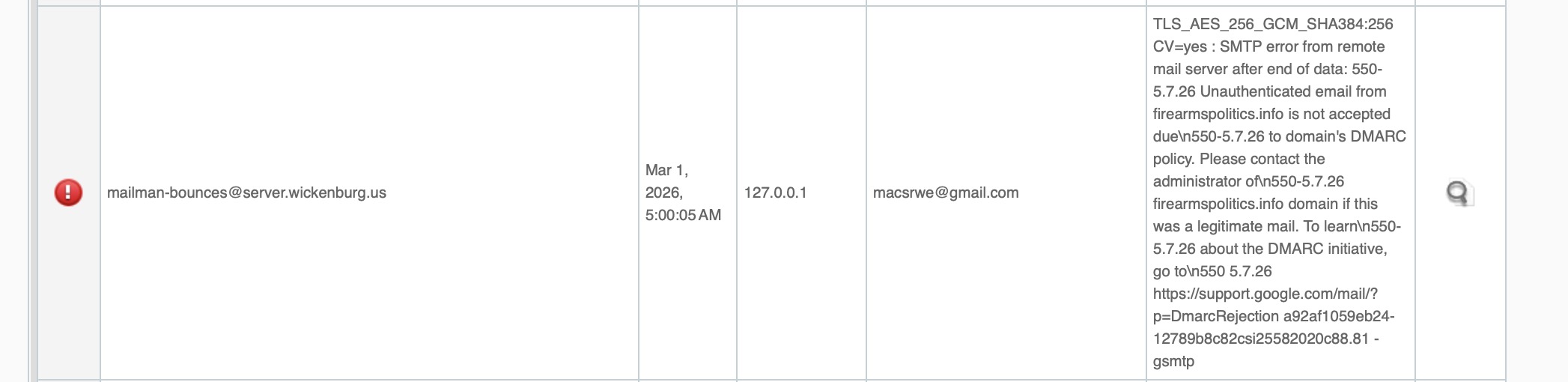 0
0 -
Macs R We - thanks for sharing that. That likely confirms that it is an upstream issue with how Mailman is handling that message. Could you let me know if you receive any replies from their list?
0 -
So far the replies have boiled down to "mailman doesn't do its own DKIM, the server adds it" and "learn to configure DKIM." The former was something I understood to be the default case for all other mail, and the latter was the point of the submission, insofar as all my non-mailman mail is being perfectly accepted as aligned. So the discussion has not proceeded on to the helpful part yet.
The discussion is publicly visible at: https://mail.python.org/archives/list/mailman-users@python.org/thread/NMYCL6PLFAQS2ZS64B7H45S7SCWCGV4I/ .
0 -
Let's see if we get a few more replies there before I bring it up with the team. I would assume there has to be a way to handle this easily or else no one would be using Mailman.
0 -
As of now, it looks like the misbehavior occurred because no one customized the mailman domain name in mm_cfg.py. The defaults worked for years prior to DKIM, but DKIM broke them.
0 -
Is that a setting that doesn't get overwritten in future updates?
0 -
As it was explained to me, Defaults.py is the file that gets overwritten in updates, but mm_cfg.py is the permanent file that modifies it for localization and is applied last. In my case, it was empty, my mailing list having been set up years ago by the hosting provider when DKIM didn't matter. I would guess there are other cPanel users in this bucket.
0 -
Editing the mm_cfg.py file seems like something that would be doable if we just need to place a value in that file in order for the sender domain to show up.
Have you tried adding anything there on your end to see if that helps the issue?
0 -
A couple of points...
I have indeed modified mm_cfg.py and nothing apparently broke, but I need to make mailman generate some internally-initiated mail (like its first-of-the-month "here's your password" notice) before I can ensure that my original problem has been fixed. I did tickle it into generating an "uncaught bounce notification" message, but since I can't assuredly say that wasn't also working before my modification, I'd just like to be positive.
If cPanel modified the mm_cfg.py file, it would have to be clever. The case of a single mailman domain on the server is simple, three lines. But if there is more than one domain running mailman, there is some more complicated virtual domain trickery that has to be done. I didn't get into that since I have zero plans to run more than one instance.
(Side note: the text input field I am typing into at the moment has two slashes at the bottom of the scroll bar, the symbol for "this input field is drag resizable"... yet it most definitely is not.)
(Edit: Apparently the field IS drag resizable, but only before you have typed enough text into the field to generate a scroll bar, at which point clicking on the resize symbol attracts the scroll bar to your cursor and apparently absorbs its mana.)
0 -
Would setting up a list that needed approval be an "automated" enough email to test?
Ultimately, when I've brought up Mailman issues in the past I've been told we aren't planning to make any changes in there, but if we can prove there is something fundamentally wrong with the DKIM system I may be able to get something going.
0 -
I'm afraid you're asking the wrong guy. I suspect it wouldn't tell you anything if the admin address is on the same server as the mailing list. Perhaps if it is offsite, but I couldn't say for certain one way or the other, any more than I can vouch with any certainty for the "uncaught bounce verification" trick.
0 -
Let me look into this a bit and I'll let you know what I find out.
0 -
At this point I think a ticket would be the best plan so we can see this in action directly on a non-testing environment. Are you able to make that ticket?
0 -
What exactly is being suggested here? Am I volunteering my production mailman list for your folks to experiment on?
0 -
I wouldn't phrase it quite like that - I just am not able to reproduce the DKIM issue on a test machine as any automated messages (such as a moderation notification) seems fine on my end. We'd need to see this in action before could propose a fix.
0 -
I think I'll put this in suspense until after 4/1, when I see whether or not the monthly mail sends successfully. It's not worth siccing a team on a problem that doesn't happen anymore. If it fails again, I'll open a ticket.
0 -
That works - we'll be here!
0
Please sign in to leave a comment.
Comments
22 comments