nginx 'domains' logs not configured to rotate
Answered
doing a bit of housekeeping and noticed 5GB of nginx logs (reverse proxy)
/etc/logrotate.d/nginx has config for these two locations:
- /var/log/nginx/*.log
- /var/log/cpanel-server-traffic/web/traffic-nginx.log
but it doesn't have anything for the logs related each individual site (there's lots of these!)
/var/log/nginx/domains
I've also got an empty directory that seems like it should have the compressed & rotated logs in it?
/var/log/nginx/domains.rotated
Whats the correct logrotate config to do the logs in /var/log/nginx/domains too?
-

Hey there! You are correct that these logs aren't processed by the standard cPanel tools as outlined here:
We have an example logrotate script that you can reference here:
so let me know if that does the trick for you!
0 -
thank you, thats perfect!
I've updated logrotate so hopefully tonight I'll see a bit of space come back.
ls -lh 127*
-rw-r----- 1 root root 15M Oct 10 10:05 127.0.0.1
-rw-r----- 1 root root 205M Oct 10 11:29 127.0.0.1-bytes_log
-rw-r----- 1 root root 988M Oct 10 11:31 127.0.0.1-ssl_log
2.5 years of server monitoring logs :)
0 -
You're very welcome!
0 -
All sorted, thanks again!
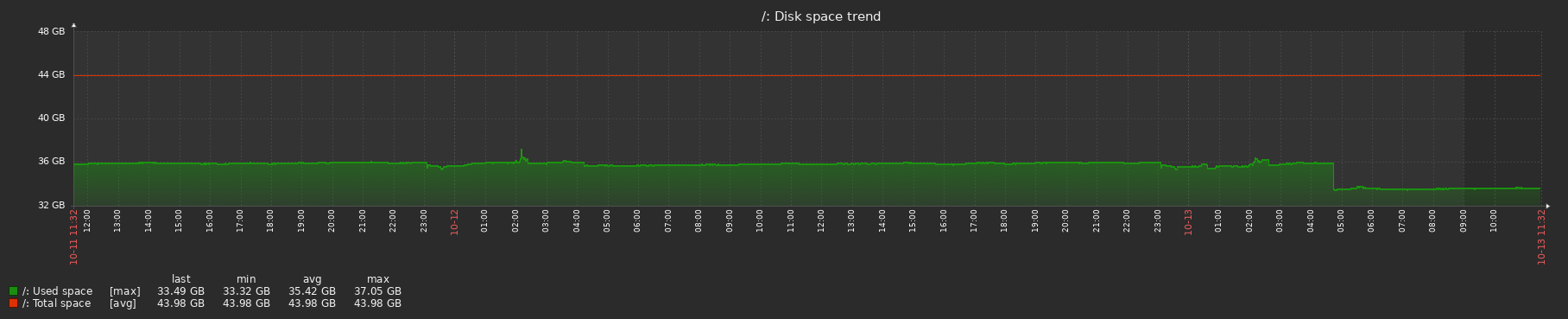 0
0 -
Glad to hear it!!
0
Please sign in to leave a comment.
Comments
5 comments