Suddenly Cpanel/WHM not working.

Hello,
suddenly i receive on 3 of my servers (different servers) when loggin in into Cpanel (2083) Internal Server Error 500, only a white page. I than log in into WHM Interface (2087) and receive
root@IP ~ # /usr/local/cpanel/cpkeyclt
YAML::Syck object version 1.34 does not match $YAML::Syck::VERSION 1.36. Receive this.
And restarting
/scripts/restartsrv_cpsrvd will work but the error still is there. So basically the whole WHM/Cpanel interface is not working.. Can you check this error and help.
- Fixed CPANEL-49671: Update YAML::Syck to 1.36 for CVE-2025-11683. i think it has something to do with this.
I am un Ubunut 22.04
-
Similair to this one https://support.cpanel.net/hc/en-us/community/posts/35025855709847-Cpanel-System-not-functioning-after-upate which i had 1 month ago?
0 -
Hello Lukas4444,
This error indicates a version mismatch between the YAML::Syck Perl module versions.
First, try to update the cPanel/whm to the latest version using below upcp command.
/usr/local/cpanel/scripts/upcp
If the issue still persists, force reinstall YAML::Syck module
/scripts/perlinstaller --force YAML::SyckIf it installed properly, restart services using below commands.
/usr/local/cpanel/scripts/restartsrv_cpsrvd
/usr/local/cpanel/cpkeyclt
Let us know the update if this works.
Regards,
Techamigo Support0 -
I have followed these steps and I am still getting an error. I get an error on the final step:
/usr/local/cpanel/cpkeyclt
YAML::Syck object version 1.34 does not match $YAML::Syck::VERSION 1.36.
0 -

Jeremy Pond - what shows up in the cPanel log when you try and access the server? That would be located at /usr/local/cpanel/logs/error_log
0 -
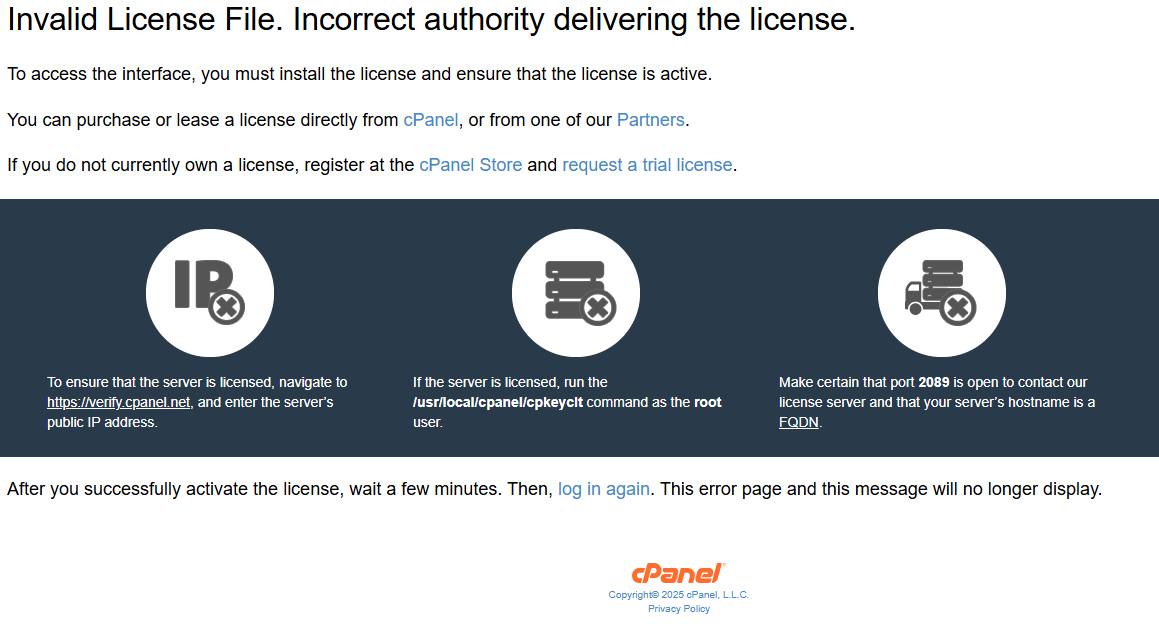
License Check Failed during startup of cpsrvd: Invalid License File. Incorrect authority delivering the license.
[...]
YAML::Syck object version 1.34 does not match $YAML::Syck::VERSION 1.36.
[2025-11-25 18:38:17 +0000] warn [whostmgrd] The subprocess (securitypolicy) exited with an error (ID 0906337984642995): The subprocess reported error number 255 when it ended.
[2025-11-25 18:38:17 +0000] info [whostmgrd] Internal Server Error: "GET /cpsess4930891449/?=undefined&login=1&post_login=78484475151078 HTTP/1.1" 500 Internal Error (ID 0906337984642995)0 -
Have you tried the workaround mentioned here? https://support.cpanel.net/hc/en-us/articles/35694698758295-Ubuntu-Invalid-License-File-YAML-Syck-object-version-1-34-does-not-match
0 -
The problem persists even though I have reinstalled cpanel and yaml. It seems to be something to do with the file /usr/local/cpanel/cpkeyclt needing to be updated to something, but I am not sure what content needs to be in it. When I open the file using nano, its is just a bunch of symbols like this ^@^@^@^@^@^@^@^@
[2025-11-25 17:21:13 +0000] Processing: Checking cPanel packages (with no digest check or broken check)
[2025-11-25 17:21:13 +0000] - Processing command `/usr/local/cpanel/scripts/check_cpanel_pkgs --list-only --long-list --notify --no-digest --no-broken`
[2025-11-25 17:21:14 +0000] [/usr/local/cpanel/scripts/check_cpanel_pkgs] [2025-11-25 17:21:14 +0000]
[2025-11-25 17:21:14 +0000] [/usr/local/cpanel/scripts/check_cpanel_pkgs] [2025-11-25 17:21:14 +0000] Problems were detected with cPanel-provided files which are controlled by packages.
[2025-11-25 17:21:14 +0000] [/usr/local/cpanel/scripts/check_cpanel_pkgs] [2025-11-25 17:21:14 +0000] If you did not make these changes intentionally, you can correct them by running:
[2025-11-25 17:21:14 +0000] [/usr/local/cpanel/scripts/check_cpanel_pkgs] [2025-11-25 17:21:14 +0000]
[2025-11-25 17:21:14 +0000] [/usr/local/cpanel/scripts/check_cpanel_pkgs] [2025-11-25 17:21:14 +0000] > /usr/local/cpanel/scripts/check_cpanel_pkgs --fix
[2025-11-25 17:21:14 +0000] [/usr/local/cpanel/scripts/check_cpanel_pkgs] [2025-11-25 17:21:14 +0000] The following packages are missing from your system:
[2025-11-25 17:21:14 +0000] [/usr/local/cpanel/scripts/check_cpanel_pkgs] [2025-11-25 17:21:14 +0000] cpanel-awstats-8.0-2.cp108~u22
[2025-11-25 17:21:14 +0000] [/usr/local/cpanel/scripts/check_cpanel_pkgs] [2025-11-25 17:21:14 +0000] cpanel-jodit-editor-4.6.2-2.cp130~u22
[2025-11-25 17:21:14 +0000] [/usr/local/cpanel/scripts/check_cpanel_pkgs] [2025-11-25 17:21:14 +0000] cpanel-mailman-2.2.0.39-1.cp130~u22
[2025-11-25 17:21:14 +0000] [/usr/local/cpanel/scripts/check_cpanel_pkgs] [2025-11-25 17:21:14 +0000] cpanel-pdns-4.9.5-1.cp122~u22
[2025-11-25 17:21:14 +0000] [/usr/local/cpanel/scripts/check_cpanel_pkgs] [2025-11-25 17:21:14 +0000] cpanel-perl-536-cpanel-core-dependencies-3.098009-1.cp108~u22
[2025-11-25 17:21:14 +0000] [/usr/local/cpanel/scripts/check_cpanel_pkgs] [2025-11-25 17:21:14 +0000] cpanel-perl-536-yaml-syck-1.36-1.cp108~u22
[2025-11-25 17:21:14 +0000] [/usr/local/cpanel/scripts/check_cpanel_pkgs] [2025-11-25 17:21:14 +0000] cpanel-php84-8.4.14-1.cp130~u22
[2025-11-25 17:21:14 +0000] [/usr/local/cpanel/scripts/check_cpanel_pkgs] [2025-11-25 17:21:14 +0000] cpanel-roundcubemail-1.6.11.1-1.cp130~u22
[2025-11-25 17:21:14 +0000] [/usr/local/cpanel/scripts/check_cpanel_pkgs] [2025-11-25 17:21:14 +0000] cpanel-unbound-1.24.1-2.cp126~u22
[2025-11-25 17:21:14 +0000] - Finished command `/usr/local/cpanel/scripts/check_cpanel_pkgs --list-only --long-list --notify --no-digest --no-broken` in 0.488 seconds0 -
I ran the script to reinstall cpanel again and I am able to get a little further, but still getting an error:
 0
0 -
If that workaround didn't resolve the issue can you please submit a ticket so we can check this out? You can start by email cs@cpanel.net since you can't get to the normal "Create a Support Ticket" interface in WHM.
0
Please sign in to leave a comment.
Comments
9 comments