How to restrict incoming mail in Exim (WHM/cPanel) so specific domains only accept messages from Proofpoint servers?

Hi everyone,
I’m managing a WHM/cPanel server running Exim, and I need to configure it so that certain hosted domains (for example, domain1.com and domain2.com) only accept incoming emails from Proofpoint servers.
These domains are protected by Proofpoint, but currently, someone could bypass that by sending mail directly to my server’s MX record instead of going through Proofpoint. I want Exim to reject any email for those domains unless it’s coming from one of Proofpoint’s IP ranges.
Basically:
-
If the email is for
domain1.comordomain2.com, it should only be accepted if it originates from Proofpoint IPs. -
Any other source should get a 550 rejection.
I know I can use ACLs in Exim (under WHM > Exim Configuration Manager > Advanced Editor), but I’m not sure about the best way to structure the rule — especially to keep it clean and easy to maintain if the list of domains or Proofpoint IPs changes.
Does anyone have an example ACL or recommended method to achieve this?
Thanks in advance for your help!
-

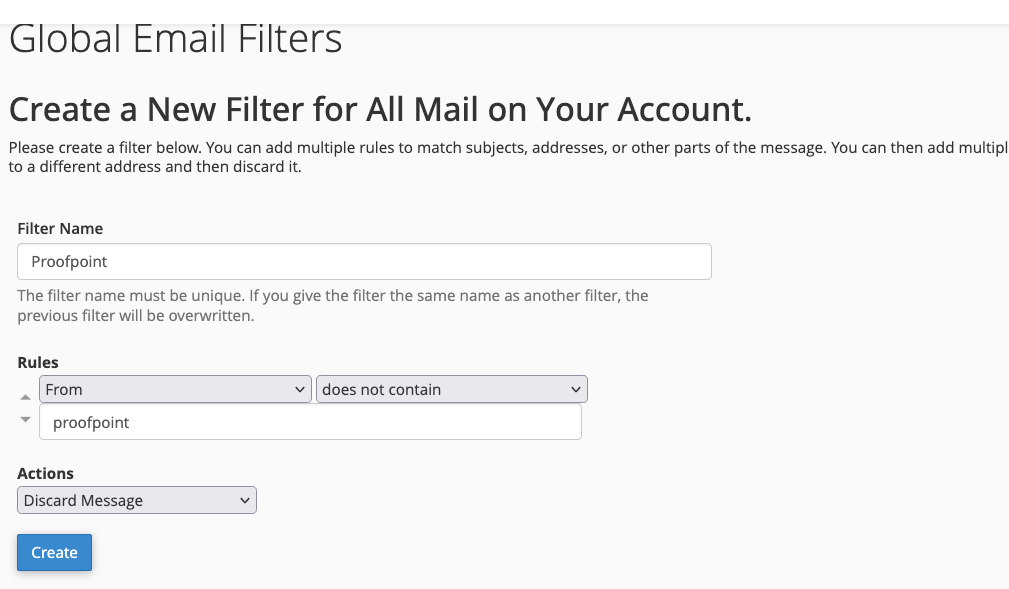
Hey there! This could be as easy as creating a custom rule in the cPanel >> Global Email Filters page. I've attached a screenshot showing what this could look like, but you would just need to find the header that is included in all the Proofpoint emails and create a check for that. If the header doesn't exist, the email will be discarded:
 0
0
Please sign in to leave a comment.
Comments
1 comment