Global Email Filters not working...

Hi,
I've setup a Global Email Filter and it seems to only partly work.
I'm using cpanel version 118.0.60.
It seems that it correctly hits the "Rules" but does not perform any of the actions.
The rule I setup is if "From" contains "larryschwarcz" and the actions are to Fail with a message and then deliver to a folder.
When I send a test e-mail from that e-mail account (a different domain) it does not get delivered to my inbox, does not send a reply to the sending email address nor does it deliver to the specified folder.
I'm hosted by webhostinghub.com and they are looking into this but are not aware of any reason why this should happen.
This certainly is either a bug in the cpanel code or I'm making a mistake. I'm guessing it's likely me making a mistake ;-),
Does anyone have any suggestions what could be wrong here?
Thanks in advance!
Larry
-

Hey there! Do you have root access to the server? If not, working with your host is the best option to get this resolved as they would be able to check the logs on the machine to get more data.
If you do have root access, do you see any more information in /var/log/exim_mainlog about that mail delivery? That would show if it is properly reaching a filter and how it is being processed.
It would also be best if the machine was updated to a modern version of cPanel as version 118 is end of life, although I wouldn't expect that to be related to your issue.
1 -
Hi cPRex,
Sorry to take so long to reply but my host was working on figuring out the issue.
Sorry, I do not have root access to the server. Nor do I have the ability to update the version of cPanel (that's controlled by my host).
It looks like I do have access to /var/log/ but the directory is empty. I'm assuming I'm on a local root and don't have access to the systems root directory.
They did take a look at it and they replied that I need to reverse the order of my actions. I was failing with a message (user not found) and then moving to a specific folder. They said that the "Fail with Message" action would do the fail action and then delete the message explaining why the message was not moved to the folder.
I reversed the order of the actions to first move to a folder and then fail. It then correctly moved the message to the folder did not do the fail with a message action (I tested with my gmail account).
In the end they said they got it working correctly if I created two separate filters with one action each. First move to a folder and then fail with a message.
Yes, this would work but it seems like a clunky work-around.
I guess I should first see if they could update cPanel to a more current version to see if the issue persists.
Thanks for the help and Happy Holidays!
Larry.
after much testing that I would need to create two separate filters; one to move the message to a
0 -
I would also recommend getting the system updated to at least the latest stable version and seeing if you still experience this, as I don't have any other complaints about this on my end.
0 -
I just heard back from my host. Basically it could be updated sometime but they can't say when.
So it looks like I'm stuck with this version for some time.
Any suggestions on how to get a single Global Email Filter to work with two actions; move to folder and then fail with message?
Thanks again,
Larry.
0 -
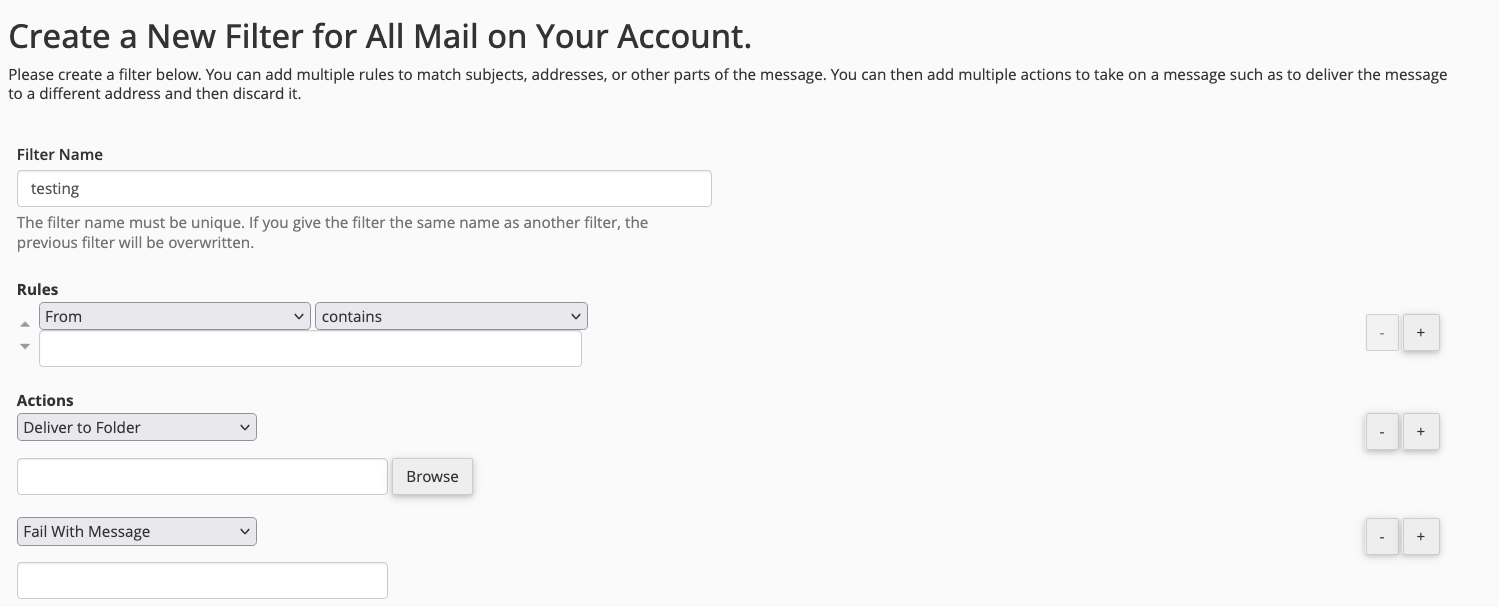
So if you set it up so it looks like this, that doesn't work on your system?
 0
0 -
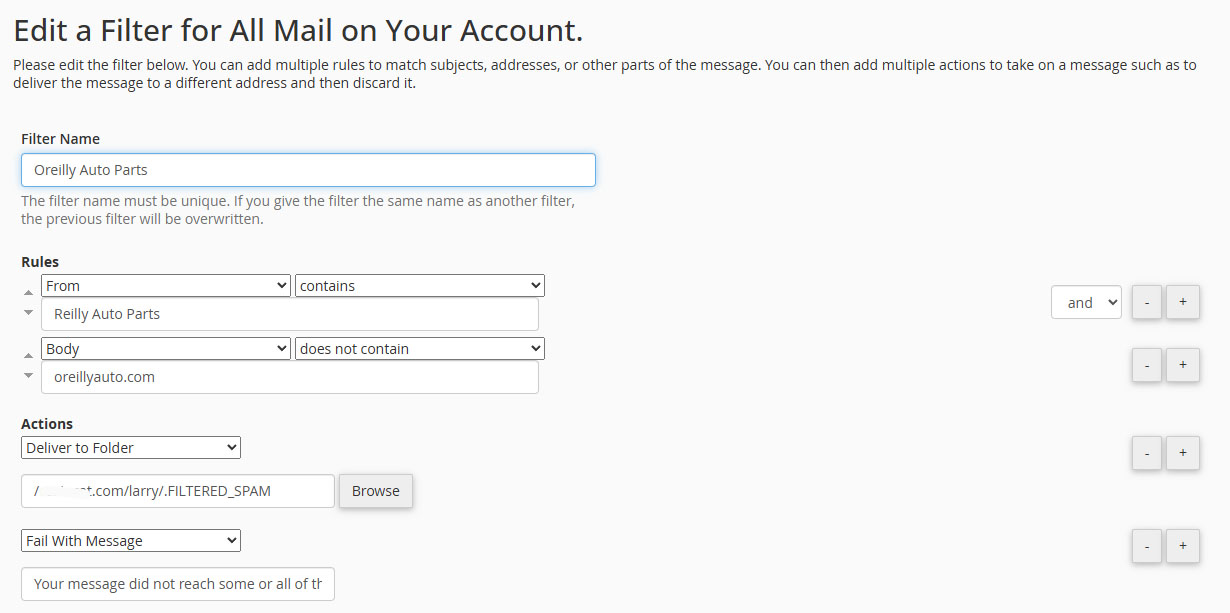
Here's one I setup that does not work. It seems to move to the folder but does not perform the "Fail With Message" action.
 0
0 -
It seems to be working well for me - I setup the following filter:
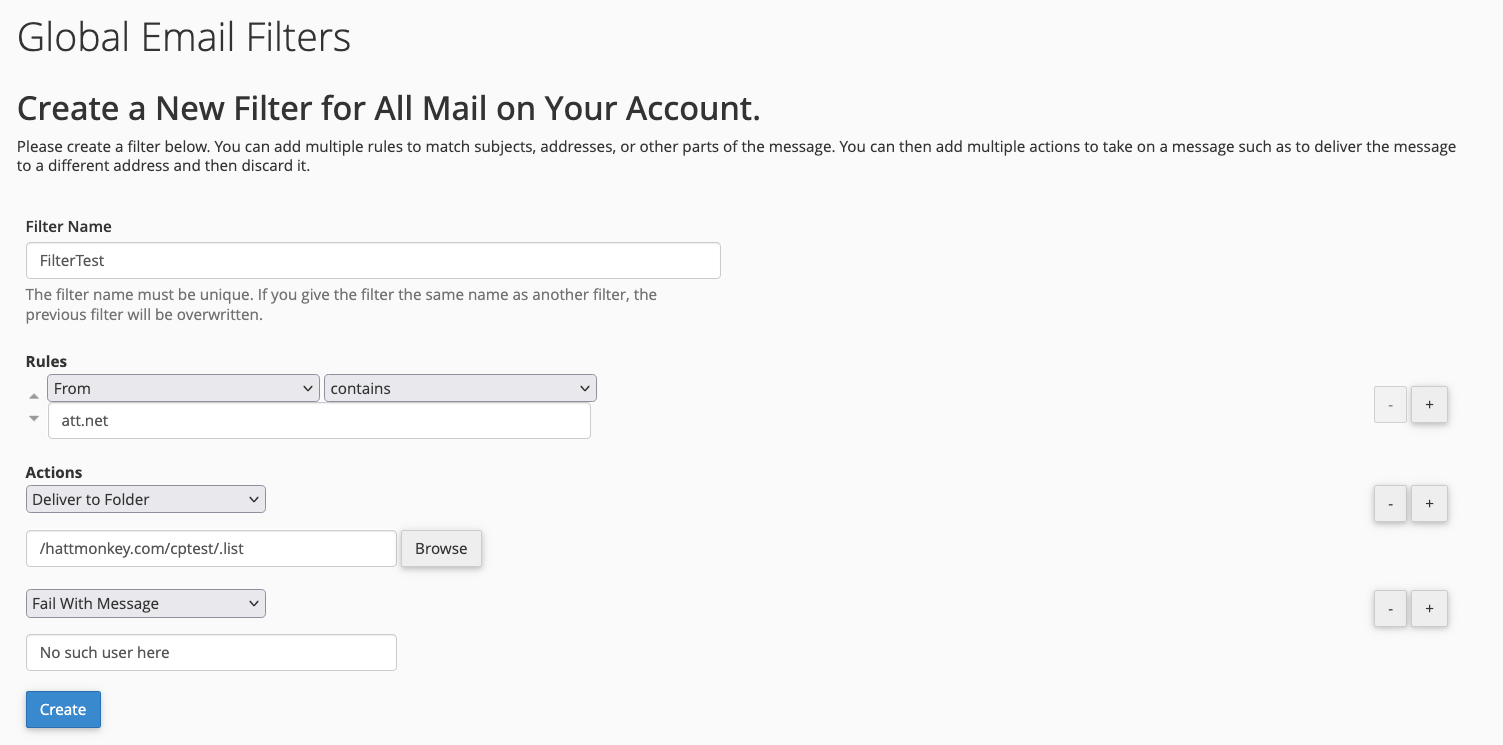
and confirmed the message was moved the "list" folder as well as the failure was triggered.
If your host has access to the Exim logs they should see both entries there showing the delivery happening and the failure message, which looks like this:
2025-12-22 16:37:35 1vXnav-000000094Zi-26qm => cptest <cptest@domain.com> R=archive_incoming_email_domain_method T=archiver_incoming_domain_method
2025-12-22 16:37:35 cwd=/var/spool/exim 7 args: /usr/sbin/exim -t -oem -oi -f <> -E1vXnav-000000094Zi-26qm
2025-12-22 16:37:36 1vXnax-000000094cQ-3wPW <= <> R=1vXnav-000000094Zi-26qm U=mailnull P=local S=6124 T="Mail delivery failed: returning message to sender" for username@att.net
2025-12-22 16:37:36 1vXnav-000000094Zi-26qm Completed
2025-12-22 16:37:36 cwd=/var/spool/exim 3 args: /usr/sbin/exim -Mc 1vXnax-000000094cQ-3wPW
2025-12-22 16:37:36 1vXnax-000000094cQ-3wPW Sender identification U=mailnull D=-system- S=mailnull
2025-12-22 16:37:36 1vXnax-000000094cQ-3wPW => username@att.net R=dkim_lookuphost T=dkim_remote_smtp H=mx-att.mail.am0.yahoodns.net [98.138.3.192] X=TLS1.3:TLS_AES_128_GCM_SHA256:128 CV=yes C="250 ok dirdel"
2025-12-22 16:37:36 1vXnax-000000094cQ-3wPW Completed
At this point, I can't reproduce and it seems like an issue specific to that environment.
0 -
I'll see if I can somehow get access to that log file.
Thanks again!
Larry.
0 -
You're very welcome - I'm sorry I can't offer more on my end!
0
Please sign in to leave a comment.
Comments
9 comments