WHM EXIM mod to permit outgoing .eml attachments stops working

We use Spamcop to process received spam, using their submission format that involves forwarding the offending mail as an attachment, to an ID assigned to us on the Spamcop service.
Now, outgoing mail having attachments with the .eml suffix is routinely shortstopped by outgoing EXIM on our WHM system as a "virus risk." There is a writeup at
https://support.cpanel.net/hc/en-us/articles/26318185855511-How-to-permit-eml-email-attachments
that describes how to permit this. It involves simply removing the ,eml suffix from two lists of verboten suffixes. I followed the directions and it worked like a champ. HOWEVER...
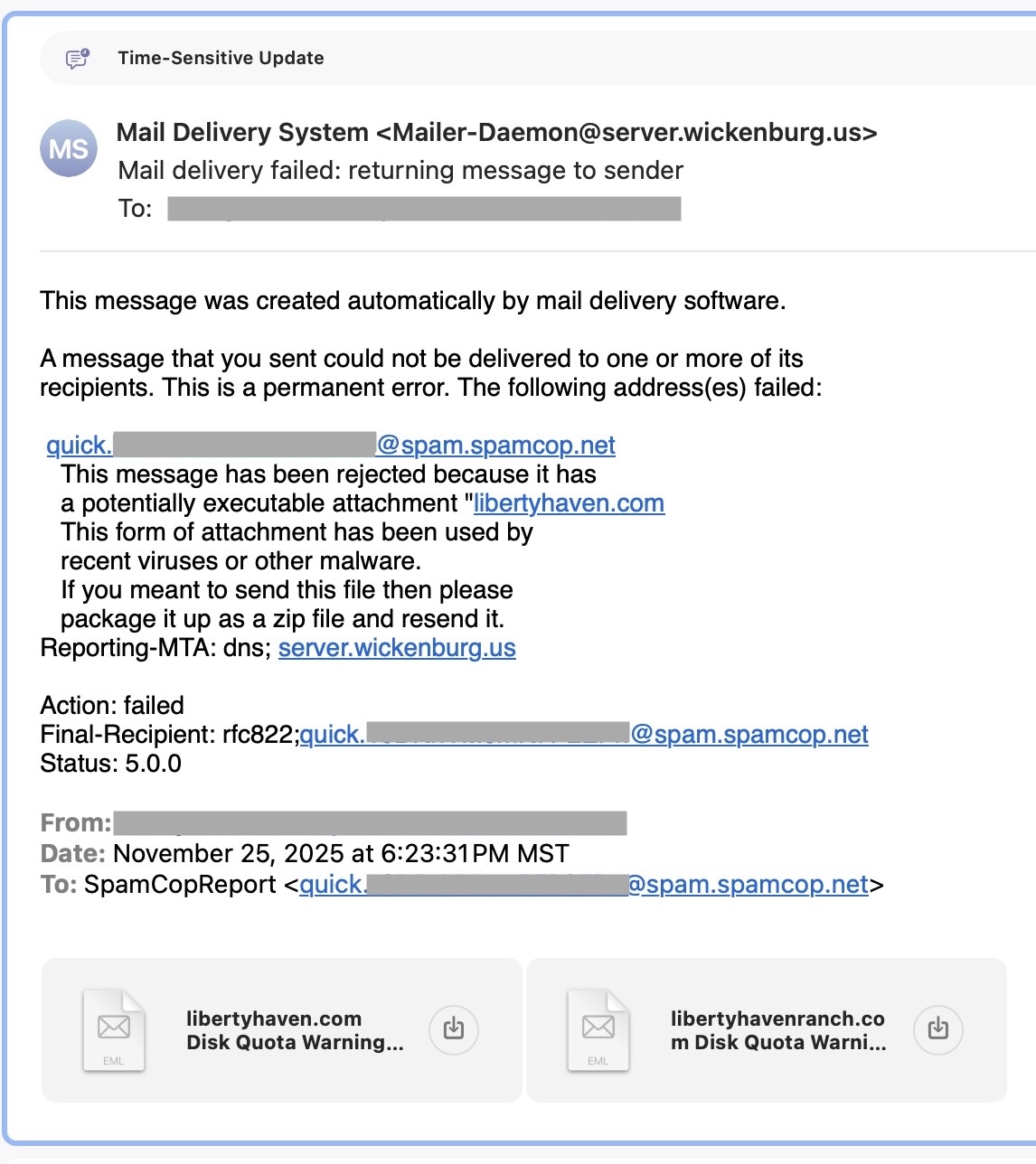
Every so often (maybe once or twice a year) our outgoing spam-report mail starts getting rejected again by our own outgoing server (sample output below). When I go back into WHM to check the special EXIM parameter edits, they are all still there!
The two times this happened in the past, I thrashed around changing who remembers what, and managed to get my system back into the right state. Tonight's regression, I've been unable to fix. I've verified that the two strings are 100% as they should be, and rebooted the system, to no avail. Outgoing .eml attachments are still being flagged.
Does anybody know what is going on here and how to fix it?
-
If you are editing /etc/cpanel_exim_system_filter directly, that's your issue. That file can be updated and is updated periodically.
What you want to do is copy /etc/cpanel_exim_system_filter to another file ( such as /etc/cpanel_exim_system_filter_11262025 )
Then edit /etc/cpanel_exim_system_filter_11262025
Then, in WHM, navigate to Exim Configuration Manager --> Basic Editor --> Filters
Then specify your "System Filter FIle" as /etc/cpanel_exim_system_filter_11262025
Of course you can call that newly copied over filter file any name you want, and reference as that name in the System Filter setting. That's just how I name my own.
2 -
Thank you for the clue I needed to solve my problem. I'm still annoyed though, that the failure remains inexplicable.
Using your contribution as a starting point, I discovered that in fact I had already done what you suggested back in May. (It truly sucks getting old, but the alternative is less preferable.) The file was still there. I compared it with the master file (in case the master file had been enhanced with something new that I should transfer over) but the master file contents were unchanged. When I went to specify my System Filter File, I found that it was already set properly to my altered file, so I don't understand why things stopped working, I toggled it back and forth (saving it both times) just to "get somebody's attention," and now I am no longer getting the bouncebacks. So I should be all set until the next mysterious failure.
I updated my cheat sheet with clearer instructions (based on yours) as to how to make this local mod stick. I'll see if I can find somewhere to report a suggested enhancement to that cPanel support article to include the whole story.
1 -

Macs R We - what specifically do you think should get adjusted in that article? I'm happy to tweak it!
0 -
First off, there is already an ungrammatical instruction there that apparently seems to attempt this, but as it makes no clear sense it probably doesn't attract a lot of patronage:
Please note that you have the option 'Attachments: Filter messages with dangerous attachments' enabled in "Exim Configuration Manager", you will need to follow the below article to allow .eml attachments there as well.
It could be replaced by a statement of the form:
Before making the changes described below, ensure you have created a private copy of the EXIM configuration file, as described athttps://support.cpanel.net/hc/en-us/articles/360050472674-How-to-preserve-Exim-system-filter-changes(omitting the steps involving manual text editing); then return to this page to complete your edits with the WHM tools as described below.It would be cleaner to have a URL to refer to that had just the sections concerning the creation and substitution of the file (and not the manual editing portions), but I suspect no such guide exists currently.0 -
I fixed the typo on that page, but I'm not entirely sure of the point of the larger change since neither of those pages reference the /etc/cpanel_exim_system_filter file. I believe the point of these pages is so you don't have to adjust the main filter on the system.
If I'm misunderstanding, which is *always* a possibility, let me know!
0 -
Aaargh, I am losing track of my document references.
It seems to me that the original file, https://support.cpanel.net/hc/en-us/articles/26318185855511-How-to-permit-eml-email-attachments, says the same thing redundantly. The section you just fixed references a document that tells you how to permit attachments by making a local copy of the EXIM file and manually editing it, then the document goes on to tell you how to make the SAME edits using the WHM tools. The warning about "Please note that if you have the option 'Attachments: Filter messages with dangerous attachments' enabled in WHM >> Exim Configuration Manager" appears to me to be redundant, as if you didn't have that option enabled you wouldn't have to follow the steps included in the document it is in, either.
Am I perhaps missing some subtlety? Is there more than one file involved in this change? (Perhaps that would explain why occasionally my behavior goes back to stock even though it looks like everything is still set properly to the local copy.)
0 -
I interpreted that as a "hey, if you've turned this option on *and* you want to allow .eml attachments, make sure you tweak that filter as well" - is that not the case?
0 -
My understanding was that if you hadn't already had that option turned on, you wouldn't be reading this document in the first place because rejecting documents by their suffix would be something that wasn't happening on your system at all.
0 -
What's even more interested is that "On" is the default for that option, so it's more likely you'd have to specifically turn it off.
I tweaked the wording on the page a bit after seeing that is the default.
0
Please sign in to leave a comment.
Comments
9 comments