Activate filter in Roundcube

hi
Currently, I have quite a few emails in my inbox, which I want to organize so that certain senders are stored in one folder and other senders in other folders.
In short, I want to organize the messages, so I need to know how to activate the Filters or Rules option, and how to organize everything when I apply them.
Currently, my Roundcube does not have the filter option :
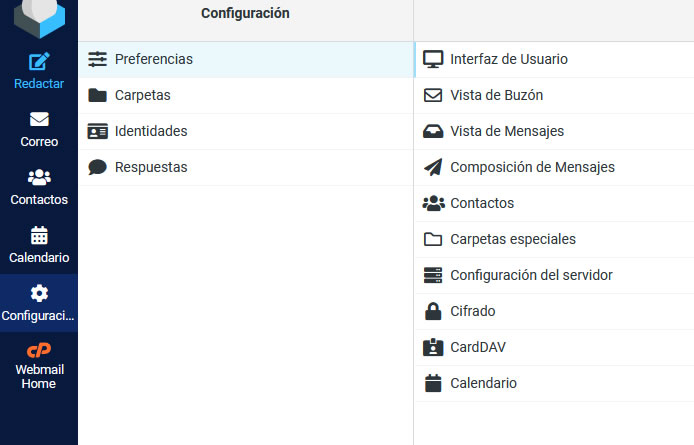
However, I see online that Roundcube does have a filter option, as shown in this other image :
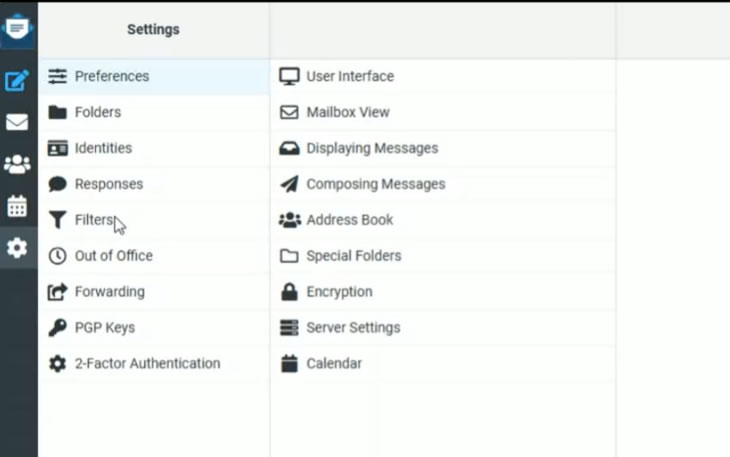
Question: How can I activate the FILTER option so that it displays as in the second image?
-

Hey there! There isn't a way to change the interface on the cPanel side of things, but you can use the cPanel >> Global Email Filters or cPanel >> Email Filters to handle all the filtering of your messages. This includes directing certain messages to specific folders.
0 -
thank
I did use it, but this only works for new emails. It doesn't work for emails already in the inbox.
Is there a way to create a rule or filter that applies only to emails already stored in the inbox?
0 -
Unfortunately no, I don't have any tools available that will apply a filter to messages already in the inbox.
0
Please sign in to leave a comment.
Comments
3 comments