Options for page caching regarding twitter (x) widgets

Hi,
Long story short over the last few days i have been trying to get my twitter widgets to work again since they added new rate limits to widgets. I finally got them working but only 1 request will work, if i load the page again i get a http status code 429 (too many requests). As it turns out a single widget request uses all of the 30 alloted requests due to the way the widget js file bounces back and forth between the site and the twitter server.
For anyone interested, when you load a single twitter widget it takes up 20 of the alloted 30 limits, with only 10 left, this is why another page load gets the status code 429.
Here is the header info for the twitter header data for the single widget request.

You can see that it allows 30 and 10 left, so it uses 20 on a single request.
And here are all the requests for a single twitter widget call
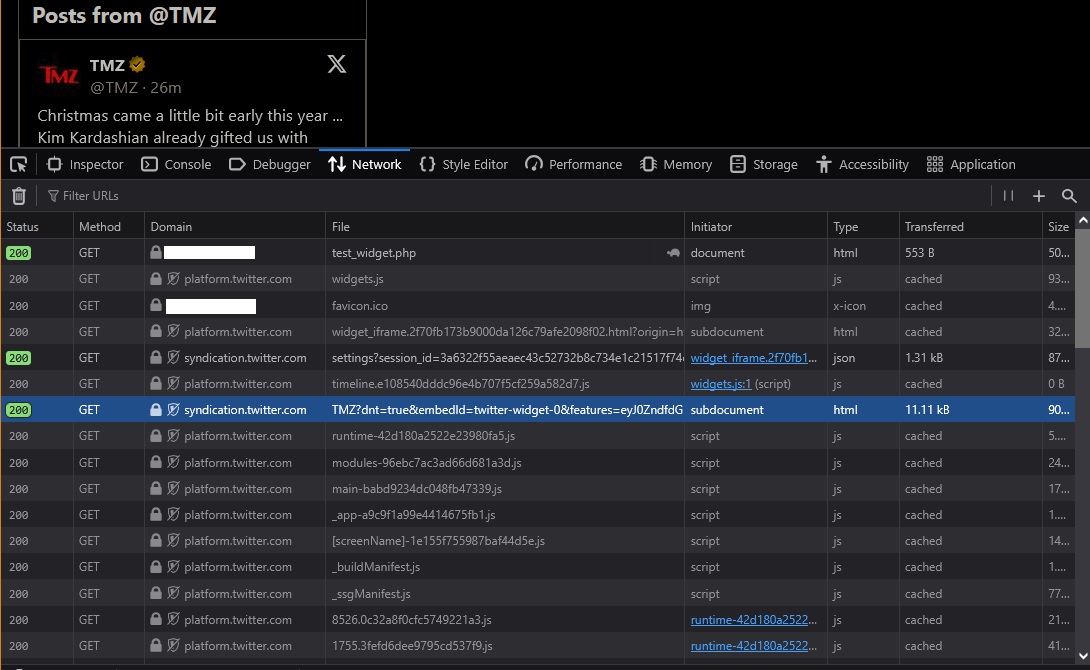
One way around this is to cache the page for 16-20 min before loading a fresh page. Twitters default request reset seems to be 15 min so i feel 16-20 min refresh rate would work.
It has been forever since i had to deal with page cache and i am sure i am behind in new process and techniques. I have been reading the cache guide at apache website but i feel myself going down the rabbit hole and coming up with nothing useful.
I know that litespeed can only be used if you have wordpress or one of the other software titles that has a plugin for it. I am not sure what i should use to cache my page (maybe select something from the php menu, not sure).
This particular domain i do not have root access as it is on a shared host.
I am running php 8.3 and i do see on extensions, the options for caches, apcu and opcache. Should i use one of those ?
Any help with caching my page every 16-20 min would be helpful.
Thanks in advance... :)
-

Hey there! The best option in cPanel would likely be to install Nginx, which lets you have a bit more control over the caching options on the system. Once Nginx is installed you'll have the /etc/nginx/ea-nginx/cache.json file on the system with the following section:
   "proxy_cache_valid" : {
      "200 301 302" : "60m",
      "404" : "1m"
This tells the system how long to cache certain things based on the response type. You can also setup a more general cache for all files with the proxy_cache_valid field. More details on these and other settings can be found here:
https://docs.nginx.com/nginx/admin-guide/content-cache/content-caching/#limit-or-disable-caching
but I would say that is likely the best choice for speed and caching on a cPanel box.
0
Please sign in to leave a comment.
Comments
1 comment