Outgoing spam false positives

Hi! I’m having an issue with outgoing emails. Lately I had to raise the spam score threshold because I was getting many false positives with outgoing messages that were legitimate. I’d like to understand why legitimate outgoing messages are being marked as spam.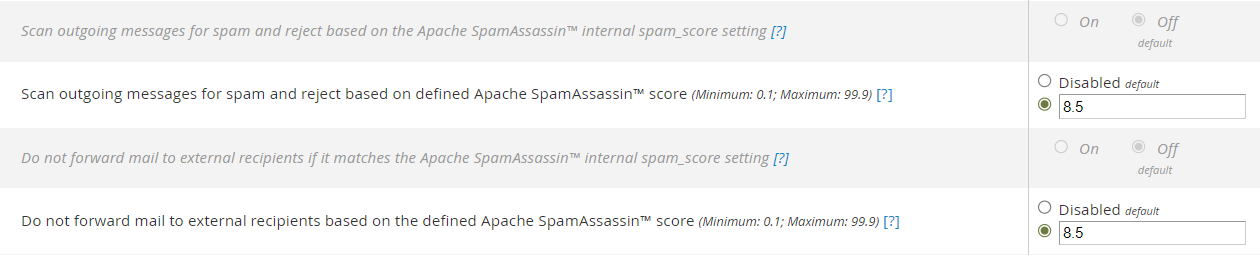
I found this method, but it doesn’t help in my case because the messages marked as spam never actually get sent, so I don’t have a message path to inspect.
https://support.cpanel.net/hc/en-us/articles/360052411594-How-can-I-check-why-SpamAssassin-applied-a-particular-score
Is there any way to see which rules are being applied, and how to modify them?
-

Hey there! Do you see anything helpful in /usr/local/cpanel/logs/spamd_error_log? That's the first place I'd check for this information.
https://support.cpanel.net/hc/en-us/articles/1500001761942-How-to-find-SpamAssassin-scan-results
0 -
Yes, that helps. I found the cause. From what I can see, it’s due to the domain, it’s a .work TLD, and it seems it’s not well regarded.
Do you know how or where to modify SpamAssassin rules?
Dec 15 18:40:52.258 [1545014] warn: check: dns_block_rule URIBL_BLOCKED hit, creating /root/.spamassassin/dnsblock_multi.uribl.com (This means DNSBL blocked you due to too many queries. Set all affected rules score to 0, or use "dns_query_restriction deny multi.uribl.com" to disable queries)
Dec 15 18:40:52.338 [1545014] info: spamd: identified spam (8.4/5.0) for cpaneleximscanner:985 in 1.2 seconds, 9275 bytes.
Dec 15 18:40:52.338 [1545014] info: spamd: result: Y  8 - ALL_TRUSTED,FROM_SUSPICIOUS_NTLD,FROM_SUSPICIOUS_NTLD_FP,HTML_MESSAGE,KAM_DMARC_NONE,KAM_DMARC_STATUS,KAM_OTHER_BAD_TLD,KAM_SOMETLD_ARE_BAD_TLD,MIME_HTML_ONLY,PDS_OTHER_BAD_TLD,URIBL_BLOCKED,URIBL_DBL_BLOCKED_OPENDNS scantime=1.2,size=9275,user=cpaneleximscanner,uid=985,required_score=5.0,rhost=localhost,raddr=127.0.0.1,rport=38782,mid=<2SnodvvngMc2vhXwpfDXAKFlTEE7cUoZjmBoAg3YuE8@domain.work>,autolearn=spam autolearn_force=no,shortcircuit=no
0 -
For right now, the best option is likely to whitelist that domain from the outbound scanning:
I'm going to create a case to see if we can get this permanently fixed inside the SpamAssassin system.
0 -
Would you be able to create a ticket so we could confirm it's just the presence of .work itself causing the issue?
0 -
I'd be interested in the resolution here. I am having a large proportion of my users complaining about outgoing messages being marked as spam. This started last Thursday 2025-12-11.
As well as the above, I'm also getting "SMTP protocol error in "AUTH LOGIN" ... AUTH command used when not advertised" which I believe is related, since it results in spamassasin assigning:
DOS_OUTLOOK_TO_MX,
T_DOS_OUTLOOK_TO_MX_IMAGE,
RDNS_NONE, and
generic: trusted_networks doesn't contain internal_networks entry '0/0'
among other flags.We have checked, and the users are using port 465 with authentication enabled.
I believe either there's been an upgrade of Outlook which is misbehaving, or there's a configuration issue between components on the WHM server.
e.g. from /usr/local/cpanel/logs/spamd_error_log
Dec 17 00:39:05.689 [2106642] info: spamd: connection from localhost [127.0.0.1]:55560 to port 783, fd 6
Dec 17 00:39:05.693 [2106642] info: spamd: setuid to cpaneleximscanner succeeded
Dec 17 00:39:05.704 [2106642] info: generic: trusted_networks doesn't contain internal_networks entry '0/0'
Dec 17 00:39:05.714 [2106642] info: spamd: checking message <redacted@redacted.com> for cpaneleximscanner:993
Dec 17 00:39:06.903 [2106642] info: spamd: identified spam (6.0/5.0) for cpaneleximscanner:993 in 1.2 seconds, 69358 bytes.
Dec 17 00:39:06.904 [2106642] info: spamd: result: Y  6 - FSL_HELO_NON_FQDN_1,HELO_NO_DOMAIN,HTML_MESSAGE,HTML_TITLE_SUBJ_DIFF,KAM_DMARC_NONE,KAM_DMARC_STATUS,RDNS_NONE,SHORT_HELO_AND_INLINE_IMAGE,SPF_SOFTFAIL,T_DOS_OUTLOOK_TO_MX_IMAGE,URIBL_DBL_BLOCKED_OPENDNS scantime=1.2,size=69358,user=cpaneleximscanner,uid=993,required_score=5.0,rhost=localhost,raddr=127.0.0.1,rport=55560,mid=<redacted@redacted.com>,autolearn=no autolearn_force=no,shortcircuit=no
0 -
cPRex ticket open, 95889845
Thanks!0 -
I see someone just logged in to check things out, so we should have more details soon!
0 -
Should I raise a ticket as well or have we ascertained the problem?
0 -
tudorh - We haven't found much on our side yet on the OP's server, but you're always welcome to submit a ticket!
0 -
Our team sent quite a lengthy reply to the OP in the ticket, and ultimately recommended making adjustments using this guide: https://support.cpanel.net/hc/en-us/articles/360053467273-How-to-Adjust-Spam-Assassin-Rule-Scoring-Serverwide
0 -
Yes, that’s one of the approaches I had in mind to solve it. I only opened the ticket because you mentioned you wanted to verify whether the .work TLD was actually the issue. We can close it then.
0 -
In my case, the spam detection appears to be done so early in the process that the server doesn't generate a bounce. Instead, Outlook generates a fake email that doesn't contain any useful information. So I can't see what values were assigned to the spam flags in order to determine what is triggering it off, and most of these emails have a lot of spam flags.
I also notice that localhost isn't in trusted_networks. Only the cPanel network and my host's networks are in that list. However, it appears that the hand-off from exim to spamassassin is done as rhost=localhost. Could this be triggering some of the flags?
Conversely, I understood the log message suggesting to add 0/0 was all IPs (maskless), which doesn't make sense. Why is spamassassin using localhost as the remote host (rhost) as opposed to the actual sender IP?
0 -
I tried disabling the KAM filters, which reduced the overall score, but it still doesn't make sense as to why outgoing mail are being filtered as though they're incoming email on port 25.
One of the things I discovered by doing a wireshark capture was that the incoming ciphers on one particular Outlook client didn't match any of the ciphers required by the server, resulting in handshake failure. It then seemed to send the email anyway, in plaintext, on port 465, which was then passed through as a message from localhost to port 25, which spamd then treated as any email would be if received on port 25.
I verified the users version of Windows 11 and Outlook. They were using 24H2, but otherwise it appears everything is up to date.
I have opened up a ticket of my own. CPanel ticket #95900202
0 -
tudorh - I'm following along with that ticket on my end now as well!
0 -
After much escalation, a level 4 tech found a bug in Spamassassin! \o/
After performing some manual scans of the messages that you previously sent, it appears that SpamAssassin is incorrectly parsing the email headers, which is resulting in the email client header IP and EHLO being checked for SPF, DKIM, RDNS, etc. As your email client cannot have this information, SpamAssassin blocks the email from being sent and flags the email as potential SPAM.
It seems that this correlates with the recent upgrade to Exim 4.99.1 as well, as this is when the issue appears to start on this server. You upgraded to cPanel 132 here:[2025-12-11 00:35:04 +0000] Completed update 11.130.0.16 -> 11.132.0.9
Exim 4.99.1 was made available in cPanel 132.0.8, and thus your server upgraded to this version of Exim during this upgrade; Exim 4.99.1 was not made available for cPanel version 130.
I can see this occurring when scanning one of your messages manually on the server:...
As such, I have filed a case with our developers with case ID CPANEL-51092 to have this be reviewed further. Once a change has been implemented to correct this, it will be noted by this case ID in our changelogs:
Where can I locate the cPanel changelogs?
At this time, there is currently no available workaround for this issue. I'd recommend either sending email via Webmail when required, or continue by adding your email address to SpamAssassin "Welcome List" as you currently have done to override any negative score that you are receiving.So it appears that anyone upgrading to 11.132.0.8 onwards is at risk of experiencing this.
0 -
Excellent work from David tracking this down. I've also linked this Forums thread to the case so if I hear any updates on my end I'll be sure to share them here.
0
Please sign in to leave a comment.
Comments
16 comments