Munin is not Showing after Installation
Answered
I’ve decided to give Munin a try and installation was pretty easy and quick, showing none errors.
I can't find Munin on plugins area and even if I use search field as well and as I’m running on Almalinux 9.7.0, I don’t have CageFS to worry about.
Checked yum list installed |grep -i munin
I get
cpanel-munin.x86_64 2.0.73-2.cp130~el9 systemn
Check
systemctl status munin-node.service
I can see it’s enabled and active and I can also see stats are getting populated at /var/lib/munin and logs as well at /var/log/munin
As I’m running Nginx Manager, I have added the code below to /etc/munin/plugin-conf.d/cpanel.conf
[apache_*]
env.url http://127.0.0.1:%d/whm-server-status?auto
env.ports 8081
Checked:
curl -I http://127.0.0.1/nginx_status
HTTP/1.1 200 OK
Server: nginx
Checked also
nginx -V 2>&1 | grep -o with-http_stub_status_module
and get
with-http_stub_status_module
If check Process Manager page, I can see the /usr/local/cpanel/3rdparty/bin/perl542 -wT /usr/local/cpanel/3rdparty/perl/542/sbin/munin-node
Appearently, Munin is running and issue seems to be just a matter that I can’t see it on my panel anywhere.
-

Hey there! If you have the package installed *and* you're not seeing it in WHM >> Manage Plugins, that would tell me it is installed.
I confirmed on an AlmaLinux 9 machine that it does indeed install cpanel-munin-2.0.73-2.cp130 when you use the WHM >> Manage Plugins tool.
However, even though it seems to be installed, I would still expect this to show up under WHM >> Manage Plugins with an "uninstall" option:
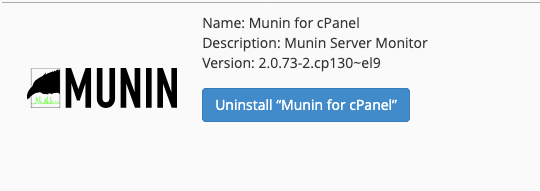
Do you see anything interesting in the main cPanel log (/usr/local/cpanel/logs/error_log) when opening the Manage Plugins page?
0 -
Hi cPRex
I forgot to mention before that when I go to WHM >> Manage Plugins I can see the uninstall button just like the picture you mentioned.
When I check cPanel log (/usr/local/cpanel/logs/error_log) when opening the Manage Plugins page I can see that below but I believe nothing related to this issue.
[2026-01-23 09:11:27 -0300]: “/usr/local/cpanel/scripts/restartsrv_nginx reload†called by (431541 - queueprocd - process - reload_service)

==> cpsrvd 11.132.0.21 started

==> cpsrvd: loading security policy....Done

==> cpsrvd: Setting up SSL support ... Done

==> cpsrvd: transferred port bindings: 10,11,12,3,4,5,6,7,8,9

==> cpsrvd: bound to ports

[2026-01-23 09:14:25 -0300] info [cpsrvd] version 11.132.0.21 online

[2026-01-23 09:15:25 -0300] info [whostmgrd] Successfully verified signature for cpanel (key types: release).

[2026-01-23 09:19:42 -0300] info [cpsrvd] Request Timeout: "-" 408 Timeout while creating a secure connection

[2026-01-23 09:20:41 -0300] info [whostmgrd] Successfully verified signature for cpanel (key types: release).
Meanwhile, I thought CSF could be blocking some external connection or so. I’ve disabled CSF for a moment, logged in using anonymous mode but still can’t see Munin anywhere but the Manage Plugins page where I can see the uninstall button.
0 -
Great - seeing the uninstall button is a good sign and at least confirms the software is installed and cPanel is aware of that.
I would then expect you to see a Munin tool in WHM, which looks like this screenshot:
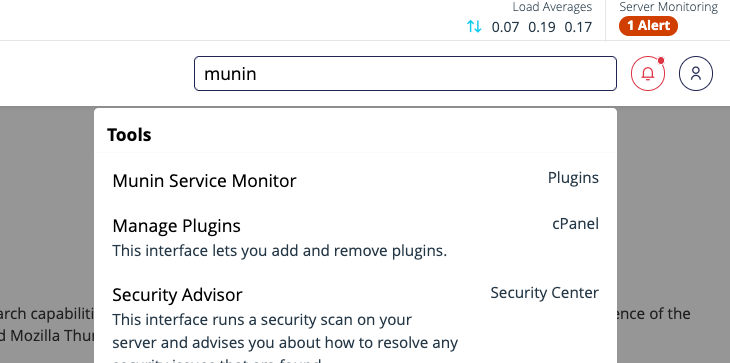
Does that show up for you?
0 -
That's exactly the only thing missing here. Even when using search field or at Plugins area, Munin is not been displayed.
It's seems the menu or something wasn't correct installed or is missing somewhere. Tried to figure out a direct url to see if that's the case but couldn't find anything usefull as it varies a lot depending on the installation.
0 -
Have you tried removing and reinstalling Munin to see if that changes the behavior? If not, it would likely be best to create a ticket as I can't reproduce this on a test machine.
0 -
That was trully the last resort... lol ... So I did it and it worked like a charm.
Like someone once said, for a complex problem there's always a simple and quick solution.
This is one of those cases I remember this guy.
Thank you.
0 -
I'm glad that's all it took!
0
Please sign in to leave a comment.
Comments
7 comments