Can't restore a full backup

Hi! I downloaded a "Full backup" from a client in a CPanel server y bringing to my own CPanel server (no as a reseller, as a owner of the server).
I created the account with the same domain and user, then i went to the new Cpanel account -> Backup wizard -> restore and selected the full backup file in my computer, and after a period of time, shows an error like the one bellow.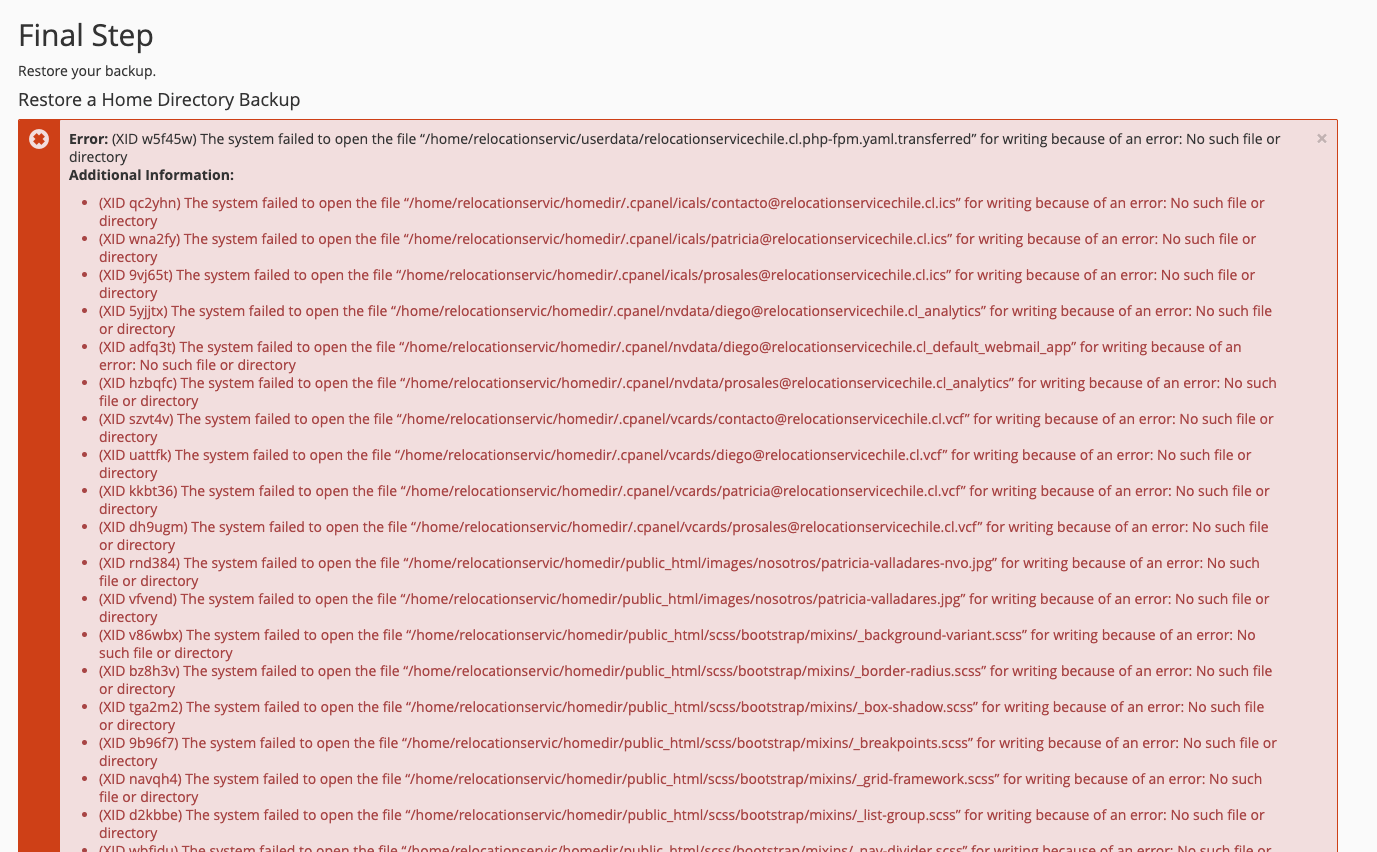
Any ideas how to solve it?
Regards
Sebastian
-

Hey there! It's add that it is restoring to /home/username/homedir and not just /home/username/public_html. Does that directory path exist on your machine? Is it possible this user was created with a custom path on the Source server and that is something that may have to be adjusted?
0 -
I don't think you can restore a full cPanel backup in cPanel.
You can do it in WHM -> Transfers -> Transfer or restore a cPanel Account.
0 -
I suppose that's a good point - we should probably clarify exactly how the backup was created. Can you get us more details on that Sebastian Beeche?
0 -
It sounds like the issue might be related to server configuration differences or permission limits between the two cPanel environments. Full backups often require root-level restore access, so restoring from within the account (Backup Wizard) can sometimes fail. You may need the server admin to restore it via WHM instead.
0
Please sign in to leave a comment.
Comments
4 comments