Why are you warning users about expiring AUTO-SSL certificates?
Answered
cPanel is warning my users in the interface (not just via email) that their SSL certificate is expiring over a month before it is set to auto renew (Auto SSL - Let's Encrypt).
"Renew soon. Your domain is at risk!" Is what my users see about the **automatically** renewing SSL certificates. This is frustrating because it's not true and raises alarm over nothing. It causes them to believe action must be taken and that we are at fault.
It creates confusion, support friction, and is a horrible UX for admin and customer. Please provide a means to DISABLE it ASAP. I don't know why this was ever thought to be a good idea.
-

Hey there! Whenever there is an issue with the UI it's best to include a screenshot to avoid confusion. Could you post a screenshot here as well as the specific page you're seeing this behavior on? I have an SSL expiring March 6th on my personal machine and I'm not obviously seeing any notifications in the cPanel interface on my end.
0 -
Hey cPRex thanks for responding. Here's what the customer saw. I also confirmed it was there as of the date I posted the OP. This message is no longer showing because the certificate must have entered its auto-renew window and is renewed. However I saw this all over customer accounts prior to that window and that and the ticket the customer sent me is what prompted this post.
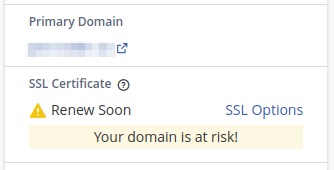 0
0 -
Thanks for sharing that - let me do some research on this and I'll let you know what I find!
0 -
Thanks for your patience on this one - I actually had a domain on my personal server that was 31 days out from renewal so I wanted to watch the process to see what happened.
It is my understanding that this warning only shows up in the interface is two things happen:
- the domain is within 29 days of renewal AND
- there is a problem with the renewal process
On my account I specifically configured a domain that didn't resolve so it would break the AutoSSL renewal process.
I'm guessing that if you check the logs in WHM >> Manage AutoSSL under the "Logs" tab, you'll see a warning related to the account.
Can you check those logs for me and see if that is the case?
0 -
Is it possible to disable the warning message in cPanel after logging in, the warning message is causing unnecessary issues with customers even if autossl install is enabled and there are no domain resolving issues.
0 -
There isn't a way to disable this warning as it indicates cPanel is detecting an issue with the renewal. Are you not seeing any issues with the domain when you check the logs at the WHM level?
0 -
No, I removed the currently installed ssl cert for that domain and reinstalled ssl without any issues by running autossl.
0 -
It would likely be best to create a ticket then as that notification should go away once there is a valid and up-to-date SSL installed on the domain.
0 -
Yeah, the notification goes away after ssl is renewed, the point is that the warning makes the customers scared and creates unwanted support friction. There should be an option to disable this feature(?) or atleast must change the time period before it shows up.
0 -
cPRex I see the same issue. Unnecessary message on the customer side, if clicked, additional unnecessary warnings show up.
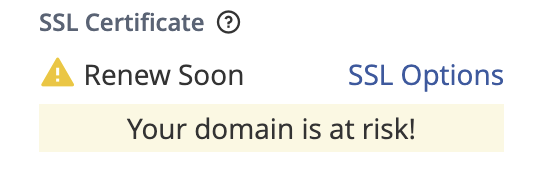
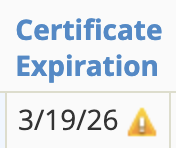
If I force run Let's Encrypt on the WHM side, the cert doesn't even need to be renewed at this stage.
This is a problem.
 0
0 -
Can you submit a ticket so that can be investigated?
0 -
I am so relieved to know that I am not the only one affected and experiencing this issue.
0 -
yes, we received a few tickets from scared customers regarding this. if autossl is enabled, it should not showup or make it to showup after ssl expires.
0 -
cPRex I can't submit a ticket because (like most) cPanel/WHM is resold to me. Are you able to submit a tix on my behalf?
0 -
sondroyo - unfortunately I can't as we need to see one of the systems that is experiencing this issue. On my personal machine when I tested this earlier the issue was resolved when I fixed the AutoSSL renewal problem on a subdomain, which I broke specifically to test this.
0 -
cPRex I asked my service provider to open a ticket.
0 -
Perfect! If they'll share that number with you feel free to post it and I can follow along on my end.
0 -
Update - I'm pretty sure I have the ticket and I left some notes on that. I'm following along on my end now, but I think we have a plan in place to resolve this.
0 -
great! let us know how it goes
0 -
For sure - I'm following along with the ticket so I'll be sure to post any updates I get!
0 -
cPRex We got an explanation back that this is an interim error message that basically shows between day 30 to renewal and day 29 to renewal. I pushed back and said that doesn't mean it isn't an issue and referenced the thread. Hopefully we can get past the "it works to specification" software engineering discussion and into the "this isn't appropriate for customers to see" real world usability.
0 -
Yup, I'm seeing all the back and forth :D
0 -
Update - we've created a case and article you can follow along with here!
I'm glad that Partner was willing to create the ticket so we could see this in action on an affected server, as my previous testing didn't reveal the issue.
0 -
cPRex glad they are acknowledging, but this should not be some sort of insane reach to fix. They pushed it back to me after reviewing the sample site's cloudflare certificate renewal date (which is totally unreleated of course); meanwhile the autossl cert has renewed. I identified another site with exactly the same issue - error showing, certificate expires march 25, autossl will not renew as it is not time yet, and asked the partner to keep pushing on the cpanel ticket.
0 -
atleast they should change the number of days before it starts to show up
0 -
Nixuser Com that's the goal. I suspect there is some weirdness to it.
0 -
Update - this is resolved in all version of 136 once that is released!
1 -
cPRex Thank you for following up.
1 -
Update - this is actually getting resolved in tonight's release as part of version 134.0.15!
0 -
Thanks for your help with this fix.
0
Please sign in to leave a comment.
Comments
30 comments