PHP-FPM configuration does not work properly

According to cPanel documentation below:
to configure specific values at the domain level, you should edit the below file:
/var/cpanel/userdata/exampleuser/example.tld.php-fpm.yaml
and afterwards run the following script to load the change:
/scripts/php_fpm_config --rebuild
The above process actually generates the below file which should not be directly edited, as upon its future generation, any changes will be overwritten:
/opt/cpanel/ea-php83/root/etc/php-fpm.d/example.tld.conf
On the other hand, you may change the values of only the below PHP-FPM properties for a specific domain via WHM > MultiPHP Manager GUI:
- Max Requests (i.e. pm.max_requests)
- Max Children (i.e. pm.max_children)
- Process Idle Timeout (i.e. pm.process_idle_timeout)
Upon saving the new values of these properties, cPanel actually updates the below file:
/var/cpanel/userdata/exampleuser/example.tld.php-fpm.yaml
and following regenerates the below file:
/opt/cpanel/ea-php83/root/etc/php-fpm.d/example.tld.conf
But, the problem here is that any property that you have manually passed at the YAML file will be lost. For example, if you have passed the below line by manually editing the YAML file:
pm: dynamic
then if you later use WHM > MultiPHP Manager to update PHP-FPM values, cPanel will remove that line, and write the default one (i.e. pm=ondemand) when it generates the below file:
/opt/cpanel/ea-php83/root/etc/php-fpm.d/example.tld.conf
-

Hey hey! So you're seeing that the yaml.conf that is created after the local changes are put in place gets regenerated, potentially overwriting existing values, when the global changes are made?
Is the "pm: dynamic" the only entry you had in the yaml file?
0 -
Hello,
I explain below the case in another way. As far as the below YAML file is concerned:
/var/cpanel/userdata/exampleuser/example.tld.php-fpm.yaml
you can update the file below via 2 ways:
- by editing it directly
- via WHM > MultiPHP Manager.
If you edit it directly, you can include any property of PHP-FPM (e.g."pm: dynamic"). But, if you use the MultiPHP Manager, the only properties that you can change are ones shown at the following screenshot:
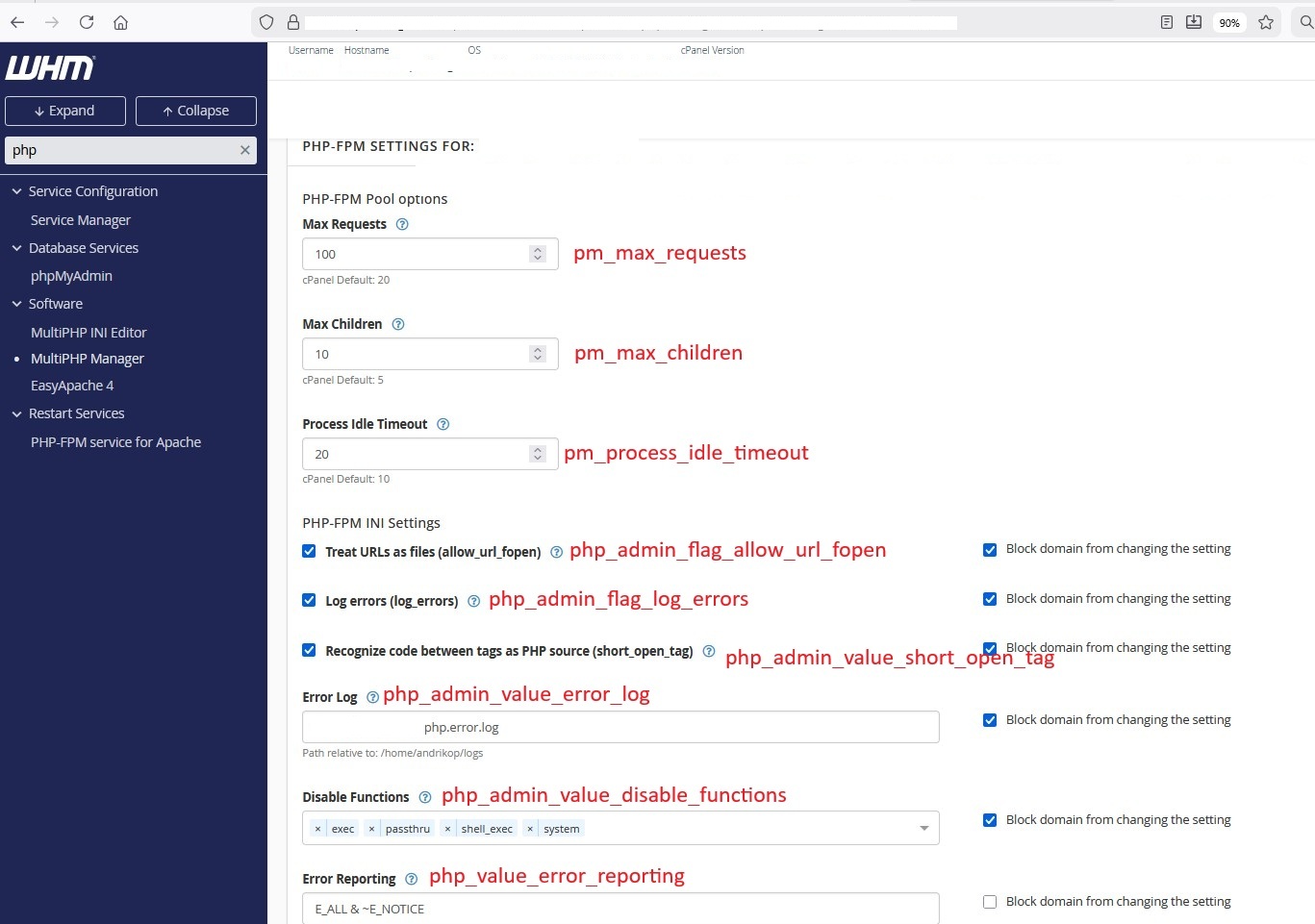
So, with MultiPHP Manager you can actually manage only the PHP-FPM properties:
- php_admin_flag_allow_url_fopen
- php_admin_flag_log_errors
- php_admin_value_disable_functions
- php_admin_value_doc_root
- php_admin_value_error_log
- php_admin_value_short_open_tag
- php_value_error_reporting
- pm_max_children
- pm_max_requests
- pm_process_idle_timeout
In addition, if you have previously edited the YAML file directly, and you have inserted some property except from the above ones (e.g. "pm: dynamic"), then MultiPHP Manager will erase it from the YAML file, and it will only include the properties listed above.
0 -
Thanks for that clarification. Let me do some testing with this and I'll get back with you as soon as I have more details!
0 -
I created a test account on a clean cPanel & WHM server. I then edited the settings for the domain through WHM >> MultiPHP Manager to only have the E_ALL option for the errors.
This saved the file.
I then manually edited the file to add "pm: dynamic"
I then re-edited the account through WHM >> MultiPHP Manager to change the error reporting field again, let the page save, and the "pm: dynamic" option is still there.
Running "/scripts/php_fpm_config --rebuild" did not seem to make a different with this behavior.
Is this the correct way to test this issue? If so, I'm not able to reproduce on a test system.
0
Please sign in to leave a comment.
Comments
4 comments