WP Toolkit Site vulnerabilities email notification issues

Howdy!
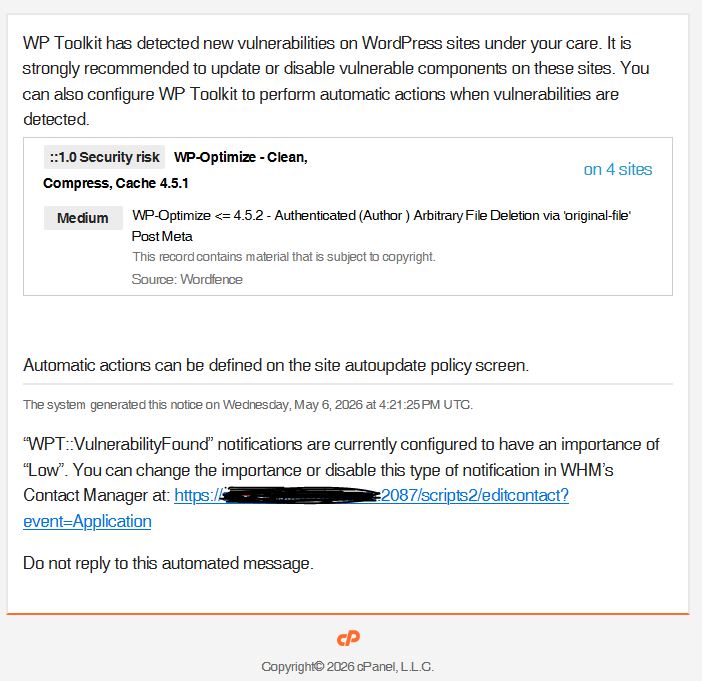
The information provided in the “WPT::VulnerabilityFound” email notification has recently changed, and is not as helpful as it once was.
1) It used to list which individual sites were affected.
2) The link to see which sites are affected (e.g. "on 4 sites") goes to the URL https://myserver.com:2087/?goto_uri=/cgi/wp-toolkit/index.cgi#/list/checkSecurity/1/instancesIds/1,6,14,15/activeTab/vulnerable-components but all this does is prompt a new WHM session and sends you to the main WHM page.
3) It also used to give more info about the specific vulnerability in the email. This one is not quite as important, but it was helpful.
In short, the notification now just tells you there is a vulnerability. It doesn't tell you where it is.
Thanks!
-

Hey hey! I reached out to the WP Toolkit team and they are aware of this issue and plan to adjust the email notifications in the next major release!
0 -
Hey cPRex! Excellent. Thank you!
0 -
You're welcome!
0 -
Thanks for this info. I received a similar notification today and I was confused. The email claimed I had a vulnerable plugin that I could not locate anywhere on the server. I do however have another plugin that refers to the vulnerable plugin ( if exists (vul_plugin) {extend vul_plugin}) which made me think -- does WP Toolkit scan the codes and not just the plugins folders to find potential vulnerable plugins?
0 -
CBAWS - I'm not sure on that one, and since it's related to how they perform security options it's not something they would release publicly, most likely.
0 -
Following up on this issue: we’re still seeing WP Toolkit vulnerability notifications that say “on a site” without showing the affected WordPress URL or the cPanel account in the email. For customers who manage several hosting accounts, the message doesn’t tell them which account to sign in to or which site to update. They often forward the notice to our support team just to identify the installation.
As security issues become more frequent, this adds unnecessary support work and delays patching. Could WP Toolkit list the affected WordPress URL(s) and the corresponding cPanel account in the notification itself, alongside the existing links? That would let customers act on the alert or forward it directly to the developer responsible for the right site.
Is there an update on the planned change, or a release version we can look for?
0
Please sign in to leave a comment.
Comments
6 comments