Outlook (New) not synching folders to cpanel server

Outlook (New) which is installed by default in Windows will be replacing Outlook Classic by 2029 - https://learn.microsoft.com/en-us/answers/questions/5787077/new-outlook-to-replace-classic-outlook. Using Outlook (New) involves agreeing to provide Microsoft with full access to the email account (yikes), but that's another matter.
The issue in this post is that Outlook (New) just doesn't seem to duplicate the user created folder structure in the cPanel account on the server.
Steps to duplicate the issue:
- in Outlook (New) with a cPanel email account added, create a folder and move an email from the inbox into the new folder;
- go to domain.com/webmail roundcube and/or ssh to /home/account/mail/domain.com/user and ls;
- the new folder doesn't exist and the email moved to the new folder is still in the inbox.
Googling this issue seems to suggest that there's no solution other than rolling back to Outlook Classic.
Does anyone have any other suggestions?
-
Outlook (New) is a piece of garbage. And if aren't careful, you will end up setting up a connection that looks like it is using your connection settings -- but all the email will be proxied through Microsoft cloud.
Outbound mail --> Microsoft --> Destination
Inbound mail --> Microsoft --> your Outlook (New)
That's what they mean by having acccess to your mail. All your incoming mail will be fetched by MS servers and then forwarded to your Outlook (New).
It's a wonderful thing (not) for troubleshooting. I've made it clear to customers that if they use Outlook (New) they do so at their risk if they are proxying their mail through MS -- and that if they have issues they'll need to reach out to MS (good luck).
1 -
Thanks mtindor, I tend to agree. The problem is that a large proportion of users (customers) use Windows and Outlook (New) is set become their default mail software in the not too distant future. Many businesses restrict third party apps being installed by their staff. This is going to take cPanel and other similar imap providers out of the solutions equation.
0 -
Agreed FredQ . However, I still think it should do what you are expecting it to do with IMAP folders. It's junk, but I haven't experienced Outlook (New) not syncing new folders that are created.
0 -

I've been on "new" for a bit - let me do some testing and I'll let you know what I see on my end!
0 -
I'm not able to reproduce the behavior - I created a new email, checked it in Roundcube, and I was able to subscribe to the folder I had just created:
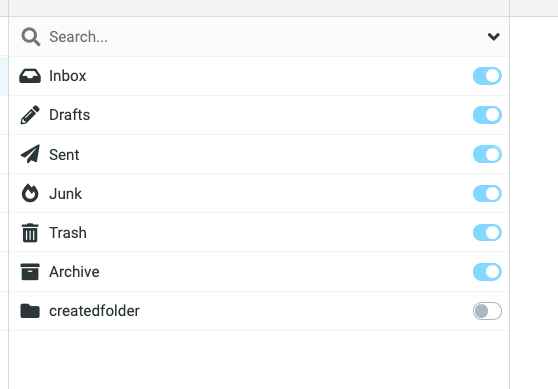
after doing that it shows the email I put in there:
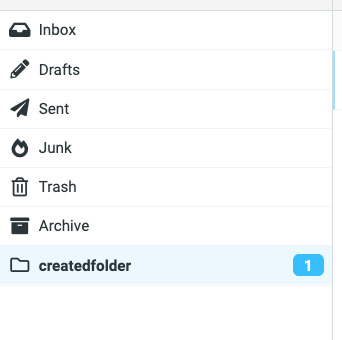
If you click the three dots menu next to the email address in the top right, do you see the "manage folders" tool there?
0 -
Hi Rex and thanks for the response – it's encouraging to hear that Outllook (New) is creating folders on the server and in RoundCube for you – hopefully our issue is something simple to resolve.
However, it's all over the place:
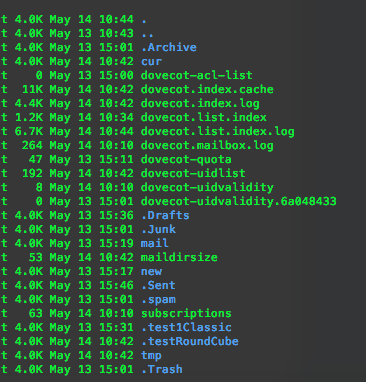
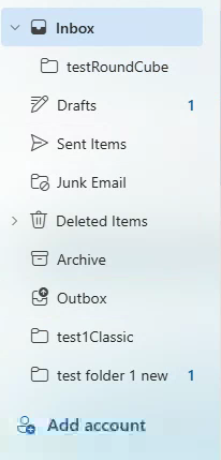
- creating the new folder 'test folder 1 new' in Outllook (New) just doesn't create the folder on the server. I'm checking both the subscribed folders listed in Roundcube and via ssh in the cPanel account /home/account/mail/domain.com/email_user/ – no new directory;
- Crating new folders in Outlook Classic works fine eg 'test1Classic';
- Creating a new folder in RoundCube places the folder inside the Inbox in Outlook (new);
- Moving an email into 'test folder1 new' in Outlook (new) leaves the email in the inbox in RoundCube;
- In Outlook (new) there's a 'Synch' button under the 'View' menu, but this doesn't synch the changes made in Outlook (new) to the server.
Server
Outlook (New)
RoundCube
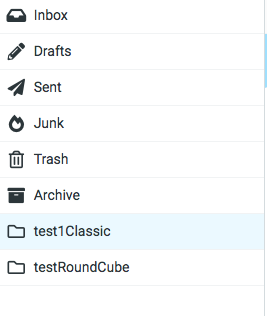
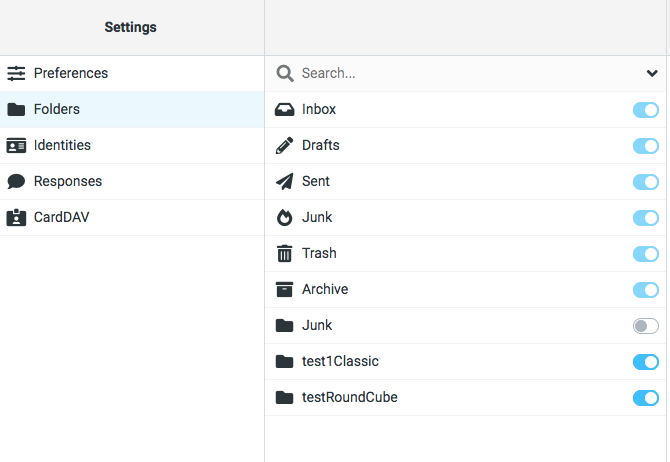
It seems like an 'INBOX' root path issue (as with Classic) in Outlook (New) – but I can't find where this is set in Outlook (New)? Do you have any other pointers as to what else to check that might be causing the issue?
I was also thinking it's my version of Outlook (New), I'm using Windows 10 – Microsoft Outlook version: 1.2026.428.200 Client Version: 20260501001.15 – but this seems pretty recent ie 1st May 2026?
0 -
I'm honestly not sure what else to check as it seems you've done an excellent job troubleshooting this. At this point it would be best to create a ticket.
0
Please sign in to leave a comment.
Comments
7 comments