WebDAV Backups Failing for larger accounts

I am using WebDAV for backup on one of my servers unfortunately I do have another option in this specific case.
So the issue I am having is any account larger then ~5GB fail. It is hard to tell exactly what the threshold causes the failure, since most accounts are smaller then 5GB, but then a handful around 40-100GB. I have had it work up to 40GB ONCE and only once ever.
I suspect it is transfer time alone, since the interface only allows for a 300s timeout.
Testing via the command line...
```
dd if=/dev/urandom of=test_40gb.bin bs=1M count=$((20*2048)) && curl -T test_40gb.bin --user "User:Password" https://<URL REMOVED>/Archive/SERVER_1_Backup/test_40gb.bin -w "\nTransfer time: %{time_total} seconds\n" && rm test_40gb.bin
40960+0 records in
40960+0 records out
42949672960 bytes (43 GB, 40 GiB) copied, 263.246 s, 163 MB/s
Transfer time: 2513.847144 seconds
rm: remove regular file 'test_40gb.bin'? y
```
And the file does arrive on the client's WebDAV backup server consistently... takes between 20 and 40 min to move a 40GB file, but it works! This also tracks with almost every account larger than ~5GB always failing, as anything larger than 10GB would exceed the 300s max timeout.
How can I better address this issue without forcing the client to switch away from WebDAV? Don't worry, they do have SSL etc, so the backups are sent over a secure connection.
So assuming I have not made any critical incorrect assumptions here...
How can I override this 300s limitation? even if I can increase it to like... 3000s instead.
Edit: Markdown not working correctly, and web editor seems broken. When I click code block it just applies it to the entire post and not JUST what is selected.
-
Really, there's gotta be a way to override this artificial 300s limitation ><
0 -

Hey there! In the WHM >> Backup Configuration page when you create a new Webdav backup you should see a timeout option at the very bottom:
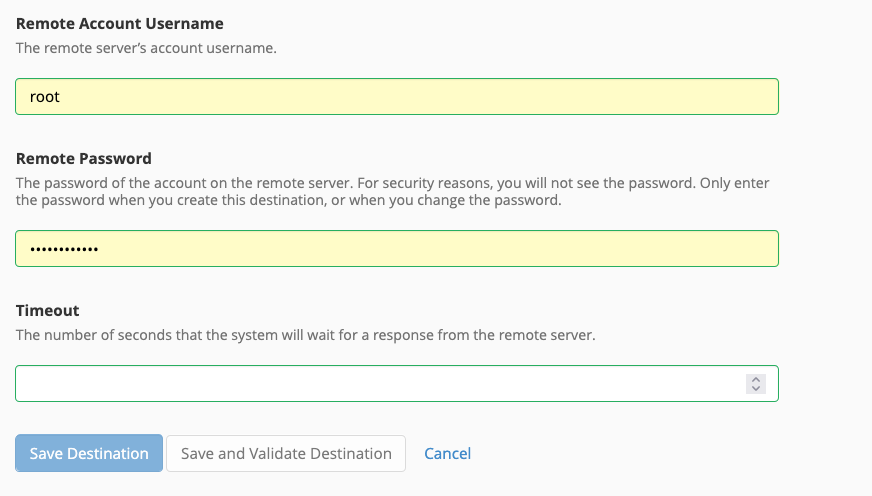
Can you try adjusting that value there to see if that works?
0 -
Hey cPRex,
Yea I have that set to 300s, which is the maximum the UI allows, I have even tried to manually make it longer by manually adjusting the backup config files but then it fails validation.0 -
So it does indeed!
I did some homework on this and found that this seems to be the same limit across all destinations, and that is hardcoded in the product.
For your use case the best option is likely to switch from webdav to something else, as that wasn't designed for a large-scale backups like what you're trying to do now.
0 -
My customer is requesting the backups to be posted to their webdav, so I don't really have a way around that.
Almost seems like an issue in their implementation of webdav, since backups to my google drive with the 300s timeout works fine even with similar transfer times exceeding 300s to webdav.
You would think they would allow backup chunkification(ie... split into 5gb parts)
0 -
It definitely could be something on their end as well - the 300s is just to wait for a response from the server, but I wouldn't expect that to be tripped if a transfer takes longer than five minutes.
0 -
yea, we only have ping times in the 10s of ms, so it is not a server response time issue.
I have tried opening a ticket with them about it, but their form seems to be broken.
0
Please sign in to leave a comment.
Comments
7 comments