WP-Toolkit

I don't want WP-Tookit in my clients dashboard. Can I safely remove the /mu-plugins wp-toolkit wp-toolkit.php ? Will this keep it out of their dashboards? Thanks in advance.
-
If you want to keep WP Toolkit just want to hide it from your client then edit the Feature List from WHM and untick WP Toolkit from there.
Andrew N. - cPanel Plesk VMWare Certified Professional
Do you need immediate assistance? 20 minutes response time!* Open a ticket
EmergencySupport - Professional Server Management and One-time Services0 -
Thanks. Did that. I want to hide it inside the WordPress dashboard.
0 -

When you say their WordPress Dashboard, can you be more specific? If the feature has been restricted at the Feature List level I wouldn't expect it to appear anywhere in the account.
0 -
Hi Rex,
It's switched to OFF in package features and does NOT display in CP accounts. I don't give anyone access to that so that doesn't matter. It DOES however display when logged into any WordPress account. With a setting to enable Patchstack. I don't like stuff installing I didn't ask for that I don't know anything about. Are there any docs on this?
This might be more clear: https://snipboard.io/3nUBbP.jpg
In the left hand menu there is now a WP-Toolkit option in the menu.
I know how to hide this with a code snippet. However, I would actually like to know more about what it actually does.0 -
Your snipboard link isn't working for me for some reason.
So users login to WordPress directly, WP Toolkit is disabled, but they still see WP Toolkit options in the left sidebar? That seems odd - can you confirm that's what you're seeing?
0 -
Yes. Sorry about the snippet .. Here's another go. All client WP sites have this as a mu-plugin now after the latest updates.
https://snipboard.io/9kEtdl.jpg0 -
Interesting - let me do some homework and I'll get back to you!
0 -
Here's what I did on my end:
-created a feature list with no WP Toolkit options
-created a package using that feature list
-created a new cPanel account with live DNS using this limited feature list
-manually installed WordPress on the cPanel user
-access WordPress as the main admin userAt this point, I don't see anything in the sidebar related to WP Toolkit:
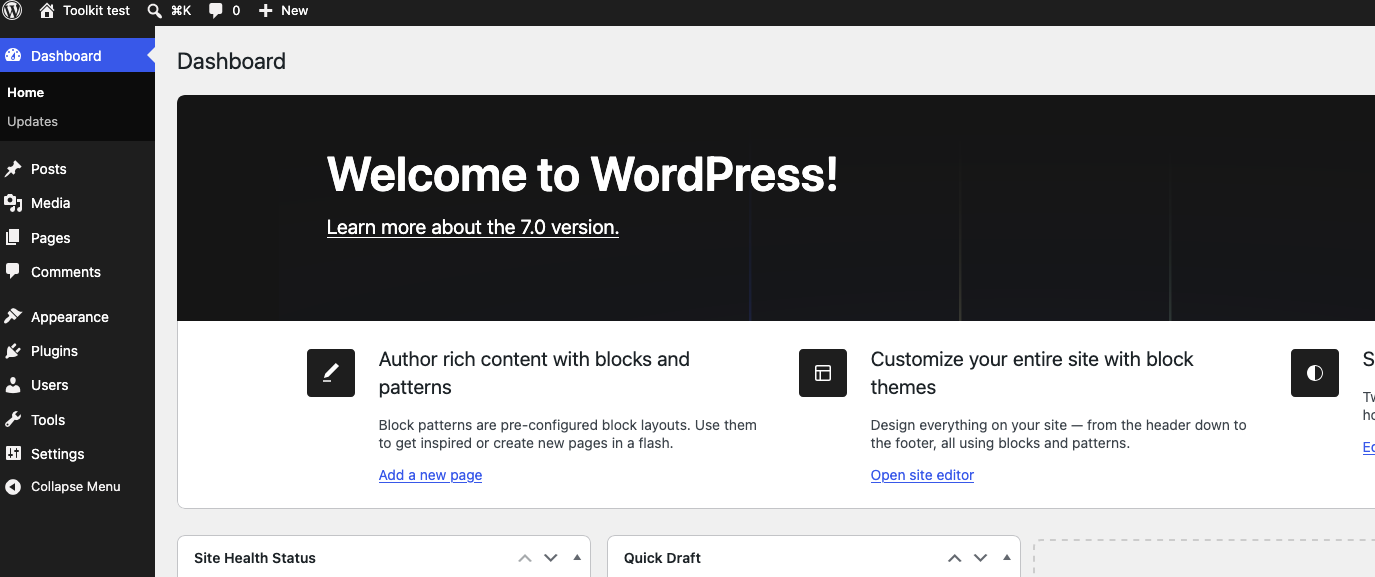
I also don't see anything in the main cPanel interface that would let me manage the site with WP Toolkit.
At this point it seems I'm not able to reproduce this. If I missed a step let me know!
0 -
That's fine. But this is a production server that already had WP-Tookit installed under a package. On the last update the mu-plugin was installed... I'd like to know what it does.
@server wp-content]# ls mu-plugins/
wp-toolkit wp-toolkit.php0 -
Can you get me the full path to that directory that you're seeing?
0 -
In public_html.. (or www) where WP is installed.
www/wp-content/mu-plugins/0 -
Thanks for that confirmation. This is something provided by WordPress updates directly and not necessarily related to cPanel: https://support.cpanel.net/hc/en-us/articles/360052807214-What-is-the-mu-plugins-directory-in-my-WordPress-site
0 -
Then it installed mysteriously? I didn't install it. Here's the header.
mu-plugins]# cat wp-toolkit.php
<?php
// Copyright 1999-2026. WebPros International GmbH. All rights reserved.
/*
* Plugin Name: WP Toolkit plugin
* Plugin URI: https://www.plesk.com/wp-toolkit/
* Description: WP Toolkit plugin is installed by WP Toolkit or WP Guardian to provide functionality that can only work within WordPress itself
* Version: 6.10.1-10341
* Requires at least: 4.0
* Requires PHP: 5.6
*/0 -
0


Please sign in to leave a comment.
Comments
14 comments