WHM-Root Server Statistics not showing

Hello, Server statistics not showing in WHM-Root just showing token.ex version, load etc. cpanel version 136 latest. note: Newly installed.
-
Maybe that's why
Implemented CPANEL-50070: Remove redundant server info rows from the WHM home Statistics sidebar and hide the sidebar when it has no content.
https://docs.cpanel.net/changelogs/136-change-log/
0 -
Does that mean everything is fine? But the matter seems incoherent.
0 -

Can you get me more specific details on what you're expecting to see vs what you're actually seeing? It's not clear to me exactly what the issue is here based on your description.
0 -
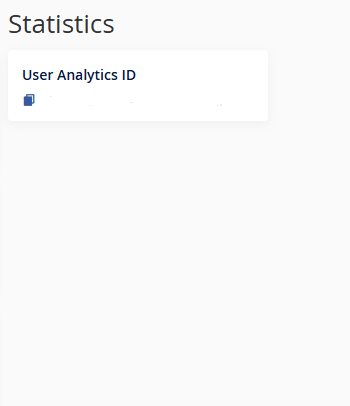
Check screenshot. WHM, Just showing id.
 0
0 -
We have the same, CloudLinux 9, cPanel 136.0.19
All the "missing" information is on top of WHM window so I'd say that the header "Statistics" seems misleading.
0 -
Interesting - I have an AlmaLinux 8, 10, and CloudLinux 9 machine where things look good, so I'm not obviously able to reproduce this on my end right now.
Could one of you guys make a ticket?
0 -
This type of problem occurred after a cPanel clean install on a new server.
0 -
I think that is by design, as stated in the 136 change log:
"Implemented CPANEL-50070: Remove redundant server info rows from the WHM home Statistics sidebar and hide the sidebar when it has no content."
All duplicate data has been removed.
0 -
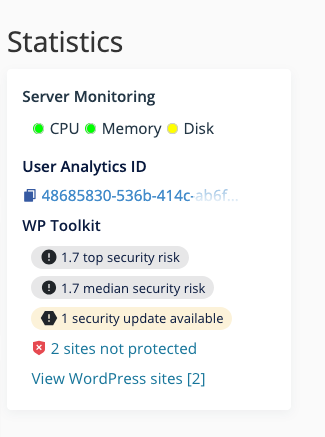
The duplicate data has been removed for sure, but only showing the User Analytics ID line isn't what I'd expect to see. Here's what a test server with some "active" sites shows:
 1
1 -
Internal investigation is required.
0 -
Sudipto Mahmud - can you create a support ticket?
0
Please sign in to leave a comment.
Comments
11 comments