Backuply by Softaculous still lised in WHM after uninstall

I removed Softaculous and then Backuply via these directions: https://backuply.com/docs/getting-started-backuply-server/uninstall/#uninstall-in-cpanel.
I even did a graceful reboot and "Backuply by Softaculous" is still listed in WHM. It's not listed on the "Manage Plugins" page however.
How do I completely remove Backuply by Softaculous?
-

Hey there! Ultimately this would be a question for them as their tool is leaving cruft after the uninstall.
Can you let me know which page of WHM you're seeing this on? Once I know that I may be able to come up with a workaround for you.
0 -
Hi Rex! It's on the sidebar when I do a search:
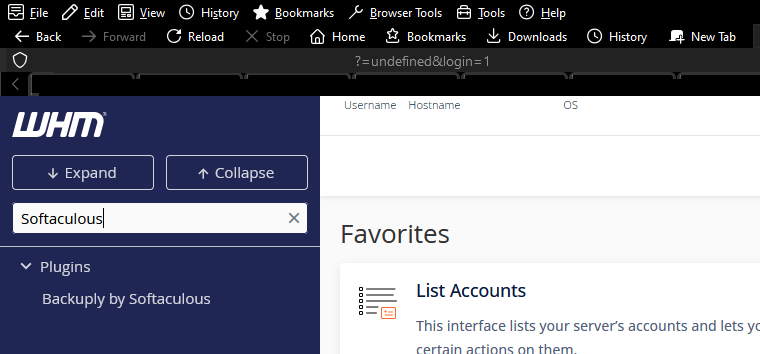 0
0 -
Perfect - the following guide should get you in the general area where you'll likely find traces of the software:
https://api.docs.cpanel.net/guides/guide-to-whm-plugins/guide-to-whm-plugins-uninstall-plugins
0 -
Rex, thanks. So I saw absolutely nothing related to Backuply by Softaculous in
/usr/local/cpanel/3rdparty/.I can't do the BASH scripts if I don't know what the plugin internally references itself as; how do I determine that? I've seen some pretty funky non-intuitive names in plenty of places in the past.
Edit:
[root@server ~]# grep -r "Softaculous" /usr/local/cpanel -s
/usr/local/cpanel/Whostmgr/ACLS.pm: # Softaculous is enabled and user has access0 -
Do you still see anything in /var/backuply/? You could also try the manual removal method outlined here: https://backuply.com/docs/getting-started-backuply-server/uninstall/#uninstall-in-cpanel
0 -
The Linux grep command is insanely slow so I asked an LLM for suggestions on other directories where WHM files are located. Did a grep command on them, downloaded the following file:
/var/cpanel/pluginscache.yamlI removed the Backuply / Softaculous nonsense and without having to restart anything I reloaded WHM and it disappeared from the sidebar, good!
This will probably work for others who had to manually uninstall something like a plugin but cruft is left behind. Make a copy of the original file before modifying and re-uploading (or editing via SSH). There are several cache related files with "Backuply" in them though I now know how to remove plugin cruft in WHM.
Edit: cPRex Saw your post after I posted this. No, no such directory. Turns out it was a WHM cache issue.
0 -
Well that's good - it likely would have cleared up by itself overnight, but glad you found it!
0 -
The cache resets after one day? I removed Softaculous like a couple days ago but okay. I presume outright deleting cache files will mean WHM will automatically regenerate them? I'd recommend backing them up for anyone who would blindly try that idea out first though.
0 -
I would think that gets checked as part of nightly maintenance, but I could just be making that up.
0
Please sign in to leave a comment.
Comments
9 comments