Client Account Restore: Add-on Domain Incorrect Group

BEHAVIOUR: On cPanel version 110.0.136, if a client deletes the doc root of an add-on domain and they restore that domain's folder structure from backup, cPanel re-creates the nuked root folder of that add-on domain with the same user as the account, e.g., 'accountname' / 'accountname', instead of 'accountname' / 'nobody'. The result is that Apache doesn't have permission to open the document root for the domain to read .htaccess and the result is a 403 error for the entire site.
EXPECTATION: In the event of a hamfisted removal of an add-on domain's root folder, when cPanel re-creates the folder to restore its contents, it should ensure that the folder has the correct owner & group to ensure Apache can access its contents.
-

Hey there! That's interesting - let me do some testing and I'll let you know what I find!
0 -
I think we'll likely need access to your system to properly test this as there are too many variables to setup a valid test and I wasn't able to reproduce this on the latest build of version 110.
Do you happen to know your PHP handler? This can be found in WHM >> MutliPHP Manager.
0 -
The PHP handler was cgi for that PHP version. We normally use lsapi as the PHP handler for all the versions installed. (That was missed when we added this version.)
If it's helpful, I can do a new test with lsapi as the PHP handler. Just let me know.
[EDIT TO ADD]: Just to be clear, I'm not reporting the 403 error as the bug; that was just a byproduct of the restore issue. Clarifying: cPanel creates an add-on domain root directory with differing owner/group, e.g., terminator/nobody. If the user deletes that doc root by accident, a subsequent restore from that account's cPanel "File and Directory Restoration" panel sees the restored doc root having owner/group set incorrectly, e.g., terminator/terminator.
Restored permissions and metadata should match that which was backed up. And that behaviour should be entirely independent of the PHP handler.
0 -
I agree, and so far I'm not able to reproduce an ownership mismatch when restoring that data after it's been manually removed.
Can you let me know specifically how you're performing the restore portion of this work?
0 -
Hi, Rex.
The restore is done from the client account cPanel login, using the "File and Directory Restoration" function:
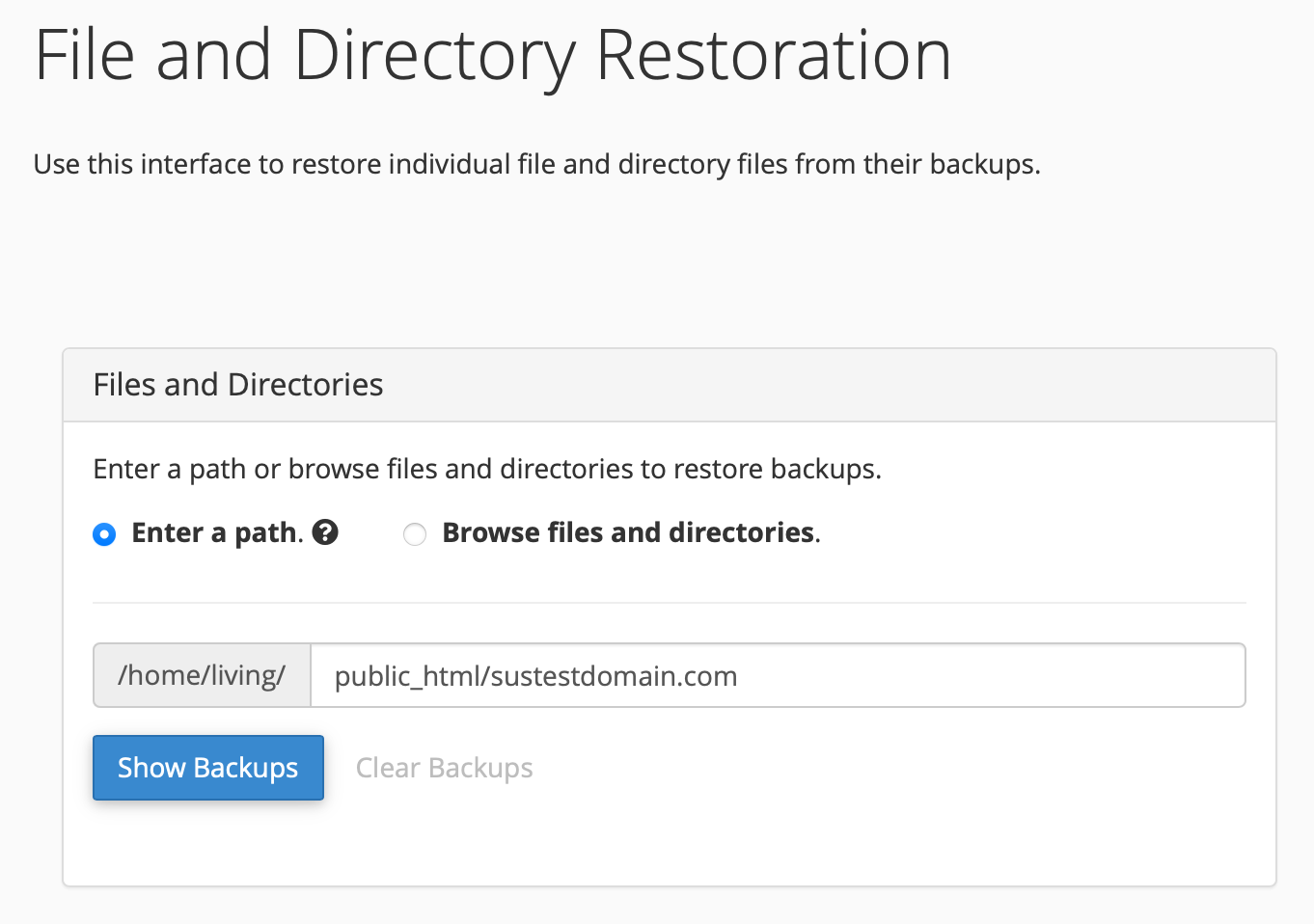
The steps to reproduce:
- Create the account as an add-on domain within the client account cPanel;
- SSH into the server as root, then 'su - <account>';
- CD to 'public_html' and 'rm -rf <add-on domain>'
- Restore add-on domain root directory from 'File and Directory Restoration' panel; (After selecting backup, right-hand panel correctly indicates that the directory is not present on disk);
- Check perms on restored directory: Owner is correct, group is not.
NOTE 1: I can reproduce this regardless of whether the restore is done from the 'root' WHM login or the 'living' account cPanel login. Either way, the backup perms were 'living/nobody' and the restored perms were 'living/living'.
NOTE 2: While the original issue was seen with the cgi PHP handler, the follow-up test was done with that account correctly having the lsapi PHP handler defined. The result was identical.
What it looks like from the terminal:
[root@tanuki ~]# su - living
Last login: Sun Jul 19 05:35:05 EDT 2026
[living@tanuki ~]$ cd public_html/
[living@tanuki public_html]$ ls -ld sustestdomain.com/
drwxr-x--- 4 living nobody 4096 Jul 21 18:12 sustestdomain.com/
[living@tanuki public_html]$ rm -rf sustestdomain.com/
[living@tanuki public_html]$ ls -ld sustestdomain.com/
drwxr-x--- 4 living living 4096 Jul 21 18:12 sustestdomain.com/
0 -
Perfect - let me do some more testing on this and I'll let you know what I find!
0 -
Here's what I did to test this:
-Created a version 110 server
-Created a cPanel account with 2 addon domains
-Let WHM run a backup
-Confirm the backup had good data
-Manually removed one of the directories - /home/username/public_html/addon-directory
-Used the File and Directory restoration tool to restore the directoryMy addon domain directory was restored with the correct username:username ownership as well as all the files underneath it, so at this point I can't reproduce the issue.
It would likely be best to create a ticket so this can be tested directly on your server.
0 -
> My addon domain directory was restored with the correct username:username ownership
it should be username:nobodyI tested this also and it changed from
username:nobody
to
username:username0 -
quietFinn - what's your PHP handler?
0 -
lsapi
0 -
My addon domain directory was restored with the correct username:username ownership as well as all the files underneath it, so at this point I can't reproduce the issue.
Rex, if you got 'username:username', you did reproduce the problem. It must be 'username:nobody'. cPanel creates a new add-on domain doc root with owner:group as 'username:nobody'. All enclosed directories underneath that doc root should be 'username:username'.
The reason why the group of the document root needs to be 'nobody' is because Apache is run as 'nobody'. Daemons often run under 'nobody' to ensure that exploits can cause minimal damage due to 'nobody's minimal permissions. Without 'username:nobody', Apache is unable to access any web site's document root.
0 -
Trane Francks - that's a separate issue then, as they are created with owner:owner on my 110 test system.
It would be best to create a ticket as it seems there are too many variables here for me to make a valid test.
0 -
That just makes no sense to me, Rex. We have accounts dating back to 2010 that have migrated over the years to this server. Every last one of them has 'username:nobody' for every add-on domain. Those perms are not wrong for v110. The same perms apply for every 'accountname/public_html' directory.
I don't know. Perhaps CloudLinux with mod_lsapi & CageFS are somehow implicated in this seeming discrepancy. I'm at a loss to explain further.
0
Please sign in to leave a comment.
Comments
13 comments