cPanel API 2 Function for Legacy application

I can see in the documentation that "The cPanel API 2 system is deprecated". were they just removed yesterday or today? My application was working fine but all of a sudden I am getting the below json results
{
    "cpanelresult": {
        "apiversion": "2",
        "error": "Access denied",
        "data": {
            "reason": "Access denied",
            "result": "0"
        },
        "type": "text"
    }
}
Im going to start porting over to UAPI but im hoping I have some time to work on this.
-

Hey there! No, that "deprecated" warning has been up for years, and we don't currently have plans to fully remove it. Your access issue is likely something else as there haven't been changes on our end that would cause this.
0 -
I also just started having this issue with API calls that were working for years and the code hadn't changed. In my Perl scripts, I was would create a new HTTP Request object and then call its "authorization_basic()" function which normally took user ID and password arguments. These calls were failing in multiple places. I didn't test them all, but it was definitely more than one place.
In my case, the "content" response from the HTTP request call to the API wouldn't be returned as JSON, but would instead be HTML code of a cPanel login page, essentially indicating that the call wasn't being properly authorized during the API request. Some of the URIs for the calls were to using port :2082 or :2086 (insecure), but changing them to be secure and using https:// URIs and secure ports wasn't enough to correct it.
AI chats (yes, I know AI is unreliable, but I couldn't wait to run this through the normal cPanel support forums as I had hundreds of paid, hosted sites now getting fatal errors) indicated that basic auth for cPanel API functions was being deprecated and I needed to switch to using API tokens. Even if this wasn't true, I figured there was no harm trying it to see if it helped.
I created some API tokens in WHM for both my root and reseller accounts, and replaced those API calls with: $request->header('Authorization' => "whm root:$root_token"), which then worked properly. Unfortunately, I had to do this in dozens of subroutines that call the API, which all now need to be retested along with the apps that call those subs. In some cases, I needed to authorize with "whm [reseller userid]:$reseller_token) for certain functions like creating a new account (I think), since that wouldn't accept the root account when creating a new user account using a subdomain of my main domain (whcih was under the reseller user account).
In any event, it does seem like something external happened yesterday (or very recently) that started causing these API errors, and the change wasn't in my code. This happened across dozens of subroutines that used cPanel API calls and had functioned for years with basic password authorization.0 -
Could one of you let me know which cPanel version you're on? I'm not finding anything obvious but knowing the specific version number would help me take a deeper dive.
0 -
cPanel Version 136.0.36
running on AlmaLinux v8.10.0 standard
Perhaps a regression from something that wouldn't seem definitively related to a recent change?0 -
I believe the change you're looking for is here:
https://docs.cpanel.net/changelogs/136-change-log/
"[Security] HTTP Basic authentication is no longer accepted on the cPanel interface (ports 2082 and 2083) by default. Use an API token for scripted calls, or re-enable the WHM Tweak Settings option “Allow HTTP Basic authentication to the cPanel interface”. In
cpanel.configthis is the reverse booleanskiphttpauth:skiphttpauth=0accepts Basic authentication,skiphttpauth=1refuses it. WHM, Webmail and Web Disk are unaffected."If you update that configuration value do things start working again as they did before?
1 -
Thanks for the update. I've already made the changes to my code to use API tokens, so I can't test that config setting change, unfortunately. Apparently AI wasn't smart enough to find that option yesterday when I needed it. ;)
Although, when I go into WHM->Tweak Settings, I'm not seeing that setting when I filter for "auth":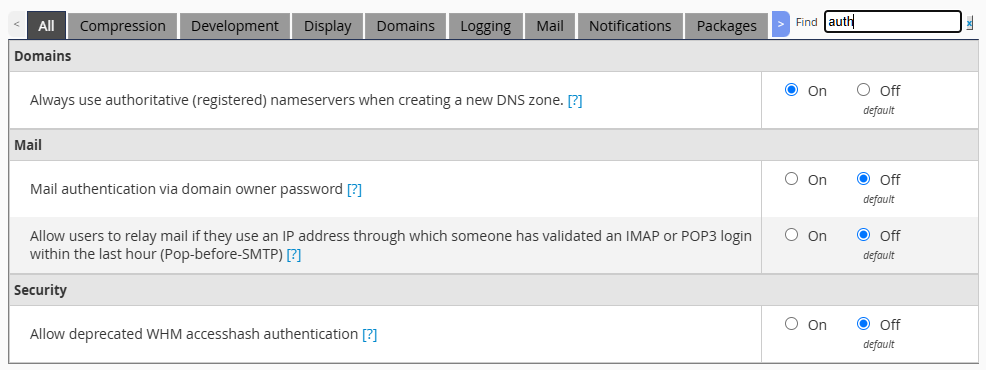
I'm guessing for long-term use, I'm better off having made the move to API tokens anyway.0 -
I don't see this in the UI either - since it's an issue related to security I believe this is a command line only change.
0 -
Makes sense.
1 -
Thanks everyone for the updates. I figured it out yesterday and it was cpanel.config fix. Im going to slowly rerwite my code to use the newer APIs so I dont have any issues going forward.
1 -
Also I cant seem to find it, but is there a way to close this post?
0 -
No, we don't really "close" posts - people just eventually stop sharing on them.
0 -
Ah, got it; good to know, thanks for the clarification.
And thanks again for all the help tracking this down. The
cpanel.configfix got me back up and running, and I'll be tackling the UAPI rewrite over the next few weeks so I'm not caught out by something like this again. Appreciate the quick responses.0
Please sign in to leave a comment.
Comments
12 comments