disable wp toolkit vulnerabilities email GLOBALLY

Hello,
How can I globally disable the “Site Vulnerabilities Found” email notifications for all cPanel accounts, so none of our clients receive them?
We manage around 500 client accounts, and these notifications are becoming extremely frustrating.
Every time a vulnerability is detected, cPanel sends an email directly to the affected client. This results in a constant stream of support requests asking, “What are we supposed to do about this?”
Automatic updates are already enabled, but these notifications keep coming.
I understand the importance of vulnerability detection, but sending technical security alerts directly to hundreds of non-technical clients creates unnecessary confusion and support overhead.
What I want:
- Globally disable these specific notifications for all existing cPanel accounts.
- Ensure they are also disabled by default for newly created accounts.
- Ideally, keep vulnerability scanning enabled without notifying clients directly.
Is there a WHM setting, configuration option, or command-line method to accomplish this globally?
I really don’t want to have to disable these manually for hundreds of individual accounts.
-

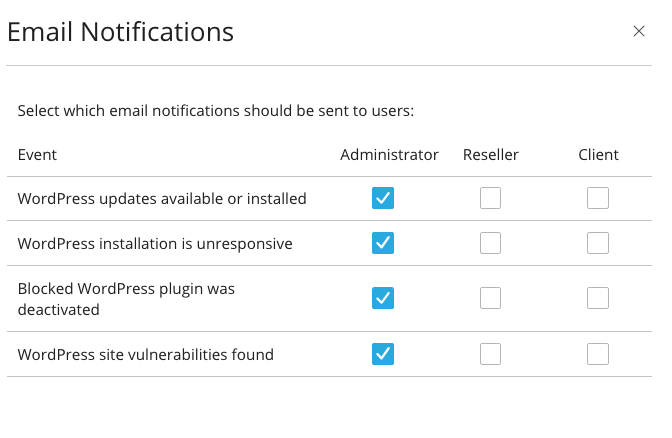
Hey there! We have a tool where you can choose what emails the client receives inside the WHM >> WP Toolkit interface.
https://support.cpanel.net/hc/en-us/articles/360059457434-Where-to-manage-WP-Toolkit-notifications
I've attached a screenshot showing this area where you can make the selections.
 0
-
Would be great if these were the default options and then could be overridden per-instance.
We have clients that don't want them at all and some that do, so, unfortunately we have to aid the ones who DON'T want them in adding email filters to just discard them.
Now, what I'd love to see, is GLOBAL options for updates (core, plugins, themes)
0 -
bellwood - I've sent that feedback over to the Toolkit team!
0 -
Thanks =)
0
Please sign in to leave a comment.
Comments
4 comments