Spamassassin not modifying subject line... or is it? Not how it was

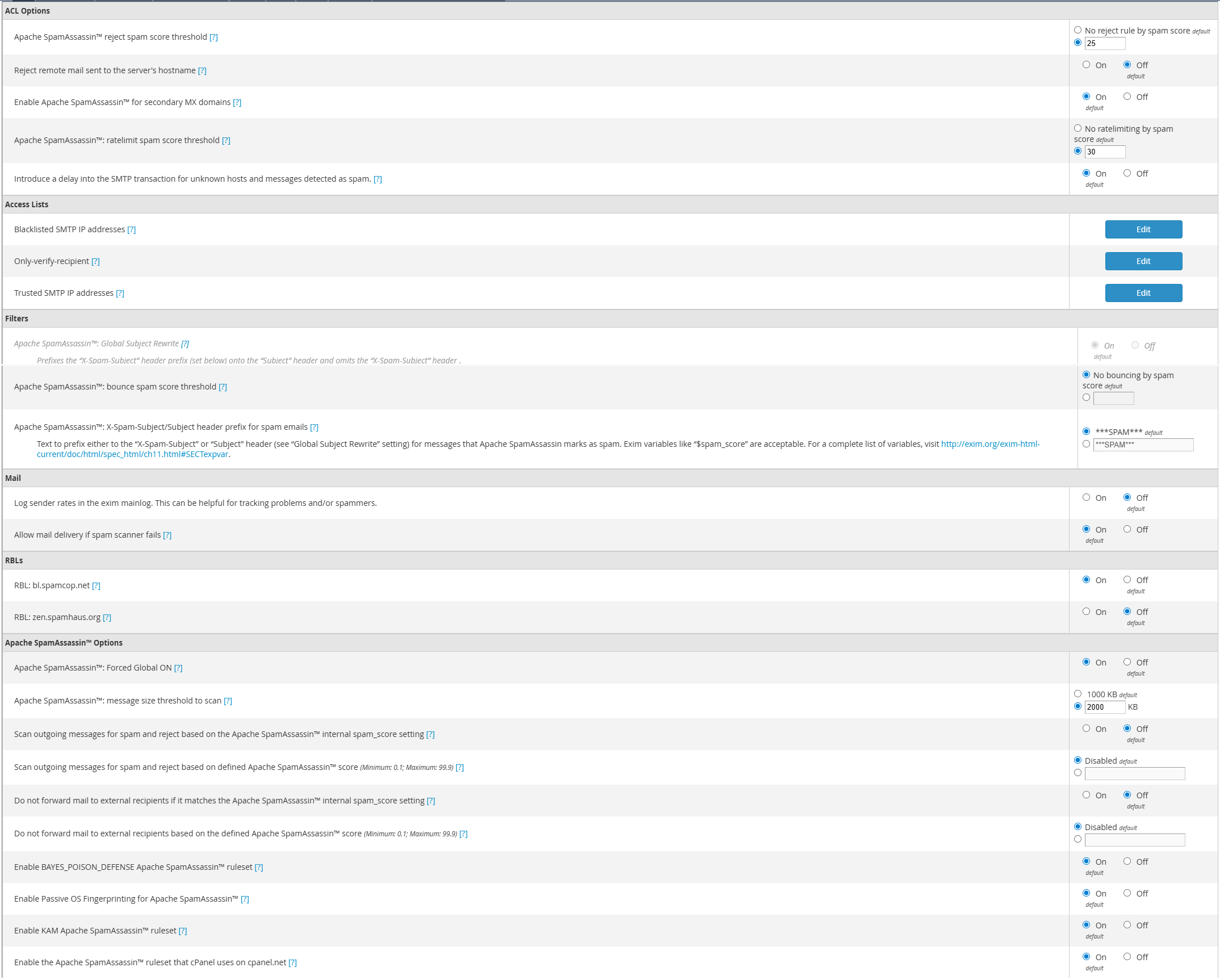
I have gone through the exim config and enabled spamassassin globally. I've set "X-Spam-Subject/Subject header prefix for spam emails" in the Filters section to default. I've checked to confirm that spamassassin is running. I've gone through the email headers for an obvious spam and see that yes, it is scanning and flagging the email... but only in the headers. Not the subject line for the actual email, like it was doing before (I actually had it set to show the spam score in the subject as well as the usual ***SPAM*** tag).
I'm looking for other ideas on where to track down why it's not physically modifying the subject line. Is it because of a conflict between spamassassin and Immunify360 Email? While I had the "incoming" beta filter enabled, I even tried disabling it to see if the subject line would start modifying again. Nope.
Here's the spam flags from the headers... you'll see that the x-spam-subject shows the right tag inside the headers, but the actual subject line remains unchanged.
To: me@mysiteaddress
Subject: Suspicious login attempt blocked – Protect your account
X-PHP-Originating-Script: 6842745:xns.php
From: Coinbase Alert <spammer@probablyfakedomain>
Reply-To: spammer@probablyfakedomain
MIME-Version: 1.0
Content-Type: text/html; charset=UTF-8
Message-Id: <4cYQB31Y3tz390vJGN@stillprobablyfakedomain>
Date: Fri, 26 Sep 2025 15:24:43 -0700 (PDT)
X-Spam-Subject: ***SPAM*** Suspicious login attempt blocked – Protect your account
X-Spam-Status: Yes, score=9.6
X-Spam-Score: 96
X-Spam-Bar: +++++++++
X-Spam-Report: <snip a bunch of noise code>
X-Spam-Flag: YES
-

Hey there! It *should* be adding the "***SPAM***" tag to the subject by default, as we specifically outline instructions on how to stop that from happening here:
It might be best to create a ticket so this could be examined directly on the server, since this is one of those "it should just work" items and you've already checked most things I can think of.
0 -
Yeah, except that my cPanel license comes through OVH as part of my server rental, so I'm technically not a cPanel customer... even though I use cPanel and pay monthly for it. OVH, in terms of support, is next to useless in cases like this, which is why I fell back on the forum (after digging up my old login, that is).
I'll see if it will let me open a ticket anyway. I suspect it may be a conflict between Immunify360 Email scanner and the default spamassassin settings put in place by cPanel, but they should just work together...
I miss MSFE.
0 -
You definitely aren't the first to relay that support experience. They should be forwarding us anything they can't solve so we can check directly.
0 -
Well, I opened a ticket with OVH. In the meantime, is there a way I can prep this server for whenever cPanel gets their hands on the support request, so that someone can get in there and get dirty? I know that before this whole "we can't deal with you directly" policy, there was a list of IPs and a SSH key that had to be installed to permit access... that still a thing?
*edit* I see I can't even open a support request through cPanel anyway... it will not allow me to proceed beyond entering in the licensed IP address... I can open a Customer Service request, but I suspect they'd just laugh at it and file it in the bagged "sorting facility" under their desk.
0 -
Correct - the request would need to come from OVH. You can always purchase a license directly from us, and the Customer Service team could help with that.
We maintain a list of support IP addresses here:
https://docs.cpanel.net/whm/support/grant-cpanel-support-access/
0 -
While I fight with support, does anyone want to look over the exim settings here and see if maybe I'm missing something?
 0
0 -
When all else fails (and you're done trying to argue with support and not getting anywhere because A says to talk to B, but B says you need to talk to A), just do a hard global reset on the entire exim configuration, and start reconfiguring one line at a time.
It appears to be properly making the subject line adjustments now.
I still miss MSFE. Anyone found an alternative yet? ;)
0 -
Resetting Exim is never a terrible plan, although if you have a lot of customizations it can be time consuming for sure.
0
Please sign in to leave a comment.
Comments
8 comments