WHM fails after upgrading from 130.0.16 to 132.0.9 on AlmaLinux 9.7

Hi,
I recently attempted to upgrade from cPanel 130.0.16 to 132.0.9 on an AlmaLinux 9.7 server, and WHM/cPanel stopped working immediately after the update attempt.
During the upgrade, the system reported that the update to 132 had failed, but I didn’t have the chance to review the full update log.
Right after the failure:
-
WHM and cPanel were no longer accessible
-
However, all websites continued working normally
-
Email and other services also stayed online
After that, I rebooted the VPS — and WHM never came back.
Here are the symptoms now:
-
cpanel.servicefails with exit code 127 -
WHM ports 2087/2086 do not respond
-
/usr/local/cpanel/scripts/check_cpanel_rpmsis missing -
upcp,upcp.static, andupdatenowall fail -
updatenowexits with code 2 -
Perl module
JSON::XSis missing for Perl 5.36 -
cPanel tries to load Perl 5.42 modules, causing an API mismatch
Example error:
Can't locate JSON/XS.pm in @INC
Perl API version v5.42.0 does not match v5.36.0
So in summary:
-
130.0.16 was working fine
-
Upgrade to 132.0.9 failed
-
WHM/cPanel became inaccessible immediately after the failed update
-
Websites still worked
-
After rebooting, nothing in WHM works anymore
Has anyone experienced similar behavior when upgrading from 130 to 132 on AlmaLinux 9.7?
Is there a known compatibility or dependency issue that could cause WHM to completely fail after a partial update?
Any insight would be greatly appreciated.
-
Hello,
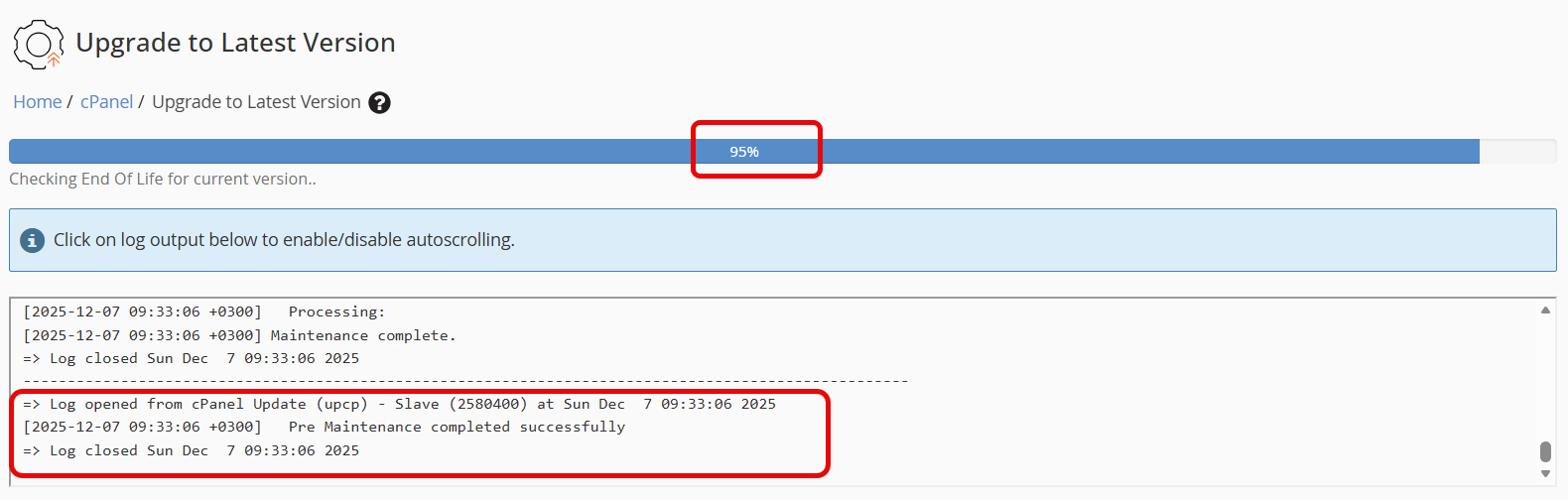
There are no issues updating cPanel from version 130 to version 132 for AlmaLinux v8.10.0. However, the update for AlmaLinux v9.7.0 STANDARD is not completing.
 0
0 -

If you could open a ticket and share some of the IPs that failed to update that would likely be the most helpful thing, as this seems like a mirror failure and not a problem with the update itself, per se.
0 -
Hi cPRex,
i have create the Ticket:
- #95863962
0 -
Got it, and I've already sent a reply. I'll be sure to update this thread as well.
0 -
Are you still experiencing the issue if you try the update now?
0 -
I have just spent 3 hours working on a dead box before I found this thread.
What an absolute disgrace the trial/test phase must be to put such a server disrupting update into release. Countless websites offline, servers offline and reputations ruined with this horrendous careless attention to detail.
Pricing goes up, quality goes down.
0 -
Just tried to update my cPanel (AlmaLinux 8.10.0) and got this error... I'm seeing the "old" login page, but can't login. Going to try the suggestions mentioned here in this thread.
EDIT:
I did/usr/local/cpanel/scripts/check_cpanel_pkgs --fix
and the first row it showed me was
2025-12-12 09:14:23 186 (ERROR): Core cpanel-perl modules have been found to be corrupt. Attempting to correct this.
After this so was I back to 130.0.16. Not going to update to 132.0.14 again.
0 -
Fwiw, I have had this happen on 4 of our servers this week. This is the sequence of commands that has fixed all of mine so far.
/scripts/check_cpanel_pkgs --fix/scripts/perlinstaller --force Proc::FastSpawn/usr/local/cpanel/scripts/fix-cpanel-perl/scripts/upcp
After that final upcp run, WHM was back in order. We noticed it happening because all of the backup's failed and we got notified.
EDIT: Oops! as pointed out, I'm talking about a different issue here than the original OP was talking about. After reading all the responses, by the end I lost the thread in my head. That'll teach me to type before coffee.
For reference, 500 errors on WHM/cPanel logins, failure to perform JetBackup backups, and the error message below is what started my trek to find a solution:
# /scripts/restartsrv_cpsrvd /scripts/restartsrv_cpsrvd: error while loading shared libraries: /usr/local/cpanel/3rdparty/perl/536/cpanel-lib/x86_64-linux/auto/Proc/FastSpawn/FastSpawn.so: cannot open shared object file: No such file or directory0 -
I think there are at least two different issues presented in this thread, so I'm going to try and clarify some things that were discussed and things that have been fixed.
The OP reported this issue:
Can't locate JSON/XS.pm in @INC
Perl API version v5.42.0 does not match v5.36.0
which was a known problem outlined in https://support.cpanel.net/hc/en-us/articles/36565502803223-net-snmp-packages-break-v130-to-v132-update-on-servers-using-MySQL
The latest failed update issue seemed to be a temporary mirror problem that kept updates from completing properly, leaving servers in an odd state where they saw the older style login pages. That has been resolved at this point and isn't something that should continue to happen.If you are seeing any issues with the update process at this time, please create a ticket and include your server's IP address so we can check the logs on our side.
0 -
Hello everyone, I just tried to update from version 130.0.16 to version 132.0.14 (my server: AlmaLinux v9.7.0 STANDARD kvm cPanel Version 130.0.16 ) and I confirm the update was successful.
There were no errors. I am sending the update log).0 -
Janez Tunjic - glad to hear it!
0 -
Since ‘fixing’ this issue, one server is now generating 19 emails per hour at 18 mins past. So far we have over 300 emails telling us the below;
output of the command: /usr/local/bin/php -d opcache.enable_cli=0 -d display_startup_errors=0 -d display_errors=1 -d error_reporting=E_ALL -qm
Can't locate JSON/XS.pm in @INC (you may need to install the JSON::XS module) (@INC contains: /var/cpanel/ea4 /usr/local/cpanel /usr/local/cpanel/3rdparty/perl/536/cpanel-lib/x86_64-linux /usr/local/cpanel/3rdparty/perl/536/cpanel-lib /usr/local/cpanel/3rdparty/perl/536/lib/x86_64-linux /usr/local/cpanel/3rdparty/perl/536/lib /opt/cpanel/perl5/536/site_lib/x86_64-linux /opt/cpanel/perl5/536/site_lib) at /usr/local/cpanel/Cpanel/JSON.pm line 14.
BEGIN failed--compilation aborted at /usr/local/cpanel/Cpanel/JSON.pm line 14.
Compilation failed in require at /usr/local/cpanel/Cpanel/AdminBin/Serializer.pm line 34.
BEGIN failed--compilation aborted at /usr/local/cpanel/Cpanel/AdminBin/Serializer.pm line 34.
Compilation failed in require at /usr/local/cpanel/Cpanel/Config/userdata/Cache.pm line 21.
BEGIN failed--compilation aborted at /usr/local/cpanel/Cpanel/Config/userdata/Cache.pm line 21.
Compilation failed in require at /usr/local/cpanel/Cpanel/PHP/Config.pm line 15.
BEGIN failed--compilation aborted at /usr/local/cpanel/Cpanel/PHP/Config.pm line 15.
Compilation failed in require at /var/cpanel/ea4/ea_php_cli.pm line 303.0 -
KevAtkinson - at this point it is best to create a ticket for any issues you're seeing.
0 -
Still fails for me, and when trying to create a ticket so am I not allowed since I bought the license via Hetzner, and is therefor redirected to them.
This is clearly not a Hetzner issue, and I want to get in touch with cPanel as per cPRex says himself in this thread.EDIT: I could do a customer ticket, and not a technical one. So I did, ID 95864699
0 -
Your license provider is still the point of contact for technical support issues. https://support.cpanel.net/hc/en-us/community/posts/35919412082327
0 -
We experienced this exact issue last night, just as OP reported.
Going from 130.0.16 > 132.x.x on AlmaLinux v9.7.0 got stuck at 17% and never recovered. We could SSH in but cPanel would not come back up.
We recovered via snapshot backup - before we found this thread - so we didn't get to try the fixes mentioned but will investigate another time. For now, we'll stay on 130.0.16.
Have to say I'm surprised cPanel didn't pick this up themselves, reading through this thread it seems we're not alone and many were affected.
We look forward to January's cPanel price increase.
0 -
cPRex We had same failure with broken cPanel packages and services on all four DNS Only servers but it is not realted to net-snmp as explained in provided article... https://support.cpanel.net/hc/en-us/articles/36565502803223-net-snmp-packages-break-v130-to-v132-update-on-servers-using-MySQL
Here is the error that we have on all DNS-only servers on AlmaLinux 8...
[2025-12-15 09:19:43 +0100]   All files Staged
[2025-12-15 09:19:43 +0100]   Testing if the newly downloaded packages can be installed without conflict
[2025-12-15 09:19:43 +0100]   Testing RPM transaction
[2025-12-15 09:19:43 +0100]     libmariadb.so.3()(64bit) is needed by (installed) perl-DBD-MySQL-4.046-3.module_el8.6.0+2827+49d66dc3.x86_64
[2025-12-15 09:19:43 +0100]     libmariadb.so.3(libmysqlclient_18)(64bit) is needed by (installed) perl-DBD-MySQL-4.046-3.module_el8.6.0+2827+49d66dc3.x86_64
[2025-12-15 09:19:43 +0100] W Exit Code: 82
[2025-12-15 09:19:43 +0100] ***** FATAL: Test install failed: error: Failed dependencies:
[2025-12-15 09:19:43 +0100]     libmariadb.so.3()(64bit) is needed by (installed) perl-DBD-MySQL-4.046-3.module_el8.6.0+2827+49d66dc3.x86_64
[2025-12-15 09:19:43 +0100]     libmariadb.so.3(libmysqlclient_18)(64bit) is needed by (installed) perl-DBD-MySQL-4.046-3.module_el8.6.0+2827+49d66dc3.x86_64
[2025-12-15 09:19:43 +0100]   The Administrator will be notified to review this output when this script completes
[2025-12-15 09:19:43 +0100] ***** FATAL: Error testing if the packages will install: Test install failed: error: Failed dependencies:
[2025-12-15 09:19:43 +0100]     libmariadb.so.3()(64bit) is needed by (installed) perl-DBD-MySQL-4.046-3.module_el8.6.0+2827+49d66dc3.x86_64
[2025-12-15 09:19:43 +0100]     libmariadb.so.3(libmysqlclient_18)(64bit) is needed by (installed) perl-DBD-MySQL-4.046-3.module_el8.6.0+2827+49d66dc3.x86_64
[2025-12-15 09:19:43 +0100]   see https://go.cpanel.net/rpmcheckfailed for more information
[2025-12-15 09:19:43 +0100]   The Administrator will be notified to review this output when this script completes
[2025-12-15 09:19:43 +0100]   Removing staged files and directories for binaries/linux-c8-x86_64, cpanel
=> Log closed Mon Dec 15 09:19:43 2025
It is fixed with /scripts/fix-cpanel-perl followed by upcp, but update to v132 is not possible.
Do you have a solution for this?
0 -
So my license provider replied to me "Unfortunately, we can not assist you with it as we do not give support for cPanel or the configuration of unmanaged servers.". I'm stuck between a rock and a hard place. Help, please?
0 -
It says here:
https://support.cpanel.net/hc/en-us/community/posts/35919412082327
"If your license is purchased through a third party *and* they are telling you they do not offer support, we'd like to hear about! Send an email to cs@cpanel.net to speak with our Customer Service team and include the details about your support experience."1 -
Just as a test, what happens if you run "yum update" on the system? This would isolate the server from any cPanel packages and could give us more helpful details.
0 -
We ran yum update prior to trying the cPanel update originally and that went fine but the upgrade to 132 still fell over.
0 -
Pete Meadows - can you share the specific error your update ran into? There's been multiple topics in this one thread so it would be good to confirm exactly what you are seeing.
0 -
Hi cPRex it was the same as OP.
The process got to 17% and then it appeared to hang, but we soon realised WHM was down and it wasn't coming back up. OPs post is exactly our experience - we could SSH in, I think the websites were still working (although we soon took the affected server out of the load balancer, just in case), and rebooting didn't help.
We recovered via a snapshot backup from earlier in the day and haven't attempted the upgrade again since.
We're on 130.0.16 and just pressed the [Upgrade to latest version] button in WHM, after running yum update first.
We're also on AlmaLinux v9.7.0. I can open a ticket and you can check IP logs at your end if it helps? Our experience was on Saturday around this time of day.
0 -
Thanks for the information. We did have some mirror issues that may have kept things from downloading properly, but that has since been resolved.
If you're still seeing issues today it would be best to create that ticket.
0
Please sign in to leave a comment.
Comments
54 comments