WP-Toolkit

I don't want WP-Tookit in my clients dashboard. Can I safely remove the /mu-plugins wp-toolkit wp-toolkit.php ? Will this keep it out of their dashboards? Thanks in advance.
-
If you want to keep WP Toolkit just want to hide it from your client then edit the Feature List from WHM and untick WP Toolkit from there.
Andrew N. - cPanel Plesk VMWare Certified Professional
Do you need immediate assistance? 20 minutes response time!* Open a ticket
EmergencySupport - Professional Server Management and One-time Services0 -
Thanks. Did that. I want to hide it inside the WordPress dashboard.
0 -

When you say their WordPress Dashboard, can you be more specific? If the feature has been restricted at the Feature List level I wouldn't expect it to appear anywhere in the account.
0 -
Hi Rex,
It's switched to OFF in package features and does NOT display in CP accounts. I don't give anyone access to that so that doesn't matter. It DOES however display when logged into any WordPress account. With a setting to enable Patchstack. I don't like stuff installing I didn't ask for that I don't know anything about. Are there any docs on this?
This might be more clear: https://snipboard.io/3nUBbP.jpg
In the left hand menu there is now a WP-Toolkit option in the menu.
I know how to hide this with a code snippet. However, I would actually like to know more about what it actually does.0 -
Your snipboard link isn't working for me for some reason.
So users login to WordPress directly, WP Toolkit is disabled, but they still see WP Toolkit options in the left sidebar? That seems odd - can you confirm that's what you're seeing?
0 -
Yes. Sorry about the snippet .. Here's another go. All client WP sites have this as a mu-plugin now after the latest updates.
https://snipboard.io/9kEtdl.jpg0 -
Interesting - let me do some homework and I'll get back to you!
0 -
Here's what I did on my end:
-created a feature list with no WP Toolkit options
-created a package using that feature list
-created a new cPanel account with live DNS using this limited feature list
-manually installed WordPress on the cPanel user
-access WordPress as the main admin userAt this point, I don't see anything in the sidebar related to WP Toolkit:
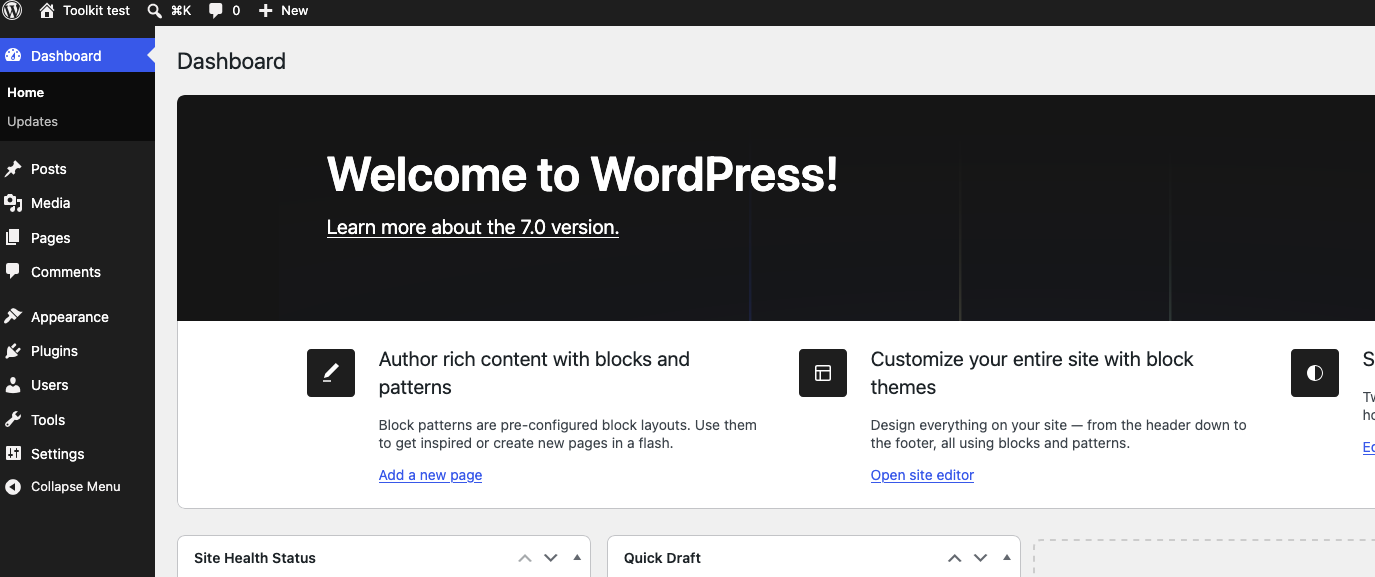
I also don't see anything in the main cPanel interface that would let me manage the site with WP Toolkit.
At this point it seems I'm not able to reproduce this. If I missed a step let me know!
0 -
That's fine. But this is a production server that already had WP-Tookit installed under a package. On the last update the mu-plugin was installed... I'd like to know what it does.
@server wp-content]# ls mu-plugins/
wp-toolkit wp-toolkit.php0 -
Can you get me the full path to that directory that you're seeing?
0 -
In public_html.. (or www) where WP is installed.
www/wp-content/mu-plugins/0 -
Thanks for that confirmation. This is something provided by WordPress updates directly and not necessarily related to cPanel: https://support.cpanel.net/hc/en-us/articles/360052807214-What-is-the-mu-plugins-directory-in-my-WordPress-site
0 -
Then it installed mysteriously? I didn't install it. Here's the header.
mu-plugins]# cat wp-toolkit.php
<?php
// Copyright 1999-2026. WebPros International GmbH. All rights reserved.
/*
* Plugin Name: WP Toolkit plugin
* Plugin URI: https://www.plesk.com/wp-toolkit/
* Description: WP Toolkit plugin is installed by WP Toolkit or WP Guardian to provide functionality that can only work within WordPress itself
* Version: 6.10.1-10341
* Requires at least: 4.0
* Requires PHP: 5.6
*/0 -
0
-
That's an excellent question - we may need to see your specific instance to determine why WP Toolkit would be installing things when it is disabled there. It's possible that it was turned on at one point and then didn't entirely turn off, but I honestly don't know.
0 -
Well Rex. Now it's front and center with a "WP Toolkit: Security Risk" on the main screen in WordPress.
Man. It would be really nice to have some way to turn this off at the server level so my customers aren't spooked by a .1/10 risk. lol. Or start fiddling with settings I don't want them fiddling with they now have access to.
Not sure if you're aware of any of this since they don't seem to tell you about it either.0 -
Were you able to create a ticket about this yet?
0 -
If it (WP dash side of things) can't be shut off (hidden) from inside the WHM interface I don't see the point. Thanks.
0 -
Hey Rex, I put in a ticket. On Plesk I found a post on a INI override to keep the mu plugin from reinstalling itself, but nothing regarding Cpanel or where this file needs to live.
0 -
Could you share that ticket number here so I can follow along?
0 -
Workaround:
To hide the WP Toolkit menu from the WordPress sidebar, add the function below to your active theme's functions.php file. This will remove the link from the admin dashboard, but the user will still be able to access the plugin if they know the URL.
// Hide wp-toolkit in Admin Menu
add_action( 'admin_init', 'hide_wptoolkit_menu' );
function hide_wptoolkit_menu() {
if ( current_user_can( 'manage_options' ) ) {
remove_menu_page( 'wp-toolkit' );
}
}0 -
This is also what I did to fix it. Thanks Olavao. Maybe someone else can use the snippet.
1 -
This is very interesting. I have WP Toolkit installed on our VPS WHM and have it applied to a number of our client's WordPress sites. Not only has "WP Toolkit: Security Risk" on the main screen in WordPress." starting appearing without any consent from us within WHM, every site's wp-config.php file is being over written by WP_TOOLKIT_API_TOKEN every day with a new token.
In addition to that cPanel is over writing the .htaccess file every day with the following code:
# php -- BEGIN cPanel-generated handler, do not edit
# Set the “ea-php83” package as the default “PHP” programming language.
<IfModule mime_module>
AddHandler application/x-httpd-ea-php83 .php .php8 .phtml
</IfModule>
# php -- END cPanel-generated handler, do not editBoth of these files are critical to the site's security and I am not at all comfortable that this is happening. How do I stop it?
0 -
What specific changes are you trying to make to the .htaccess within that section? Other edits to the file should be fine, but any changes within that section will be overwritten.
0 -
To remove the "WP Toolkit: Security Risk" message from the main WordPress screen (dashboard), also add the function below to your active theme's functions.php file.
// remove WP Toolkit widget from dashboard
function remove_dashboard_widgets () {remove_meta_box( 'wp_toolkit_dashboard_security_risk_widget', 'dashboard', 'normal' );}add_action('wp_dashboard_setup', 'remove_dashboard_widgets');0 -
cPRex - I am not trying to make any changes to the .htaccess file but I want the permissions for both files to be set so they are not editable which I keep doing and cPanel keeps over writing them including the permissions!
Olavo Monteiro - Yes I already saw your post about this. I don't have an issue with the widget, I have an issue with cPanel constantly overwriting the wp-config file.
0 -
I guess the better question is "what is the ultimate problem you're having?" If the permissions change on the file from something other than 644, does that break something else in your environment?
0 -
That is not the better question. The question is why are cPanel doing this? We monitor all critical security files that are changed when WordPress is hacked, these are the two of the most important files and best practice is to set the permissions to 600.
0 -
cPanel has always controlled the .htaccess file on accounts as that is used to set per-domain PHP versions and settings, so there isn't going to be a workaround for this.
0 -
Can you not answer why is it overwritten every day with the same piece of code? It never used to be the case. Also why the wp-config.php file is now overwritten every day? Perhaps you can ask someone if you don't know the answers.
0


Please sign in to leave a comment.
Comments
35 comments