Exclude Domain from SSL

There used to be an SSL/TLS Status menu item where you could exclude a domain from AutoSSL. That menu item has been removed. Now you go into SSL/TLS Certificates and you can click on "Status". There are still check marks by the domains but it now appears that checking the box next to the domain does nothing. You used to be able to check the box next to the domain and "Exclude domain from AUTO SSL."
Now it appears that there are no options when you check the box next to the domain. How do you exclude the domain from the Auto SSL now?
-
Hi,
It looks like the button used to exclude domains from AutoSSL was removed in the unified SSL/TLS Certificates interface. However, I verified that you can still exclude domains via the command line.
If you prefer the functionality of the old interface, you can restore it by creating the /var/cpanel/panel.ini file with the following contents:
[global]
ssl.unified_interface= false
This workaround is documented in the following article:
3 -
I'm joining this discussion because the removal of the "Include/Exclude" buttons in the new unified SSL/TLS interface is a significant step backward for user experience.
While I appreciate the workaround provided to restore the old interface via panel.ini, this isn't a viable solution for many end-users or those on shared hosting environments who don't have root access to modify global configurations.
Being able to manually include or exclude domains from AutoSSL directly from the UI is a fundamental feature for managing complex setups or avoiding conflicts with external providers like Cloudflare.
My questions for the cPanel team are:
Is there a plan to re-implement these action buttons within the new unified interface in upcoming versions?
Or has cPanel decided to permanently remove this UI functionality in favor of the command line?
I strongly suggest keeping this feature accessible within the GUI to maintain the ease of use that characterizes cPanel.
1 -

We currently have case CPANEL-52502 open with our team to get the exclusion functionality restored to the Status tab in the new interface, so that will get fixed sooner than later as this case has some priority.
1 -
This workaround is working - open /var/cpanel/panel.ini add code below and a save
[global]
ssl.unified_interface= false
and old view is visible
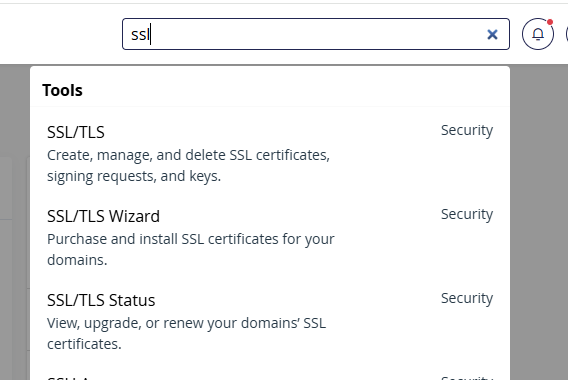
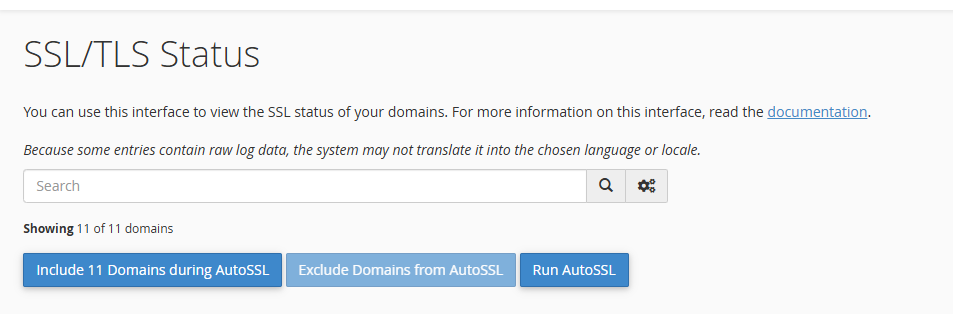
but this feature need to be MUST HAVE on new SSL UI, that user/admin can disable/enable Run AutoSSL for domains that are expired..-1 -
I'm hoping we get some more documentation about that panel.ini file. While this technically works, I can't guarantee it will always work or if it will cause issues with other tools at this time.
2 -
I can't guarantee it will always work or if it will cause issues with other tools at this time.
Not a strong endorsement of editing the file then. Hope the include or exclude domains from AutoSSL functionality is put back in the GUI. Soon.0 -
I have a mix of own servers and shared servers where I cannot mess with cPanel.
Just on one domain I have received 9 emails in 24 hours about failed SSL on subdomains and no option to exclude them as we have done before.
Considering the volume of domains I have under my watch I hope the GUI comes back soon otherwise I will have to block all cPanel originated emails.1 -
Why it was even changed is a mystery. It always worked. Simple. Include/Exclude or Run a check. The Wizard tab makes no sense to me interface-wise.
1 -
change log for 134.0.17 says:
Fixed CPANEL-52502: Fix inability to manage excluded AutoSSL domains in the unified SSL interface.
https://docs.cpanel.net/changelogs/134-change-log/
But after updating its still not possible the exclude/include via the cPanel webui
0 -
I'm posting more details in this thread as I get them: https://support.cpanel.net/hc/en-us/community/posts/39745697637271-Can-t-find-AutoSSL-option-in-cPanel?page=1#community_comment_39875524506007
0 -
Is there any update to this? Is there a plan to restore the exclude from AutoSSL? This was a handy little tool and, for the life of me, I don't understand why it was removed from the UI. I pretty much used it on every account.
0 -
Hey Mullinex .. Create the .ini file as shown up above. This puts the AutoSSL interface back how it should be.
[global]
ssl.unified_interface= false
0 -
More details on this change can be found here under the "134 and higher" tab: https://support.cpanel.net/hc/en-us/articles/360050034234-How-do-you-exclude-a-domain-from-AutoSSL
0
Please sign in to leave a comment.
Comments
13 comments